
It’s common to pick up your phone while it’s charging and feel a warm surface—sometimes even uncomfortably hot. While some warmth is normal during charging, excessive heat can signal deeper issues that affect battery life, performance, and safety. Understanding why this happens and recognizing when it becomes a problem can help you avoid long-term damage or potential hazards.
Modern smartphones are powerful mini-computers with tightly packed components. When charging, multiple systems—including the battery, processor, and power management circuits—generate heat. Under ideal conditions, this heat dissipates naturally. But certain behaviors, environmental factors, and hardware conditions can trap or amplify that heat, pushing your device beyond safe operating temperatures.
The Science Behind Phone Heating During Charging
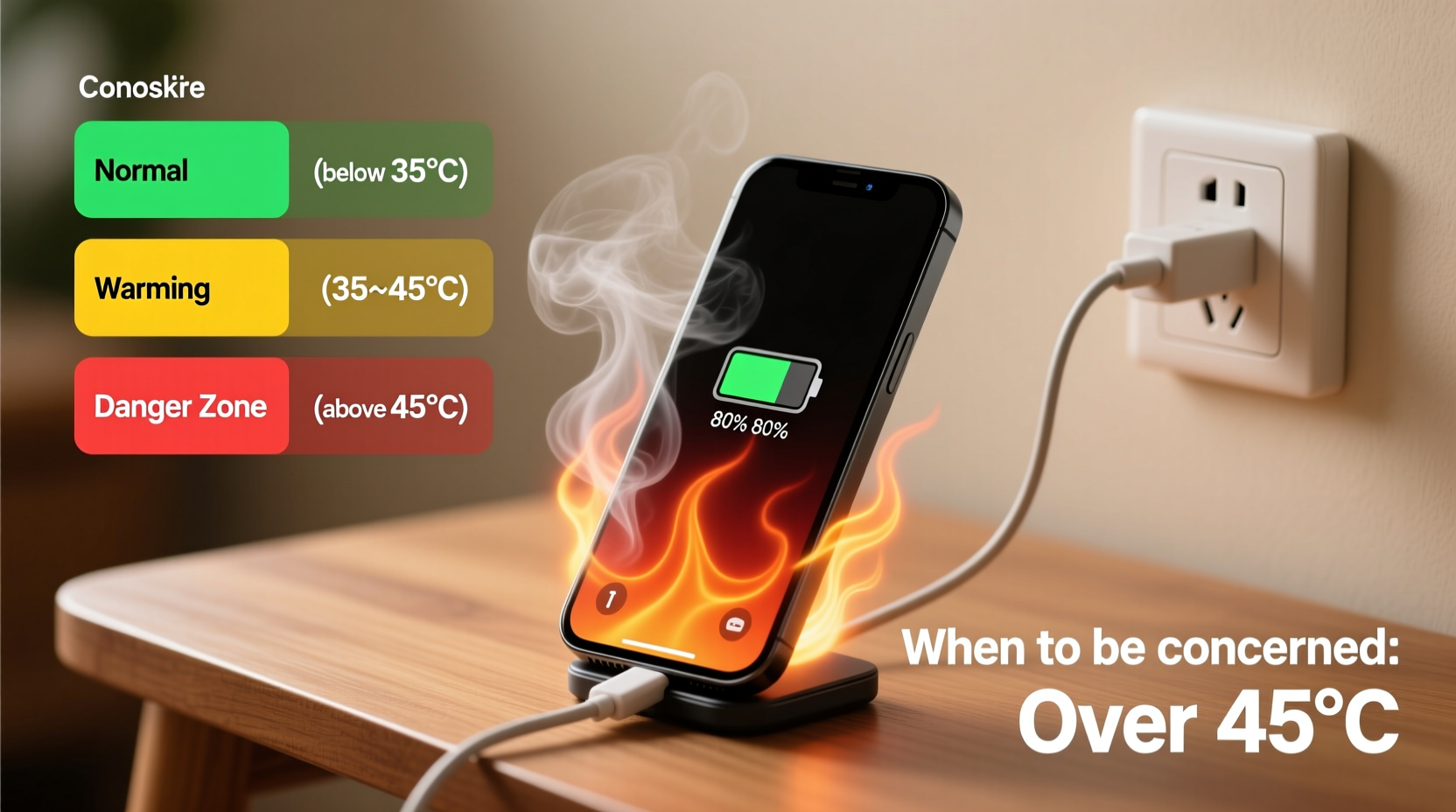
When your phone charges, electrical energy from the charger converts into chemical energy stored in the lithium-ion battery. This process isn’t 100% efficient—some energy is lost as heat. The internal resistance of the battery and circuitry contributes to this thermal output. Fast charging technologies, which deliver higher voltage or current to reduce charge time, intensify this effect.
Additionally, background processes like app syncing, GPS tracking, notifications, and software updates continue running during charging. If you’re using your phone while it’s plugged in—especially for resource-heavy tasks like gaming or video streaming—the processor works harder, generating more heat. This creates a compounding effect: charging heat + usage heat = elevated device temperature.
“Any electronic device converting energy will produce heat. In phones, the combination of fast charging and multitasking pushes thermal limits.” — Dr. Lena Patel, Electrical Engineer & Mobile Device Safety Researcher
Common Causes of Excessive Heat While Charging
Not all heat is created equal. Some causes are harmless and temporary; others point to poor habits or failing hardware. Here are the most frequent contributors:
- Using fast chargers without adequate cooling: High-wattage chargers (e.g., 30W, 65W) increase charge speed but also heat generation, especially if the phone is enclosed or in use.
- Charging inside a case: Many protective cases, particularly thick or non-breathable ones, trap heat and prevent proper ventilation.
- Direct sunlight or hot environments: Leaving your phone on a car dashboard or near a heater while charging raises ambient temperature, reducing the phone’s ability to cool itself.
- Running intensive apps during charging: Streaming HD video, playing graphics-heavy games, or using navigation apps forces the CPU and GPU to work hard, increasing thermal load.
- Using third-party or damaged cables/chargers: Poor-quality accessories may not regulate voltage properly, leading to unstable current flow and excess heat.
- Battery degradation: As batteries age, their internal resistance increases, making them less efficient and more prone to overheating.
When Should You Be Concerned?
A slightly warm phone during charging is expected. However, certain signs indicate a problem that requires attention:
- The device becomes too hot to hold comfortably.
- You notice a burning smell, discoloration, or swelling of the phone body.
- The screen flickers, dims, or shuts down unexpectedly during charging.
- Charging stops intermittently with a “Temperature too high” warning.
- The battery drains quickly even after a full charge.
Prolonged exposure to high temperatures accelerates battery wear. Lithium-ion batteries degrade faster above 35°C (95°F). Consistent overheating can reduce battery capacity by up to 20% within a year, according to studies from Battery University.
In extreme cases, thermal runaway—a self-sustaining reaction inside the battery—can occur. Though rare, this condition has led to fires or explosions in poorly maintained devices. Most modern phones have built-in safeguards to cut power when temperatures exceed safe thresholds, but these aren’t foolproof.
Warning Signs Checklist
- ✅ Device shuts off automatically while charging
- ✅ Persistent overheating even after removing from charger
- ✅ Visible bulge in the screen or back panel
- ✅ Unusual odor (plastic, chemical, or burnt scent)
- ✅ Charger or cable feels hot to the touch
If two or more apply, stop using the device immediately and consult a professional.
Do’s and Don’ts: Managing Heat During Charging
| Do’s | Don’ts |
|---|---|
| Charge in a cool, dry place away from direct sunlight | Leave your phone charging on a bed, pillow, or couch (blocks ventilation) |
| Use manufacturer-approved chargers and cables | Use frayed, bent, or off-brand charging accessories |
| Turn off the phone or enable Airplane Mode while charging | Play games or stream videos while fast charging |
| Remove thick cases during charging sessions | Enclose the phone in a car mount or sealed enclosure while charging |
| Keep software updated for optimized power management | Ignore repeated overheat warnings from the system |
Step-by-Step Guide to Safer Charging Habits
Reducing heat buildup starts with small changes in daily routines. Follow this five-step plan to minimize overheating risks:
- Inspect your charging setup: Replace any damaged cables, loose connectors, or chargers showing signs of wear. Stick to OEM or certified accessories.
- Choose the right environment: Charge your phone in a well-ventilated area, preferably on a hard surface like a desk or nightstand. Avoid carpets, blankets, or confined spaces.
- Limit usage during charging: If possible, avoid using the phone while it’s plugged in. At minimum, close unnecessary apps and disable features like Bluetooth, hotspot, or location services.
- Enable optimization features: Use adaptive charging modes (available on iPhone and Android) that slow down charging when the battery reaches 80%, reducing stress and heat in the final phase.
- Monitor battery health monthly: On iPhones, go to Settings > Battery > Battery Health. On Android, use diagnostic apps or check under Settings > Battery. Replace the battery if maximum capacity drops below 80%.
Real Example: A Cautionary Case
Mark, a 32-year-old delivery driver, relied heavily on his smartphone for navigation and communication. He used a third-party 45W fast charger to quickly top up his phone between shifts. Often, he’d plug it in while still inside its rugged silicone case and leave it on the car’s center console—directly under the summer sun.
Within six months, the phone began shutting down randomly during charging. One afternoon, he noticed a faint puff of smoke when disconnecting the charger. Alarmed, he took it to a repair shop. The technician found the battery had swollen significantly, deforming the screen and risking rupture. The root cause? Sustained high-temperature charging due to poor ventilation, substandard charging gear, and environmental heat.
The phone was deemed unsafe to repair. Mark replaced it at full cost and now follows strict charging protocols: only original chargers, no charging in direct heat, and regular battery checks every 90 days.
“Many users don’t realize that cumulative heat exposure is more damaging than a single overheating event.” — Carlos Mendez, Mobile Repair Technician with 12 years of field experience
Frequently Asked Questions
Is it normal for my phone to get warm when charging wirelessly?
Yes, wireless charging is inherently less efficient than wired charging, typically losing 20–30% of energy as heat. Some warmth is expected, especially with fast wireless charging. However, excessive heat—such as needing to put the phone down due to discomfort—indicates a problem. Ensure the phone and charger are properly aligned, remove thick cases, and avoid using the phone during charging.
Can overheating permanently damage my phone?
Yes. Chronic exposure to high temperatures can degrade the battery, reduce its lifespan, and impair performance. Overheating stresses internal components like the processor and memory chips, potentially leading to permanent malfunctions. In severe cases, thermal expansion can physically warp the display or housing.
What should I do if my phone overheats while charging?
Immediately unplug the charger and power off the device. Let it cool down in a shaded, well-ventilated area—do not place it in a freezer or under cold water, as rapid temperature changes can cause condensation and further damage. Once cooled, inspect the charger and cable for damage. If the issue persists, seek professional diagnostics. Never resume charging if there’s visible damage or recurring warnings.
Protect Your Device and Yourself
Your smartphone is designed to manage heat within safe limits—but it needs your cooperation. Simple habits like removing the case, avoiding direct sun, and using quality chargers go a long way in preserving both performance and longevity. Pay attention to what your phone is telling you through temperature cues and system alerts.
Overheating isn’t just about comfort; it’s a critical indicator of device health and safety. By treating heat as a warning rather than an annoyance, you extend your phone’s usable life and reduce the risk of sudden failure or hazard.




 浙公网安备
33010002000092号
浙公网安备
33010002000092号 浙B2-20120091-4
Comments
No comments yet. Why don't you start the discussion?