
Posting a comment on a YouTube video seems simple—type your thoughts, hit enter, and you're done. But what if your comment doesn’t appear? No error message, no notification—just silence. This is a common frustration for viewers, creators, and community managers alike. Whether your comment vanished into the void or never showed up at all, there are multiple technical, policy-based, and user-specific reasons behind it. More importantly, most of these issues can be resolved with the right approach.
Why Your YouTube Comment Might Not Be Visible
YouTube’s comment system is designed to balance free expression with community safety. As such, comments undergo filtering through automated systems and moderation tools. If your comment isn’t visible immediately—or at all—it’s likely due to one of several underlying causes:
- Automated spam detection: YouTube uses AI to flag potentially spammy content based on keywords, links, repetition, or posting behavior.
- Channel moderation settings: Many creators enable manual approval for comments, especially on popular videos.
- Account restrictions: If your account has been flagged for previous violations, new comments may be held or blocked.
- Technical delays: Occasionally, comments take time to process due to server load or connectivity issues.
- Guideline violations: Content that breaches YouTube’s Community Guidelines may be removed without notice.
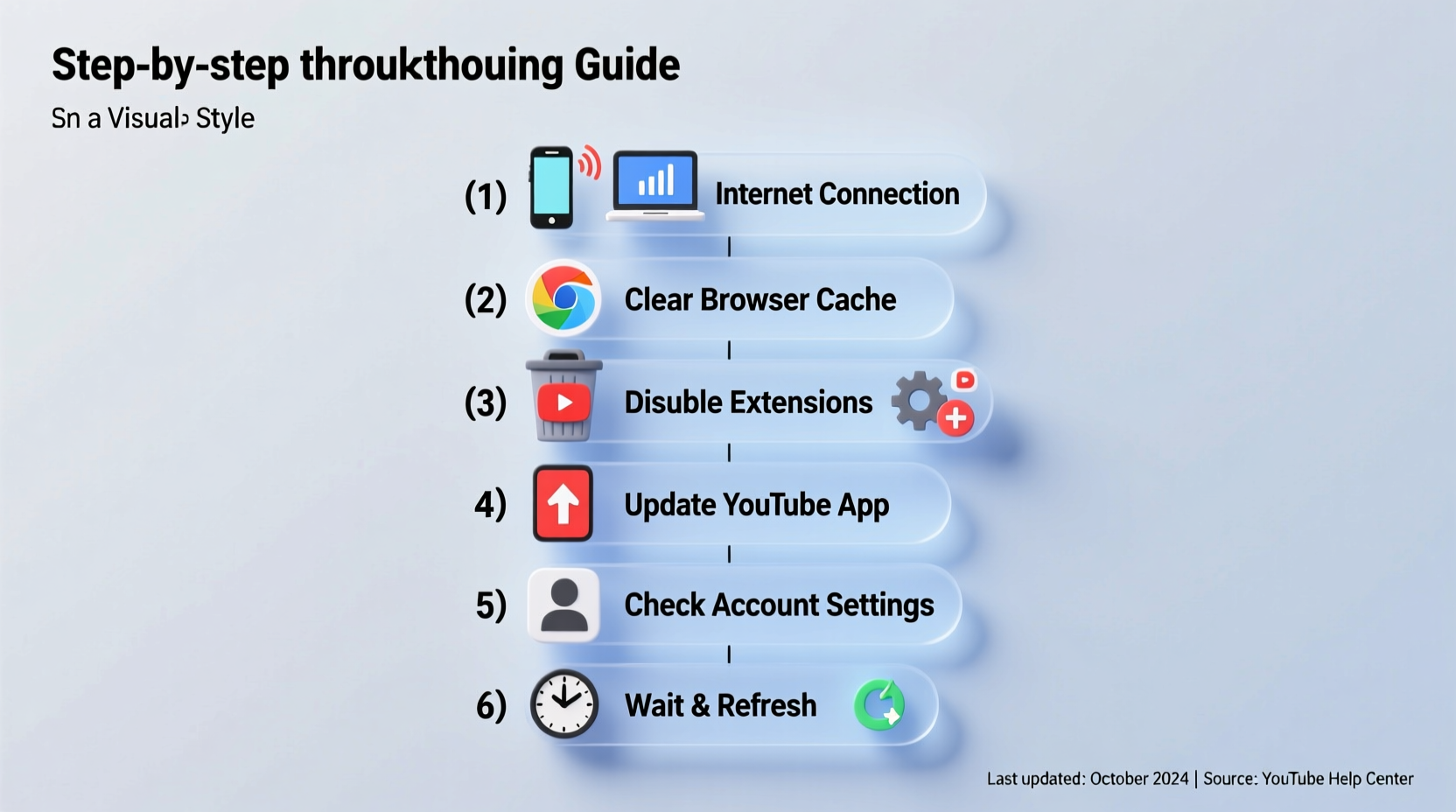
Step-by-Step Guide to Diagnose and Fix Missing Comments
Follow this structured approach to determine why your comment isn’t showing and how to resolve it.
- Wait 5–10 minutes: Some comments experience minor delays due to processing. Refresh the page after a short wait.
- Check your internet connection: A poor connection might prevent the comment from uploading fully.
- Log in to your Google account: Ensure you’re signed in. Anonymous comments aren’t supported on most channels.
- Review the comment section settings: Look for messages like “Held for review” or “Your comment will appear once approved.”
- Inspect your account status: Go to YouTube Account Settings and check for any warnings or restrictions.
- Edit or re-post thoughtfully: If the comment was flagged, revise it to remove aggressive language, slang, or promotional content before resubmitting.
When Moderation Is the Cause
Many creators use YouTube’s built-in moderation tools to filter comments. This means your input could be sitting in a queue, awaiting approval. Channels with high engagement often receive thousands of comments per video, making manual review necessary.
“Creators with large audiences rely on comment moderation to maintain respectful discussions. Patience is key—your voice will be heard if it adds value.” — Sarah Lin, Digital Community Manager
Common Technical and Policy-Related Issues
Beyond moderation, several platform-level factors affect comment visibility. Understanding these helps avoid future issues.
Comment Filtering by YouTube’s Algorithms
YouTube employs machine learning models trained to detect spam, harassment, and misinformation. These systems analyze text patterns, user history, and engagement signals. Even well-intentioned comments can get caught if they resemble known spam formats.
Age-Restricted or Demonetized Videos
Videos marked as age-restricted often disable comments entirely or limit them to verified accounts. Similarly, demonetized content may have reduced interactivity features.
Browser or App Glitches
Sometimes, the issue isn’t with YouTube but with your device. Outdated browsers, corrupted caches, or buggy app versions can prevent comments from loading correctly—even if they were posted successfully.
Troubleshooting Checklist
Use this checklist to methodically identify and resolve comment visibility problems:
- ✅ Wait at least 10 minutes after posting
- ✅ Confirm you’re logged into the correct Google account
- ✅ Check for “Held for review” or similar moderation notices
- ✅ Review your comment for potential guideline violations (insults, slurs, threats)
- ✅ Avoid posting multiple similar comments in quick succession
- ✅ Try commenting from a different device or browser
- ✅ Disable ad blockers or extensions that interfere with YouTube scripts
- ✅ Verify your account isn’t shadowbanned or restricted
Do’s and Don’ts When Posting YouTube Comments
| Do’s | Don’ts |
|---|---|
| Be respectful and constructive | Use all caps or excessive punctuation (!!!) |
| Add value with insights or questions | Include unsolicited links or promotions |
| Stay on topic and relevant | Engage in personal attacks or hate speech |
| Use proper grammar and spelling | Post duplicate comments across videos |
| Tag creators respectfully (@username) | Exploit emotional content for attention |
Real Example: A Creator’s Perspective
Jamal, a tech reviewer with over 300K subscribers, noticed fans frequently complained their comments weren’t appearing. After investigating, he discovered his channel had “Hold potentially inappropriate comments for review” enabled—a default setting for growing channels.
“I didn’t realize how many genuine comments were stuck in moderation,” Jamal said. “Once I adjusted my filters and started approving them daily, engagement jumped by 40%. Now I remind viewers in video descriptions that comments may be delayed.”
This case highlights how creator-side settings impact user experience. Even legitimate comments can disappear from public view simply because moderation is too strict or infrequently managed.
Frequently Asked Questions
Why does my comment say “Failed to send”?
This error usually indicates a network issue or temporary server problem. Try refreshing the page, switching networks, or waiting a few minutes before retrying. If the issue persists, clear your browser data or restart the YouTube app.
Can YouTube delete my comment without telling me?
Yes. If a comment violates YouTube’s Community Guidelines, it may be automatically removed by AI systems. You won’t always receive a notification, but repeated violations can lead to strikes on your account. To check your standing, visit your account dashboard.
How long do comments stay in review?
There’s no fixed timeline. Some creators approve comments within hours; others may take days or leave them unmoderated indefinitely. If your comment remains invisible after 72 hours, it may have been rejected or filtered out permanently.
Final Steps: Ensuring Future Comment Visibility
To consistently have your comments seen, adopt proactive habits. First, maintain a clean account history—avoid spamming or inflammatory remarks. Second, engage authentically rather than chasing likes or replies. Third, verify your Google account with a phone number, which increases trustworthiness in YouTube’s system.
If you manage a channel, consider adjusting your comment settings to allow faster moderation. You can also set auto-approved keywords for trusted users or whitelist certain accounts.
“Healthy online communities thrive when both viewers and creators understand the rules of engagement.” — Mark Tran, YouTube Policy Analyst
Conclusion
A missing YouTube comment doesn’t have to be the end of the conversation. In most cases, the issue stems from moderation queues, algorithmic filtering, or simple technical hiccups—all of which are fixable. By understanding how YouTube’s comment system works and following best practices, you regain control over your digital voice.




 浙公网安备
33010002000092号
浙公网安备
33010002000092号 浙B2-20120091-4
Comments
No comments yet. Why don't you start the discussion?