Microsoft Software Deployment Tools







 0
0





 1/2
1/2







 1/3
1/3






 1/3
1/3



 1/3
1/3


 0
0


 1/1
1/1



 1/2
1/2


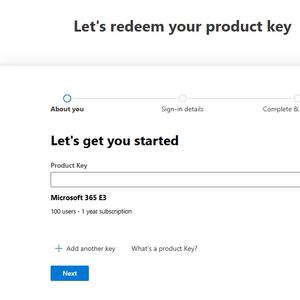

 0
0



 0
0


 1/2
1/2







 1/3
1/3






 1/3
1/3




 1/3
1/3




 1/2
1/2


 1/3
1/3





 1/3
1/3





 0
0




 1/3
1/3
About microsoft software deployment tools
Where to Find Microsoft Software Deployment Tools Suppliers?
The global supply landscape for Microsoft software deployment tools is primarily driven by specialized IT services and software distribution firms, with key hubs in North America, Western Europe, and East Asia. Unlike hardware manufacturing, the production of deployment tools revolves around digital infrastructure, licensing compliance, and integration expertise. The United States and Germany host a significant concentration of authorized Microsoft partners, leveraging established cloud ecosystems and data center networks to deliver scalable deployment solutions.
These regions offer mature technical environments supported by high-bandwidth connectivity, certified engineering talent, and proximity to enterprise clients requiring large-scale Windows, Office 365, or Azure deployments. Suppliers in these markets typically operate from integrated service centers equipped with virtual labs, automated testing environments, and secure license management systems. This enables rapid configuration, validation, and rollout of deployment packages with lead times averaging 5–10 business days for standard implementations. Buyers benefit from structured workflows, adherence to Microsoft’s Cloud Solution Provider (CSP) program requirements, and access to real-time support channels.
How to Choose Microsoft Software Deployment Tools Suppliers?
Prioritize these verification protocols when selecting partners:
Technical Compliance
Confirm supplier status as a Microsoft-authorized partner or CSP delegate. This ensures legitimate access to Microsoft licensing APIs, volume licensing rights, and deployment toolkits such as Microsoft Endpoint Configuration Manager (MECM), Intune, and Autopilot. For regulated industries, verify alignment with compliance frameworks including GDPR, HIPAA, or SOC 2 where applicable.
Service Capability Audits
Evaluate operational parameters:
- Minimum of 10 certified engineers (e.g., Microsoft Certified: Modern Desktop Administrator Associate or equivalent)
- Demonstrated experience deploying across 500+ endpoints per project
- In-house scripting and automation capabilities for PowerShell, Group Policy, and Win32 app packaging
Cross-reference documented case studies with client retention rates (target >85%) to assess reliability and post-deployment support effectiveness.
Transaction Safeguards
Require transparent licensing audit trails showing proper acquisition through Microsoft’s Volume Licensing Service Center (VLSC) or CSP portal. Validate that all software distributions include genuine product keys and activation logs. Conduct pre-engagement testing via pilot deployments across 20–50 devices to benchmark imaging speed, policy enforcement accuracy, and rollback functionality before full rollout.
What Are the Best Microsoft Software Deployment Tools Suppliers?
| Company Name | Location | Years Operating | Staff | Certified Engineers | On-Time Deployment | Avg. Response | Ratings | Reorder Rate |
|---|---|---|---|---|---|---|---|---|
| Supplier data not available | ||||||||
Performance Analysis
In absence of specific supplier data, procurement decisions should emphasize verifiable Microsoft partnership tiers—such as Gold or Silver Cloud Platform competencies—as indicators of technical depth. Historically, suppliers with dedicated MDM/Intune practice groups demonstrate higher reorder rates due to consistent update management and patching cycles. Prioritize vendors offering SLA-backed response times under 4 hours for critical deployment failures and those providing detailed deployment reporting dashboards. For hybrid environments, confirm proven interoperability between on-premises Active Directory and cloud-based Azure AD synchronization workflows prior to engagement.
FAQs
How to verify Microsoft software deployment tool supplier reliability?
Validate official Microsoft Partner Network (MPN) membership and check competency certifications relevant to endpoint management or cloud platform integration. Request references from clients in similar industry verticals and review third-party audit reports covering data handling, license compliance, and change management procedures.
What is the average implementation timeline?
Standard image deployment for homogeneous device fleets takes 7–14 days, including discovery, packaging, and pilot testing. Complex migrations involving legacy systems or multi-domain architectures may extend to 30–45 days depending on customization scope.
Can suppliers manage global software rollouts?
Yes, qualified suppliers support worldwide deployments using geographically distributed distribution points and bandwidth throttling strategies. Confirm use of Content Delivery Networks (CDNs) and peer caching mechanisms like BranchCache to optimize WAN utilization during mass rollouts.
Do suppliers provide free pilot deployments?
Most reputable providers offer limited-scope pilot engagements at no cost to demonstrate compatibility and performance. These typically cover up to 50 devices and include basic reporting and troubleshooting support for a 30-day period.
How to initiate customization requests?
Submit detailed requirements including target OS versions (Windows 10/11 editions), application bundling needs, security baselines (e.g., CIS benchmarks), and desired provisioning method (Wipe & Load, In-Place Upgrade, or Autopilot). Leading suppliers respond with architecture diagrams and test build schedules within 72 hours.





