
For millions of drivers, the daily commute is more than just travel—it’s a routine that demands efficiency, safety, and seamless connectivity. As smartphones have become central to navigation, communication, and entertainment, integrating them safely into vehicles has become essential. Android Auto and Apple CarPlay are two dominant platforms bridging this gap, each offering a simplified interface to access key apps while driving. But when it comes to daily commutes—those repeated trips filled with traffic updates, music changes, voice commands, and last-minute rerouting—one system may integrate more fluidly than the other.
This article examines how Android Auto and Apple CarPlay perform in real-world commuting scenarios, comparing responsiveness, app ecosystem, voice assistant integration, customization, and long-term reliability. The goal isn’t to declare an outright winner but to identify which platform aligns better with different types of commuters and lifestyles.
User Experience and Interface Design
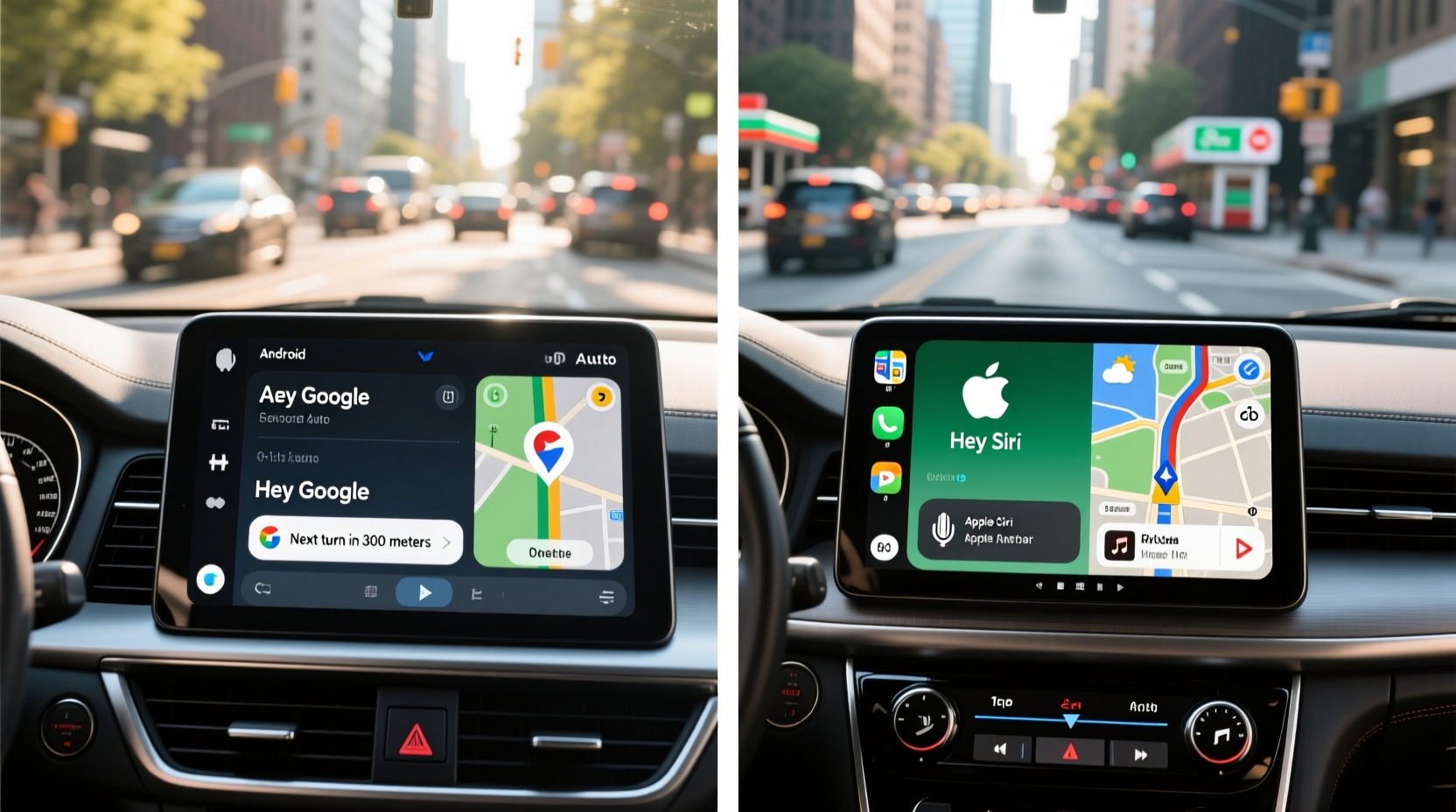
The first point of contact between driver and system is the user interface. Both Android Auto and Apple CarPlay prioritize simplicity, large touch targets, and minimal distractions. However, their design philosophies reflect the core values of their parent ecosystems.
Apple CarPlay adopts a clean, consistent aesthetic mirroring iOS. App icons resemble those on the iPhone, and the layout remains predictable across vehicle brands. This uniformity helps users transition smoothly from phone to dashboard. Swiping left or right cycles through favored apps, and the home screen dynamically surfaces recent destinations, frequent contacts, and suggested playlists based on time of day.
Android Auto takes a more functional approach. While visually less flashy, it emphasizes contextual awareness. For example, if you plug in your phone during morning hours, it might automatically suggest your usual route to work and start playing your preferred podcast. Google Assistant is deeply embedded, so voice prompts feel more natural and integrated compared to Siri’s sometimes rigid responses.
In daily use, Apple CarPlay feels more polished and intuitive for iPhone users already accustomed to iOS patterns. Android Auto, meanwhile, adapts more proactively to habits, making it slightly more efficient over time for repetitive routines like weekday commutes.
Voice Assistant Performance: Google Assistant vs Siri
No feature impacts daily commute integration more than voice assistant responsiveness. Drivers rely on voice input to send texts, change routes, adjust climate controls (via compatible vehicles), and control media—all without glancing at the screen.
Google Assistant, powering Android Auto, consistently outperforms Siri in natural language understanding, contextual memory, and multi-step requests. You can say, “Hey Google, navigate home, avoid tolls, and call Mom when I’m ten minutes away,” and it will execute all three actions sequentially. It remembers previous interactions, such as recently searched locations or played songs, enabling faster follow-up queries.
Siri, while improved in recent years, still struggles with complex or chained commands. A similar request might require multiple prompts: “Hey Siri, take me home avoiding tolls,” followed by, “Call Mom in 10 minutes.” Additionally, Siri’s contextual awareness lags; it often fails to recall recent messages or appointments unless explicitly prompted.
“Voice interaction is the cornerstone of safe in-car tech. Google Assistant’s ability to parse intent and manage layered tasks gives Android Auto a tangible edge during high-cognitive-load moments like rush hour.” — Dr. Lena Torres, Human-Machine Interaction Researcher, MIT Mobility Lab
For commuters who multitask heavily—balancing calls, deliveries, school drop-offs, and errands—Android Auto’s superior voice processing reduces mental load and increases efficiency.
Navigation and Real-Time Traffic Integration
Navigation is arguably the most critical function during a daily commute. Both platforms integrate with top-tier mapping apps, but they differ significantly in depth and adaptability.
Android Auto uses Google Maps by default, which remains the industry benchmark for real-time traffic data, predictive routing, and incident reporting. It leverages anonymized location data from millions of devices to detect slowdowns, accidents, construction zones, and even speed traps reported by users. Crucially, Google Maps learns your regular routes and departure times, offering proactive alerts like, “Heavy traffic ahead—leave 12 minutes earlier today.”
Apple CarPlay defaults to Apple Maps, which has improved dramatically since its rocky debut. It now includes detailed city flyovers, EV routing, and lane guidance. However, its traffic prediction algorithms aren’t as refined as Google’s. While it displays congestion, it often lacks granular insight into why delays are occurring or how long they’ll last. Third-party alternatives like Waze are unavailable on CarPlay, limiting options for crowd-sourced intelligence.
| Feature | Android Auto (Google Maps) | Apple CarPlay (Apple Maps) |
|---|---|---|
| Traffic Prediction Accuracy | High – uses historical + live data | Moderate – limited predictive modeling |
| Lane Guidance | Yes, with visual cues | Yes, highly detailed |
| Crowd-Sourced Alerts (e.g., police, hazards) | Yes (via Waze integration) | No |
| Proactive Departure Suggestions | Yes, personalized | Limited |
| Offline Maps | Yes | Yes |
For drivers facing variable conditions—accidents, weather shifts, or sudden detours—Android Auto provides more actionable insights, reducing stress and improving punctuality.
App Ecosystem and Customization
While both platforms support major music, messaging, and navigation apps, Android Auto allows greater flexibility in third-party integrations. Developers can build deeper functionality into their Android Auto-compatible apps, including custom interfaces and background services.
For instance, Spotify on Android Auto supports full browsing, playlist creation, and offline syncing directly from the car screen. On CarPlay, Spotify is restricted to playback controls and basic navigation—no search within albums or collaborative playlist editing.
Similarly, podcast apps like Pocket Casts or Overcast offer richer experiences on Android Auto, letting users browse episodes, adjust playback speed, and queue content. CarPlay limits these functions, often requiring users to switch back to their phones for advanced controls.
Customization is another area where Android Auto leads. Users can pin specific apps to the home screen, rearrange tiles, and enable dark mode system-wide. Apple CarPlay, in contrast, maintains a fixed layout with minimal personalization beyond app order.
Real-World Commute Scenario: A Weekday Morning Routine
Consider Maria, a marketing manager commuting 45 minutes each way through a major metro area. Her typical morning begins at 7:15 AM. She plugs in her phone, starts her engine, and heads out.
Using Android Auto: As soon as her phone connects, Google Assistant greets her: “Good morning, Maria. Your drive to downtown office is expected to take 53 minutes due to an accident near 5th Ave. Would you like to leave now?” She says, “Yes, navigate via back roads,” and Google recalculates using side streets. Midway, she receives a message from her assistant about a meeting time change. She replies hands-free: “Hey Google, tell Sarah I’ll confirm the reschedule in 10 minutes.” She then asks for the latest news brief and switches to her workout playlist—all without touching her phone.
Using Apple CarPlay: Upon connection, CarPlay loads her favorite apps: Messages, Phone, Music, and Maps. She manually taps Maps and enters her destination. Siri notifies her of traffic but doesn’t suggest alternative routes unless asked. When her assistant messages, she uses Siri to read it aloud but must respond after arrival because dictating a partial reply feels cumbersome. She plays music from Apple Music but can’t easily switch between playlists without swiping multiple times.
In this scenario, Android Auto reduces friction through automation and intelligent assistance. Apple CarPlay delivers a reliable, familiar experience but requires more manual input, increasing cognitive load during busy drives.
Setup, Compatibility, and Long-Term Reliability
Both systems support wired and wireless connections, though wireless implementation varies widely by vehicle. Some cars offer seamless wireless pairing; others suffer from lag, disconnections, or slow boot times.
Apple CarPlay has stricter certification standards, meaning compatibility issues are rarer once setup is complete. If your iPhone model is supported (iPhone 8 and later recommended), CarPlay generally works out of the box with consistent performance across manufacturers.
Android Auto’s broader device support (any Android 6.0+ phone) introduces variability. Older or non-Pixel devices may experience slower response times, app crashes, or Bluetooth conflicts. Wireless Android Auto, while convenient, is less stable than its wired counterpart and drains battery faster.
- Do: Keep your phone’s OS and apps updated for optimal performance.
- Do: Use high-quality USB cables to prevent intermittent disconnections.
- Don’t: Run resource-heavy background apps (e.g., fitness trackers, video streaming) while using either system.
- Don’t: Rely solely on wireless connectivity in older vehicle models without testing stability first.
Checklist: Optimizing Your Commute with Android Auto or Apple CarPlay
- Ensure your smartphone meets minimum OS requirements (iOS 12+ for CarPlay, Android 6.0+ for Android Auto).
- Update navigation and media apps regularly.
- Set up voice profiles for personalized assistance (e.g., “Hey Google, this is Alex”).
- Preload offline maps for areas with poor signal.
- Test wireless connectivity during off-peak hours to assess reliability.
- Configure do-not-disturb settings to minimize distractions.
- Familiarize yourself with voice command syntax for common tasks.
FAQ
Can I use both Android Auto and Apple CarPlay in the same car?
Yes, many modern vehicles support both systems. Switching requires changing the connected phone—plug in an iPhone for CarPlay, an Android for Android Auto. Some infotainment systems allow toggling between modes, but only one can run at a time.
Does one system drain my phone battery faster?
Wireless versions of both platforms consume significantly more power than wired connections. Android Auto tends to use more background data (especially with Google Maps active), leading to faster battery depletion. Using a USB cable with charging capability is strongly recommended for daily commutes.
Are there privacy concerns with either platform?
Both systems collect usage data to improve services. Android Auto shares location, app usage, and voice query history with Google unless disabled in settings. Apple emphasizes on-device processing and anonymization, giving CarPlay a slight edge in privacy transparency. Users concerned about data should review permissions and opt out of personalized ads and tracking.
Conclusion: Choosing What Fits Your Commute Life
There is no universal answer to whether Android Auto or Apple CarPlay integrates more seamlessly into daily commutes—the best choice depends on your device ecosystem, driving habits, and expectations for automation.
If you value precision, adaptability, and deep AI integration, Android Auto excels in anticipating needs, managing complex tasks, and delivering real-time insights. Its strength lies in reducing effort during repetitive, high-stress journeys.
If you prioritize consistency, clean design, and tight hardware-software alignment, Apple CarPlay offers a dependable, user-friendly experience—especially for those already invested in the Apple ecosystem.
Ultimately, seamless integration isn’t just about technology—it’s about how well the system disappears into the background, letting you focus on the road ahead. Evaluate both platforms in your actual driving environment. Test voice commands during rush hour, try rerouting mid-commute, and assess how naturally the interface supports your rhythm.




 浙公网安备
33010002000092号
浙公网安备
33010002000092号 浙B2-20120091-4
Comments
No comments yet. Why don't you start the discussion?