
Millions of people spend eight or more hours a day seated at a desk, whether in an office or at home. While modern work demands productivity, prolonged sitting—especially with poor posture—often leads to chronic lower and upper back pain. The discomfort may start subtly: a stiffness after lunch, a dull ache by mid-afternoon. Over time, these small signals can escalate into persistent pain that affects focus, mood, and long-term spinal health.
The good news is that most desk-related back pain isn’t caused by irreversible conditions. Instead, it stems from repeated postural missteps and ergonomic oversights—many of which are easily corrected. Understanding the root causes and applying targeted adjustments can transform a painful workday into one of sustained comfort and efficiency.
Why Sitting Causes Back Pain: The Science Behind It
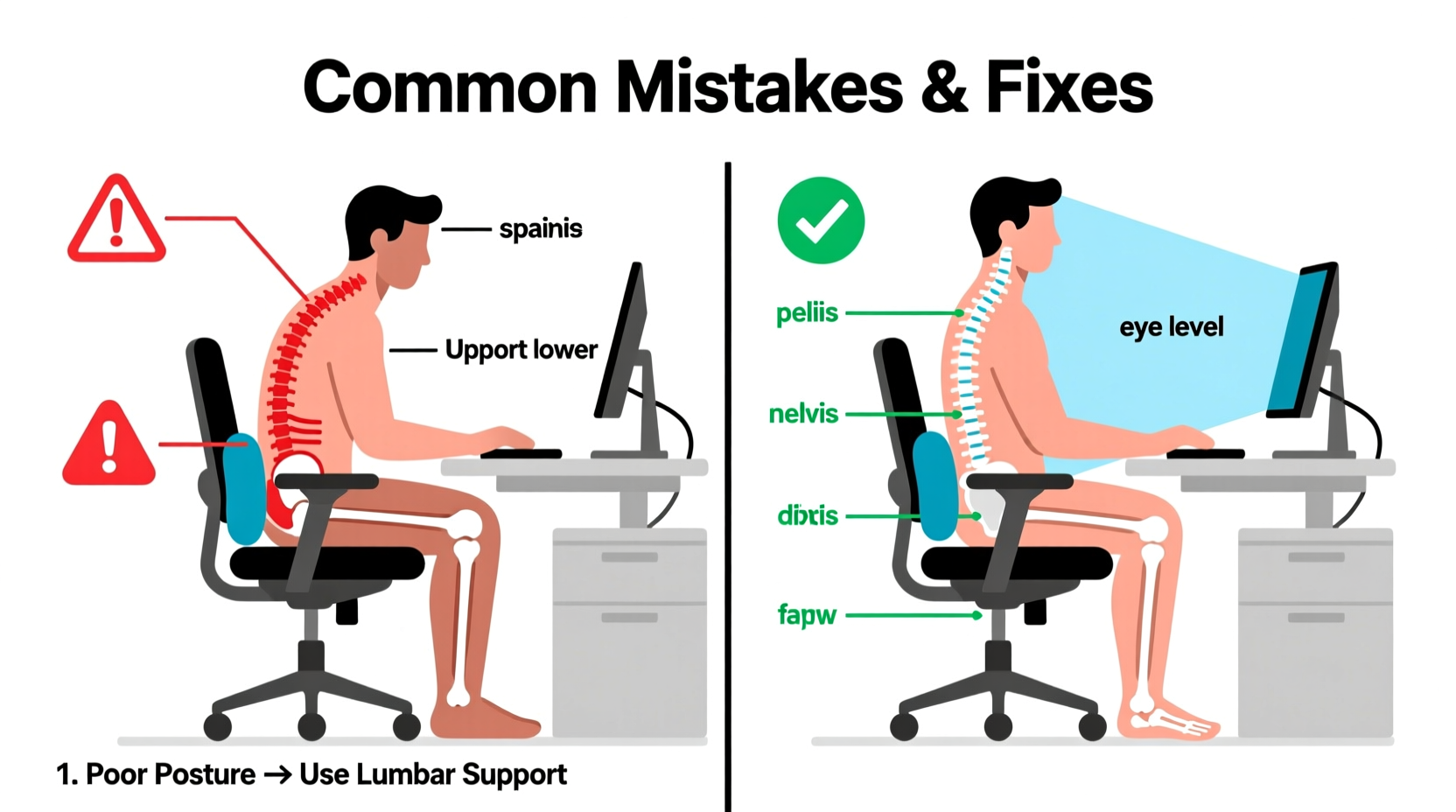
When standing, the spine maintains its natural S-curve, distributing weight evenly across vertebrae and discs. But when sitting, especially without proper support, the pelvis tilts backward, flattening the lumbar curve. This shifts pressure toward the posterior part of the discs, increasing strain on ligaments and muscles designed to stabilize the spine.
Dr. Rachel Nguyen, a physical therapist specializing in workplace ergonomics, explains:
“Sitting for extended periods reduces blood flow to spinal tissues and weakens core stabilizers. Without regular movement or correct alignment, the body compensates—leading to muscle fatigue, disc compression, and nerve irritation.”
The longer you remain static, the more pronounced this effect becomes. After just 20 minutes of poor sitting, electromyography studies show increased activation in the erector spinae (lower back muscles), indicating overwork. Over weeks and months, this cumulative stress manifests as chronic discomfort or even structural changes like disc degeneration.
Common Mistakes People Make While Sitting at a Desk
Many assume their chair or desk setup is “good enough,” but subtle errors compound over time. Here are the most frequent culprits behind desk-related back pain:
- Slouching or rounding the lower back – Leaning forward or collapsing into the seat removes lumbar support, straining discs.
- Sitting too far from the desk – Reaching for the keyboard forces forward lean, increasing load on the spine.
- Using a chair without adjustable lumbar support – Flat-backed chairs fail to maintain the spine’s natural curve.
- Feet dangling off the floor – Lack of foot support increases pelvic tilt and disc pressure.
- Screen positioned too low or too high – Looking down or up strains neck and upper back muscles, affecting overall posture.
- Staying in one position for hours – Immobility stiffens joints and fatigues supporting muscles.
- Ignoring chair depth and seat pan angle – A seat that’s too deep cuts off circulation behind the knees; too shallow offers no thigh support.
Ergonomic Fixes for Immediate Relief and Long-Term Prevention
Correcting back pain doesn’t require expensive equipment or drastic lifestyle changes. Small, consistent adjustments yield significant results. Below are proven strategies backed by occupational therapists and ergonomic specialists.
1. Optimize Chair Settings
Your chair should support—not dictate—your posture. Adjust these elements:
- Seat height: Feet flat on the floor, knees at 90 degrees.
- Lumbar support: Aligns with the inward curve of your lower back.
- Seat depth: 2–4 inches between the edge of the seat and the back of your knees.
- Armrests: Elbows rest lightly at 90–110 degrees, shoulders relaxed.
2. Position Your Monitor Correctly
The top of your screen should be at or slightly below eye level, about an arm’s length away. If using a laptop, elevate it with a stand and connect an external keyboard and mouse.
3. Keep Work Tools Within Easy Reach
Place your keyboard, mouse, notepad, and phone within a “primary reach zone” — no stretching required. This prevents twisting and leaning.
4. Use a Footrest When Needed
If your feet don’t rest flat, use an adjustable footrest. This stabilizes the pelvis and reduces disc pressure by up to 40%, according to research from Cornell University’s Ergonomics Lab.
5. Incorporate Movement Breaks
Sitting motionless is biomechanically unnatural. Stand, stretch, or pace during calls. Try “micro-movements” like pelvic tilts or seated marches to keep blood flowing.
Do’s and Don’ts at Your Workspace
| Do’s | Don’ts |
|---|---|
| Keep wrists straight while typing | Cradle the phone between ear and shoulder |
| Use a document holder next to your screen | Bend your neck downward to read papers |
| Take short walking breaks every hour | Sit continuously for more than 60 minutes |
| Adjust chair arms so shoulders stay relaxed | Raise shoulders to meet the arms while typing |
| Engage core muscles gently while seated | Lock knees or cross legs while sitting |
Step-by-Step Guide to Setting Up an Ergonomic Workspace
Follow this sequence to create a spine-friendly environment in under 15 minutes:
- Start with your chair: Adjust height so thighs are parallel to the floor and feet touch the ground.
- Set lumbar support: Place padding or use built-in adjustment to fill the gap between your lower back and the chair.
- Position your monitor: Top line of text at eye level, center aligned with your torso.
- Align input devices: Keyboard and mouse close together, elbows near your sides, forearms horizontal.
- Add accessories if needed: Footrest, wrist pad (only when not typing), anti-fatigue mat if standing.
- Test your posture: Sit upright—your ears, shoulders, and hips should form a vertical line.
- Schedule movement: Use a smartwatch or app to prompt standing/stretching every 30–60 minutes.
Real-Life Example: How Sarah Reduced Her Back Pain in Two Weeks
Sarah, a 34-year-old graphic designer, experienced sharp lower back pain after working from home for six months. She assumed her condition was due to stress or aging. An ergonomic assessment revealed multiple issues: her dining chair lacked lumbar support, her laptop sat on a stack of books at knee level, and she often crossed her legs while working.
With guidance from a physical therapist, she made simple changes: purchased an adjustable desk chair, elevated her laptop with a riser, added a Bluetooth keyboard, and began hourly stretch breaks. Within ten days, her morning stiffness disappeared. By day 14, she reported a 70% reduction in pain and improved concentration.
“I didn’t realize how much my setup was working against me,” Sarah said. “Fixing it wasn’t expensive—it just took awareness and consistency.”
Essential Stretches and Strengthening Exercises
No ergonomic setup can fully compensate for weak postural muscles. Integrate these exercises into your routine:
Daily Stretches (Hold each 30 seconds)
- Knee-to-chest stretch: Lie on your back, pull one knee toward your chest.
- Seated forward bend: Sit with legs extended, hinge at hips to reach toes.
- Child’s pose: Kneel, sit back on heels, arms extended forward on floor.
- Piriformis stretch: Cross one ankle over opposite knee, lean forward slightly.
Core-Strengthening Moves (3 sets of 10 reps)
- Dead bug: Lie on back, extend opposite arm and leg while keeping lower back pressed to floor.
- Plank: Hold forearm plank for 20–60 seconds, engaging glutes and abs.
- Bird-dog: On hands and knees, extend opposite arm and leg, hold for 3 seconds.
These movements reinforce spinal stability and counteract the weakening effects of prolonged sitting.
FAQ: Common Questions About Desk-Related Back Pain
Can sitting too much cause permanent damage?
While occasional sitting isn’t harmful, chronic poor posture and inactivity can lead to long-term issues such as disc degeneration, muscle imbalances, and reduced spinal mobility. However, early intervention typically prevents lasting damage.
Is a standing desk better than a sitting desk?
Standing desks reduce some risks of prolonged sitting but aren’t a cure-all. Standing for hours without proper support can cause foot, knee, or lower back pain. The best approach is alternating: 30–60 minutes sitting, followed by 15–30 minutes standing or moving.
How do I know if my chair is supportive enough?
A good chair allows you to sit with your lower back fully supported, feet flat, and arms relaxed. If you feel slouching by midday or need to lean forward to see your screen, your chair likely lacks adequate adjustability or lumbar support.
Final Checklist: Achieve a Pain-Free Workday
Before starting your next work session, run through this quick checklist:
- ✅ Chair height adjusted so feet are flat on floor or footrest
- ✅ Lumbar support engaged and aligned with lower back curve
- ✅ Monitor top at or slightly below eye level
- ✅ Keyboard and mouse within easy reach, wrists neutral
- ✅ No shoulder hunching or neck craning
- ✅ Plan scheduled movement breaks every 30–60 minutes
- ✅ Core gently engaged, pelvis slightly tilted forward (not tucked)
Conclusion: Take Control of Your Spinal Health Today
Back pain while sitting at a desk is not inevitable. It’s a signal—a call to reevaluate how you interact with your workspace. With thoughtful adjustments to posture, furniture, and daily habits, relief is within reach. You don’t need a full office overhaul or medical intervention to make meaningful change. Start with one fix: adjust your chair, raise your screen, or take a two-minute walk. Build from there.
Spinal health is cumulative. Each ergonomic choice compounds over time, leading to fewer aches, sharper focus, and greater resilience. Your back supports your life—make sure you’re supporting it right.




 浙公网安备
33010002000092号
浙公网安备
33010002000092号 浙B2-20120091-4
Comments
No comments yet. Why don't you start the discussion?