
Conversion rate is one of the most critical metrics in digital marketing, e-commerce, and sales analytics. It measures the percentage of visitors who take a desired action—whether that’s making a purchase, signing up for a newsletter, or downloading a resource. Yet, despite its importance, many businesses miscalculate or misinterpret this metric, leading to flawed decisions. Getting it right requires clarity on definitions, consistency in tracking, and precision in calculation. This guide walks through the process with actionable steps, common pitfalls, and real-world context to ensure your numbers reflect reality.
Understanding Conversion Rate: What It Really Measures
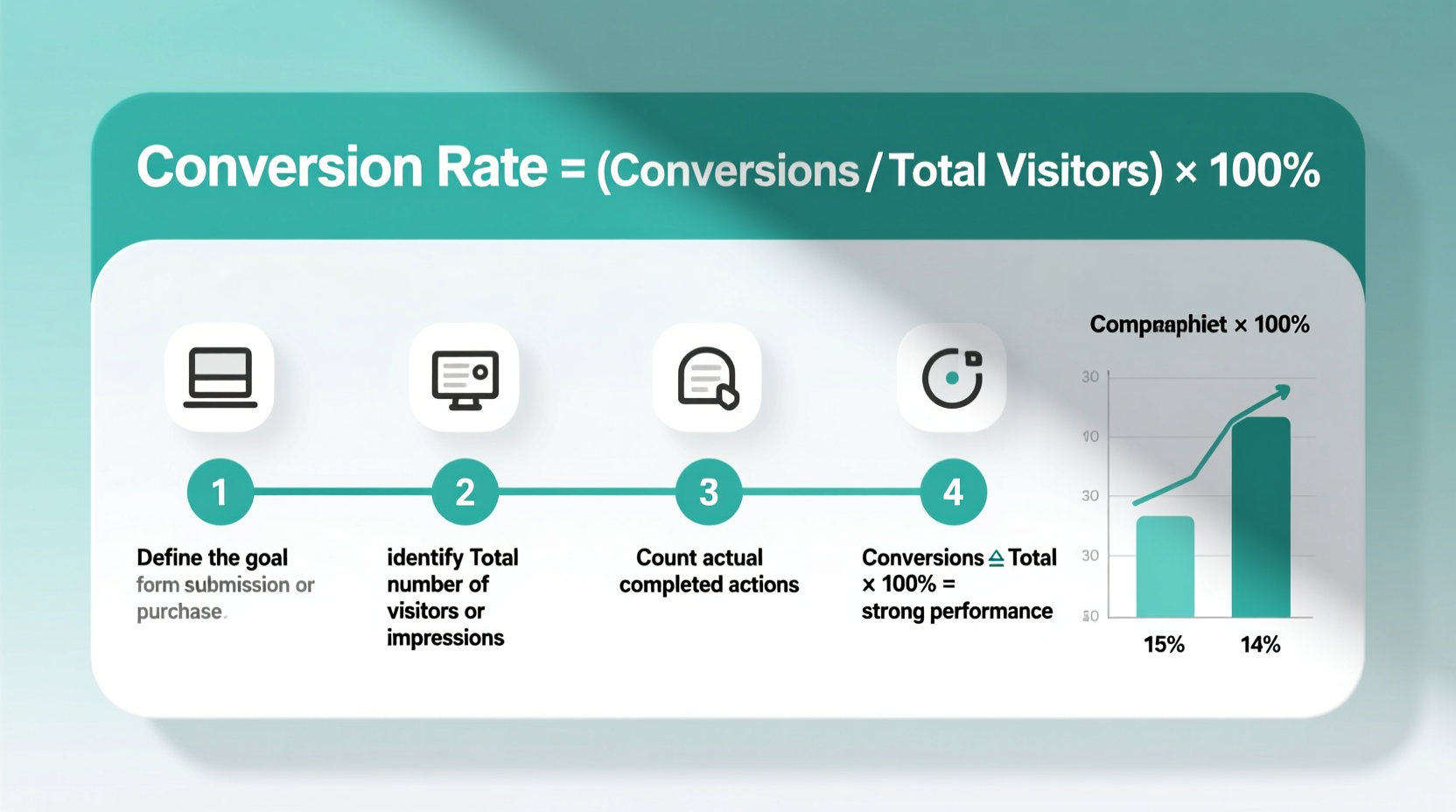
At its core, conversion rate answers a simple question: Of all the people who had the opportunity to convert, how many actually did? A “conversion” isn’t limited to sales—it can be any goal you define, such as form submissions, app downloads, or demo requests. The key is aligning the definition with your business objective.
The basic formula is straightforward:
For example, if 1,000 people visit your pricing page and 50 sign up for a free trial, your conversion rate is (50 ÷ 1,000) × 100 = 5%.
While the math is simple, accuracy depends on correctly identifying both the numerator (conversions) and denominator (visitors). Missteps here—like double-counting conversions or including irrelevant traffic—can distort results and mislead strategy.
Step-by-Step Guide to Calculating Conversion Rate Accurately
- Define Your Conversion Goal
Start by clearly stating what counts as a conversion. Is it a completed purchase? A lead form submission? A video watched to completion? Be specific. For instance, “a user who adds an item to cart and completes checkout” is more precise than “a sale.” - Select the Right Time Frame
Choose a period that reflects meaningful behavior—daily, weekly, monthly, or campaign-specific. Avoid overly short windows that don’t capture full user journeys, especially for high-consideration products. - Identify Your Traffic Source
Decide whether you’re measuring overall site conversion or segmenting by channel (e.g., organic search, paid ads, email). Each source may have different intent levels and thus different conversion behaviors. - Collect Accurate Data
Use reliable tools like Google Analytics 4, Shopify reports, or CRM dashboards to pull visitor and conversion numbers. Ensure tracking codes are installed correctly and events are firing as expected. - Apply the Formula
Plug your numbers into the conversion rate formula. Double-check for data integrity—ensure no bots are inflating visits and that conversions aren’t being undercounted due to technical issues. - Analyze and Segment
Break down results by device type, geography, referral source, or customer cohort. A 3% overall rate might hide a 12% rate among mobile users from email campaigns—a valuable insight.
Common Mistakes That Skew Conversion Rate Accuracy
Even experienced marketers fall into traps that compromise data quality. Recognizing these errors is half the battle.
- Mixing different conversion types – Combining newsletter signups with purchases in one rate distorts meaning. Track each goal separately.
- Including bot traffic – Automated crawlers inflate visitor counts without contributing to conversions, artificially lowering rates.
- Ignoring multi-device journeys – A user may browse on mobile and convert on desktop. Without cross-device tracking, this appears as two separate sessions with incomplete paths.
- Using inconsistent time frames – Comparing a 7-day campaign result to a 30-day baseline creates false conclusions.
“Accurate conversion tracking starts long before the math—it begins with clean data architecture.” — Lisa Tran, Digital Analytics Lead at GrowthMetrics Inc.
Real Example: How an E-Commerce Brand Improved Its Reporting
A mid-sized skincare brand was reporting a 2.1% conversion rate across its site. After an audit, they discovered discrepancies: their analytics tool wasn’t capturing failed transactions properly, and internal staff clicks from the office IP were inflating traffic by 18%.
They took corrective steps:
- Excluded internal IPs in Google Analytics
- Implemented server-side event tracking for purchases
- Filtered out known bot traffic using GA4’s built-in safeguards
After corrections, the true conversion rate rose to 3.8%. This revelation prompted a reevaluation of ad spend—campaigns previously deemed underperforming were now seen as profitable. The fix didn’t improve performance; it revealed actual performance.
Do’s and Don’ts of Conversion Rate Calculation
| Do’s | Don’ts |
|---|---|
| Define one primary conversion per analysis | Mix unrelated goals (e.g., downloads + purchases) |
| Use UTM parameters to track campaign-specific traffic | Rely solely on default “All Traffic” reports |
| Set up conversion exclusions for internal traffic | Ignore employee or developer visits |
| Validate tracking with test transactions | Assume setup is correct without verification |
| Segment data by source, device, and audience | Treat all traffic as homogeneous |
Frequently Asked Questions
Can conversion rate exceed 100%?
Yes, but only under specific conditions. If a single visitor completes multiple conversions (e.g., buys three products in one session), and you count each transaction individually while keeping unique visitors as the denominator, the rate can surpass 100%. However, this is uncommon and usually indicates a need to clarify whether you're measuring conversion events or converting users.
Should I include returning visitors in my calculation?
Yes. Unless you're conducting a targeted analysis (e.g., first-time visitor behavior), all relevant traffic during the selected period should be included. Excluding return visits can overstate effectiveness, especially for businesses with high repeat purchase rates.
What’s a good conversion rate?
There’s no universal benchmark. E-commerce averages hover around 2–3%, SaaS free trials may see 5–10%, and lead generation forms can range from 10–30% depending on offer strength. More important than industry averages is your own trend line—consistent improvement matters more than hitting an arbitrary target.
Action Plan: Checklist for Reliable Conversion Tracking
- ☑ Define clear, measurable conversion goals
- ☑ Implement tracking via Google Analytics, Facebook Pixel, or other verified tools
- ☑ Exclude internal and bot traffic from reports
- ☑ Test conversion events with dummy transactions
- ☑ Standardize reporting periods across teams
- ☑ Segment data by channel, device, and audience for deeper insights
- ☑ Review tracking setup quarterly for changes or errors
Conclusion: Turn Numbers Into Actionable Insight
Calculating conversion rate accurately isn't just about arithmetic—it's about building a trustworthy data foundation. When your numbers reflect reality, every decision from budget allocation to UX design gains confidence. Start by auditing your current tracking, clarify your goals, and apply consistent methodology. Over time, small improvements in measurement precision compound into significant strategic advantages. Don’t just track conversions; understand them.




 浙公网安备
33010002000092号
浙公网安备
33010002000092号 浙B2-20120091-4
Comments
No comments yet. Why don't you start the discussion?