
Holiday lighting has evolved far beyond simple strings of red and green bulbs. With the rise of smart lighting systems and programmable controllers, homeowners now have the ability to transform their homes into immersive experiences—complete with rhythm-synced color shifts, cascading fades, and cinematic scene transitions. One of the most powerful yet underused techniques is coordinating light timing across multiple rooms to simulate a narrative journey through space. When done well, this creates a sense of movement, emotion, and storytelling that elevates seasonal decor from decorative to dramatic.
The key lies not in brightness or color alone, but in synchronization—the precise orchestration of when and how lights change in relation to one another. Whether you're preparing for a neighborhood display, hosting holiday guests, or simply indulging in personal ambiance, mastering multi-room coordination can turn your home into a living canvas of light and mood.
Understanding Cinematic Lighting Principles
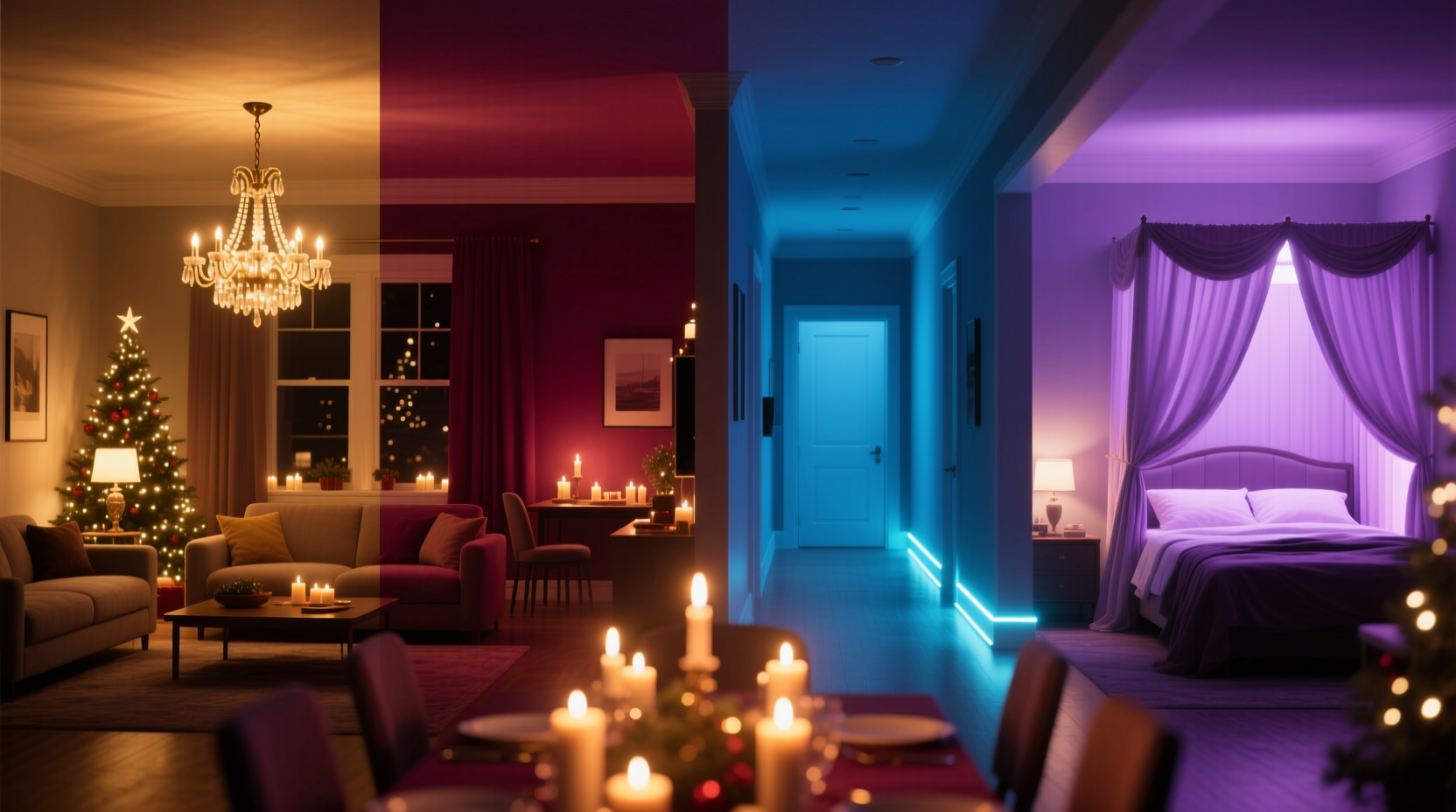
Cinematic lighting isn’t just for film sets. It’s rooted in emotional pacing, contrast, and timing—all elements that can be translated into residential environments. In movies, lighting guides attention, signals transitions, and evokes feeling. A slow dim might suggest melancholy; a sudden flash could signal surprise. Applying these principles at home means treating each room not as an isolated zone, but as a scene in a larger story.
For holiday displays, consider structuring your lighting like a three-act play:
- Act I – Arrival: Warm, inviting tones in entry areas (foyer, living room) to welcome guests.
- Act II – Immersion: Dynamic sequences in central spaces (kitchen, dining) that build energy.
- Act III – Reflection: Softer, cooler hues in quieter zones (bedrooms, study) for calm closure.
To move seamlessly between acts, lights must transition not simultaneously, but in sequence—like waves rolling through the house. This requires both technical setup and creative planning.
Choosing the Right Smart Lighting System
Not all smart lights support complex multi-room coordination. For cinematic effects, you need systems with low latency, high refresh rates, and robust scheduling or sequencing capabilities. Below is a comparison of top platforms suitable for synchronized holiday lighting.
| System | Sync Accuracy | Multi-Room Support | Programming Tools | Best For |
|---|---|---|---|---|
| Philips Hue + Hue Sync | ±50ms | Up to 50 devices | App, Bridge, API, Hue Sync desktop | TV/audio sync, real-time cinematic effects |
| LIFX + LIFX App | ±100ms | Unlimited per network | Scene timers, patterns, webhooks | Budget-friendly large-scale setups |
| Nanoleaf Shapes + Motion Effects | ±30ms | Mesh network scalability | Canvas editor, rhythm triggers | Wall-mounted visual storytelling |
| TP-Link Tapo + Kasa | ±150ms | Up to 32 per hub | Schedules, scenes, Alexa routines | Basic automation with voice control |
For true cinematic precision, Philips Hue and Nanoleaf lead due to sub-100ms response times and advanced software features. However, LIFX offers excellent value for expansive homes where sheer coverage matters more than millisecond-level accuracy.
“Lighting isn’t just illumination—it’s choreography. The difference between a good display and a great one is timing.” — Daniel Ruiz, Lighting Designer & Former Disney Theme Park Technician
Step-by-Step Guide to Synchronizing Multi-Room Transitions
Creating cinematic transitions involves more than turning lights on and off. It’s about crafting rhythm, direction, and emotional arc. Follow this sequence to implement professional-grade coordination.
- Map Your Space
Create a floor plan labeling each room and its primary lighting zones (ceiling, strip, accent). Note doorways and sightlines—these will influence how transitions are perceived. - Group Lights by Narrative Role
Assign functional categories:- Lead Zones: Entry points that initiate sequences (e.g., front door, staircase).
- Support Zones: Central areas that amplify the effect (e.g., living room, kitchen island).
- Trailing Zones: Rooms that conclude the wave (e.g., bedrooms, hallways).
- Design Transition Patterns
Choose a movement style:- Wave Forward: Lights ripple from front to back, like a curtain opening.
- Inward Collapse: Lights converge toward a central room (ideal for dinner gatherings).
- Pulse Echo: A central flash radiates outward in diminishing intensity.
- Set Timing Delays
Use staggered triggers to create motion:- Start with Lead Zone activation.
- Add 0.8–1.2 seconds delay per adjacent room.
- Adjust based on distance—longer hallways may need longer gaps.
- Program via App or Automation Tool
In Philips Hue, use the “Scenes” and “Routines” tab to chain actions with delays. For greater control, use IFTTT or Home Assistant to script custom timelines with millisecond-level precision. - Test in Low Light
Walk through the house during dusk to observe flow. Adjust delays if transitions feel too fast or disjointed. - Add Triggers
Link sequences to events:- Sunset/sunrise via geolocation.
- Voice command (“Alexa, start holiday mode”).
- Guest arrival (smart doorbell trigger).
Real Example: The Holiday Welcome Sequence
Consider the Johnson family in suburban Chicago. They host 30+ guests each December and wanted to create a memorable entrance experience. Using Philips Hue in six rooms, they designed a 12-second cinematic welcome:
- 0.0s: Porch light pulses white, triggering the sequence.
- 0.5s: Foyer lights fade up to warm amber (2700K).
- 1.8s: Living room strips activate in a left-to-right sweep, mimicking camera pan.
- 3.2s: Dining chandelier brightens with soft gold glow.
- 4.5s: Kitchen under-cabinet lights shimmer like falling snow (programmed effect).
- 6.0s: Hallway LEDs pulse gently toward guest bedroom.
- 8.0–12.0s: All rooms slowly shift to festive red/green cycle, synced to a 10-second loop.
The result? Guests consistently describe feeling “greeted by the house itself.” Children laugh at the “magic lights,” while adults appreciate the craftsmanship. The sequence runs automatically at sunset and can be restarted via voice.
Avoiding Common Pitfalls
Even experienced users make mistakes when scaling lighting across rooms. Here are frequent issues and how to prevent them:
| Issue | Why It Happens | Solution |
|---|---|---|
| Lights flicker during transitions | Wi-Fi congestion or outdated firmware | Update all bulbs; use a dedicated 2.4GHz network for IoT devices |
| Rooms fall out of sync over time | Device clock drift or cloud latency | Use local hubs (e.g., Hue Bridge) instead of cloud-only controls |
| Transitions feel abrupt | No easing curves in animation | Enable “smooth transition” settings or use cubic-bezier timing in advanced tools |
| One room doesn’t respond | Signal blockage (walls, appliances) | Add a Zigbee repeater or reposition hub centrally |
Another common error is overcomplicating scenes. Start with one transition type—such as a forward wave—and master it before layering additional effects like music sync or color cycling.
Checklist: Preparing for Cinematic Light Coordination
- ☐ Audit all rooms for compatible smart bulbs or strips
- ☐ Install a central hub (Hue Bridge, Nanoleaf Controller, etc.)
- ☐ Label each room’s lights in your app for easy grouping
- ☐ Design a narrative arc (arrival → climax → wind-down)
- ☐ Program one base transition sequence with timed delays
- ☐ Test the sequence at different times of day
- ☐ Add automation triggers (time, voice, sensor)
- ☐ Share control with household members via app permissions
Frequently Asked Questions
Can I coordinate lights without a smart home hub?
Yes, but with limitations. Some Wi-Fi bulbs (like LIFX) communicate directly via mesh networks, allowing basic group control through apps. However, for precise timing and complex transitions, a hub-based system like Philips Hue provides better reliability and lower latency.
How do I sync lights to music across rooms?
Use companion apps like Hue Sync (for PC/macOS) or第三方 tools like Govee Fusion. These analyze audio input and distribute beat-based signals to all connected lights. Ensure all bulbs are on the same network and within range of the controller to maintain sync.
Will this work with non-smart lights?
Only if you replace fixtures or use smart plugs. Traditional incandescent or LED strings cannot be individually timed or dimmed without smart adapters. For cinematic effects, individual bulb control is essential—smart plugs only allow on/off, not fading or color shifting.
Final Thoughts: Turn Your Home into a Storytelling Medium
Coordinating light timing across rooms isn’t just a technical challenge—it’s an opportunity to infuse your home with emotion and intention. When lights move like a slow breath, cascade like falling snow, or awaken like a waking dream, they do more than decorate; they communicate.
The most memorable holiday experiences aren’t defined by how many bulbs you hang, but by how they make people feel. A child’s wide-eyed wonder at a hallway that “comes alive” as they walk down it. The quiet awe of a spouse seeing the dining room bloom into color at dinner. These moments are crafted, not accidental.
With thoughtful planning, the right tools, and attention to timing, your home can become a stage for seasonal storytelling—one where light doesn’t just shine, but speaks.




 浙公网安备
33010002000092号
浙公网安备
33010002000092号 浙B2-20120091-4
Comments
No comments yet. Why don't you start the discussion?