
Gaming controllers are among the most frequently touched pieces of tech in a household. Over time, they accumulate oils from skin, dust, crumbs, and bacteria—especially around buttons, joysticks, and crevices. A grimy controller doesn’t just look unappealing; it can affect performance, cause sticky inputs, or even lead to hygiene issues. While many users attempt quick wipes with random cloths or liquids, improper cleaning can damage sensitive electronics, degrade rubberized grips, or corrode internal components. The key is a thorough yet careful deep clean that preserves functionality while restoring cleanliness.
This guide walks through a safe, effective method for deep cleaning any major gaming controller—whether it’s an Xbox Wireless Controller, PlayStation DualSense, Nintendo Switch Pro Controller, or third-party variant. You’ll learn what materials to use, which areas require extra attention, and how to avoid common mistakes that could shorten your controller’s lifespan.
Why Regular Deep Cleaning Matters
Controllers sit at the intersection of hands and technology. Every hour of gameplay transfers sweat, dead skin cells, and environmental debris into tiny gaps. Over months, this buildup hardens around analog sticks and triggers, leading to reduced sensitivity or erratic behavior. A study by the University of Arizona found that game controllers can harbor more bacteria per square inch than a toilet seat—making hygiene a legitimate concern, especially in shared households or competitive gaming environments.
Beyond health, maintenance directly impacts longevity. Dust particles act as abrasives during repeated button presses, accelerating wear. Moisture from sweaty palms can seep into circuitry if left unchecked. A well-maintained controller not only performs better but lasts significantly longer, delaying replacement costs and preserving precision during critical gameplay moments.
Essential Tools and Safe Cleaning Materials
The right tools make all the difference between a successful clean and accidental damage. Avoid household cleaners like Windex, bleach, or paper towels—they’re too harsh for delicate plastics and electronics. Instead, assemble a kit using items designed for electronics or gentle enough to avoid degradation.
| Item | Purpose | Safe Alternatives |
|---|---|---|
| Isopropyl alcohol (70%) | Disinfects surfaces and evaporates quickly without residue | Vinegar solution (50/50 with water) – less effective but usable in a pinch |
| Microfiber cloth | Cleans without scratching; ideal for screens and glossy surfaces | Cotton cloth (lint-free), but never paper towels |
| Cotton swabs (Q-tips) | Reach tight spaces around buttons and joysticks | Foam swabs (less lint, more durable) |
| Soft-bristle toothbrush | Loosen grime from textured grips and seams | New, unused brush—never share personal hygiene tools |
| Compressed air | Blow out dust and debris from crevices | A small handheld air blower (camera grade) |
| Plastic-safe disinfectant wipes | Convenient surface cleaning (e.g., Clorox Electronics Wipes) | DIY wipe: microfiber dampened with alcohol solution |
“Using high-concentration alcohol or abrasive cloths can strip anti-fingerprint coatings and degrade rubber over time. Stick to 70% isopropyl and soft materials.” — Dr. Lena Tran, Consumer Electronics Durability Researcher, IEEE Member
Step-by-Step Deep Cleaning Process
Follow this sequence carefully to ensure maximum cleanliness without risking electrical shorts or material breakdown. This process applies to wired and wireless controllers alike. Always power off and disconnect before beginning.
- Power down and disconnect: Turn off the controller completely. For wireless models, ensure it's powered off—not just idle. Unplug USB cables or remove batteries if possible.
- Dry debris removal with compressed air: Hold the controller at a slight angle and use short bursts of air around analog sticks, D-pads, triggers, and button gaps. Do not shake or tilt aggressively—this can force debris deeper.
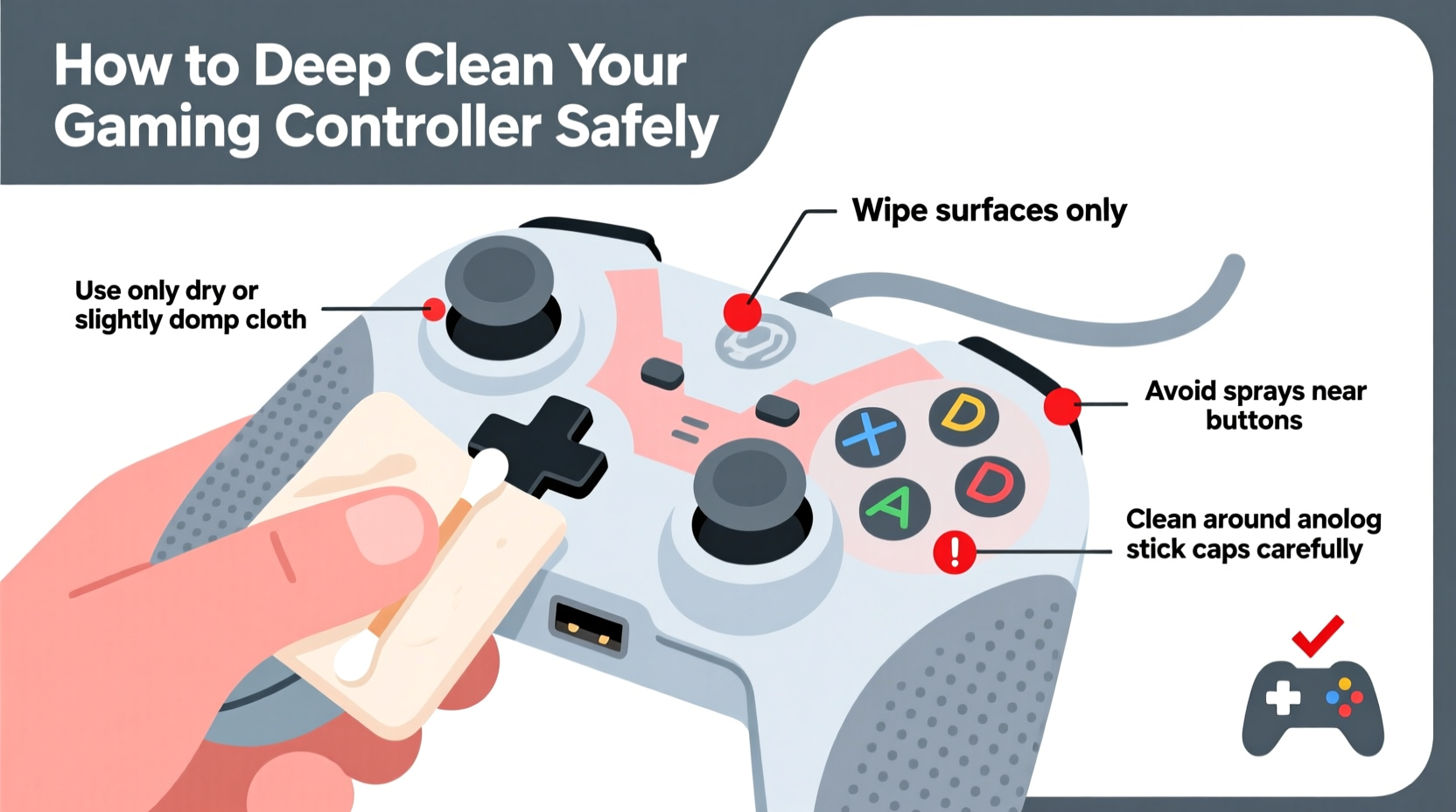
- Surface wipe with microfiber cloth: Lightly dampen a corner of the cloth with isopropyl alcohol (do not soak). Gently wipe the entire exterior, focusing on high-contact zones: grips, face buttons, and back panels. Never spray liquid directly onto the device.
- Clean analog sticks and joysticks: These are prone to stickiness due to oil accumulation. Wrap a cotton swab around with microfiber, dip lightly in alcohol, and rotate it around the base of each stick. Move the stick gently in circles while cleaning to expose hidden grime.
- Detail buttons and crevices: Use dry cotton swabs first to lift loose dust. Then moisten a new swab slightly and clean around each button edge. For stubborn gunk under buttons (like Start, Select, or shoulder triggers), gently press the button and clean along the seam where it meets the shell.
- Scrub textured surfaces: If your controller has rubberized or grippy sides, use a soft toothbrush dipped in alcohol. Brush in small circular motions to dislodge embedded dirt. Immediately follow with a dry microfiber pass to prevent streaking.
- Disinfect and finalize: Once all areas are cleaned, go over the entire surface again with a fresh, slightly damp microfiber cloth. Finish with a dry pass to eliminate moisture traces. Let the controller air-dry upright for at least 15–20 minutes before powering on.
What Not to Do: Common Cleaning Mistakes
Even with good intentions, many gamers damage their controllers through avoidable errors. Awareness of these pitfalls ensures your cleaning routine enhances rather than harms your device.
- Using household cleaners: Products like Windex, Lysol sprays, or dish soap contain chemicals that degrade plastic finishes and rubber coatings. They may also leave conductive residues that interfere with electronics.
- Over-wetting cloths or swabs: Excess moisture can seep into internal circuits, causing corrosion or short-circuiting. Always wring out cloths thoroughly and use minimal liquid on swabs.
- Ignoring manufacturer guidelines: Some brands explicitly warn against alcohol use. For example, early DualShock 4 models had coating issues when exposed to certain solvents. Check your model’s manual or support site.
- Using sharp objects to pry or scrape: Knives, pins, or metal tools can scratch surfaces or damage button mechanisms. Stick to soft, non-abrasive tools only.
- Cleaning while powered on: Even low-voltage devices risk internal damage when wet components are active. Always power off completely.
Real-World Example: Reviving a Heavily Used Xbox Controller
Mark, a college student and avid Halo player, noticed his Xbox Elite Series 2 controller responding sluggishly during matches. The right analog stick drifted slightly, and the A button required multiple presses. After six months of daily use—and frequent gaming sessions with friends—the controller felt gritty and smelled faintly sour.
Instead of replacing it, he followed a structured deep clean. He used compressed air to clear debris from the trigger wells, then cleaned each analog stick base with alcohol-dampened swabs. The textured grips were scrubbed gently with a toothbrush, revealing original color beneath layers of grime. After drying overnight, the stick drift improved noticeably, and button responsiveness returned. Mark extended the life of his $180 controller by over a year—all for less than $10 in supplies.
This case illustrates how proactive maintenance prevents premature failure and maintains competitive edge—without requiring technical expertise.
Maintenance Checklist for Long-Term Controller Care
To keep your controller in top condition between deep cleans, adopt these habits regularly:
- ✅ Wipe down after intense sessions, especially if hands sweat
- ✅ Store in a closed cabinet or protective case when not in use
- ✅ Avoid eating or drinking directly over the controller
- ✅ Replace worn thumb caps or stick tops before exposing hardware
- ✅ Use screen protectors on touch-enabled controllers (e.g., Steam Controller)
- ✅ Rotate multiple controllers if available to reduce wear on one unit
- ✅ Update firmware regularly—some updates include input calibration fixes
Frequently Asked Questions
Can I wash my controller in the sink or dishwasher?
No. Submerging a controller in water will almost certainly destroy internal electronics. Even brief exposure to running water risks leakage into ports and circuits. Stick to surface cleaning only.
Is isopropyl alcohol safe for all controller types?
Generally yes, especially at 70% concentration. However, some older or specialty controllers (like limited-edition matte finishes) may react poorly. Test on a small, inconspicuous area first. If discoloration or stickiness occurs, discontinue use.
How do I know if my controller needs more than a clean?
If cleaning doesn't resolve issues like persistent stick drift, unresponsive buttons, or connectivity problems, internal hardware may be failing. Consider professional repair or replacement. Frequent deep cleaning can delay—but not eliminate—eventual mechanical wear.
Final Thoughts: Make Cleaning Part of Your Gaming Routine
A clean controller isn’t just about appearance—it’s about performance, hygiene, and value preservation. With minimal effort and inexpensive supplies, you can maintain peak responsiveness, reduce germ transmission, and extend the usable life of your gear. Think of controller maintenance like brushing your teeth: a small, consistent habit that prevents bigger problems down the line.
By following the steps outlined here, avoiding harmful shortcuts, and adopting preventive care, you ensure that every press, flick, and trigger pull remains precise and reliable. Whether you're a casual player or a competitive gamer, your equipment deserves respect and attention.




 浙公网安备
33010002000092号
浙公网安备
33010002000092号 浙B2-20120091-4
Comments
No comments yet. Why don't you start the discussion?