
In a two-story home, achieving consistent and strong Wi-Fi coverage can feel like chasing a moving target. Dead zones on the second floor, buffering during video calls, or weak signals in the basement are common frustrations. While upgrading hardware helps, one of the most effective—and often overlooked—solutions is simply rethinking where you place your router. Strategic placement can dramatically improve signal strength, reduce interference, and ensure seamless connectivity across both levels of your home.
Unlike single-level homes, two-story layouts introduce vertical challenges that standard router positioning doesn’t always address. Walls, floors, appliances, and even furniture can block or weaken Wi-Fi signals. The good news? You don’t need technical expertise or expensive gear to make meaningful improvements. With a clear understanding of how Wi-Fi propagates and a few smart adjustments, you can maximize performance from your existing setup.
Understanding How Wi-Fi Signals Travel in Multi-Level Homes
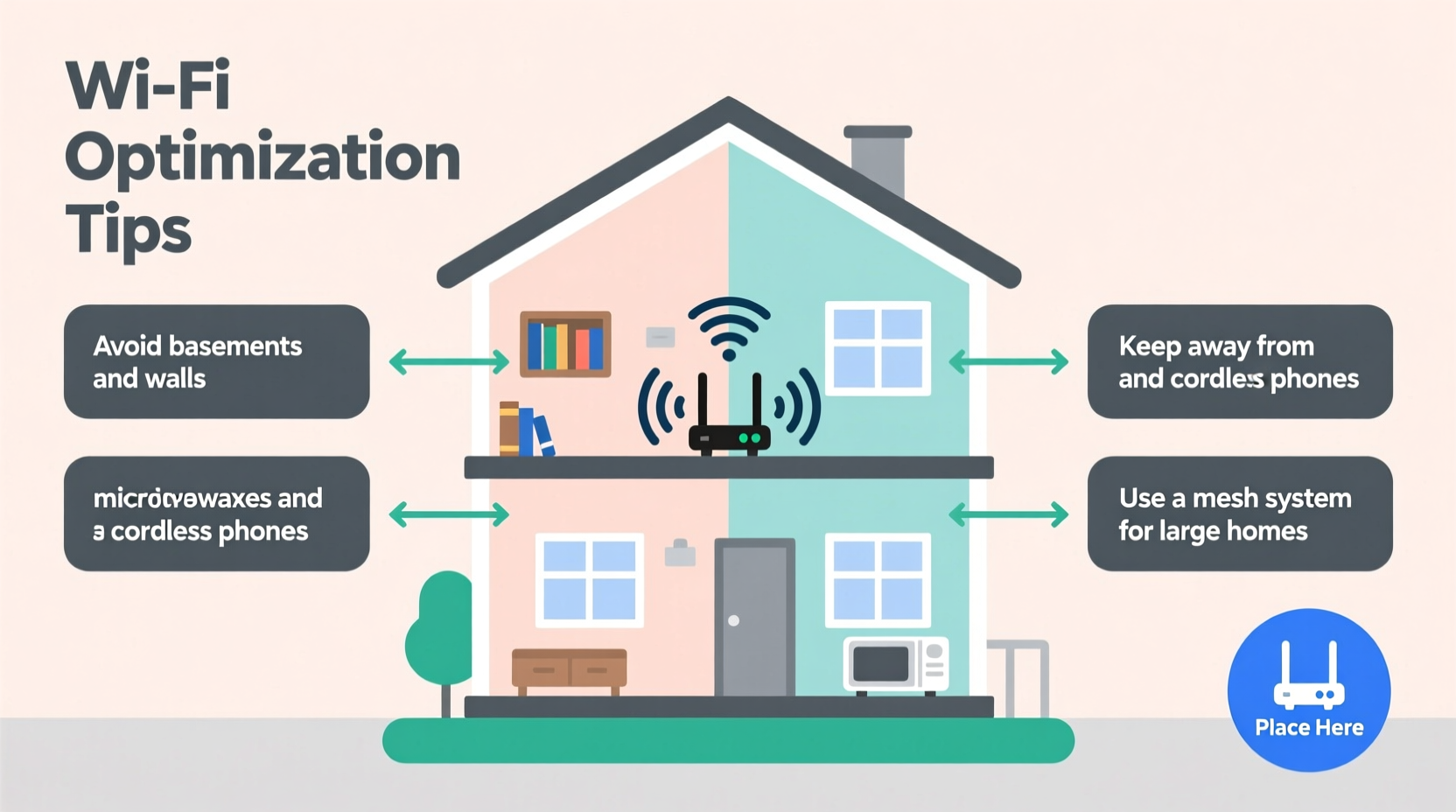
Wi-Fi operates using radio waves, typically on the 2.4 GHz and 5 GHz frequency bands. These signals radiate outward and downward from the router in a donut-shaped pattern, meaning they spread horizontally more effectively than vertically. In a two-story house, this creates a natural imbalance: if your router is on the ground floor, upper rooms may receive a weaker signal due to distance and obstruction from flooring materials like wood, concrete, or insulation.
Additionally, higher frequencies (like 5 GHz) offer faster speeds but have shorter range and poorer wall penetration. Lower frequencies (2.4 GHz) travel farther and through obstacles better but are more prone to interference from other devices such as microwaves, cordless phones, and Bluetooth gadgets.
The goal isn't just to boost raw signal strength—it's to create balanced coverage so every room gets reliable service. This begins with understanding your home’s layout and identifying physical and electronic barriers that interfere with transmission.
Best Practices for Router Placement in Two-Story Homes
Location matters more than most people realize. A poorly positioned router—even a high-end model—will underperform. Here are key principles for optimal placement:
- Centralize the position: Place the router as close to the center of your home as possible, both horizontally and vertically. This minimizes distance to all devices and balances signal distribution between floors.
- Elevate the device: Position the router on a shelf, desk, or mount it on a wall at least 3–5 feet off the ground. Higher placement improves line-of-sight propagation.
- Avoid obstructions: Keep the router away from thick walls, metal objects, mirrors, large appliances, and water sources (like fish tanks), which absorb or reflect signals.
- Don’t tuck it away: Routers hidden in closets, behind TVs, or buried under books suffer from signal degradation. Open space allows for better radiation patterns.
- Consider symmetry: If your home has an L-shape or irregular design, aim for a spot that provides the most equitable access to both wings and levels.
“Router placement is the single most impactful factor in Wi-Fi performance—often more important than the hardware itself.” — David Chen, Network Infrastructure Engineer
Step-by-Step Guide to Optimizing Your Current Setup
You don’t need to guess where to put your router. Follow this methodical process to find the best location for maximum coverage.
- Map your home’s layout: Sketch a simple floor plan of both levels, noting major rooms, thick walls, and areas with known connectivity issues.
- Identify current pain points: List where Wi-Fi is weakest—bedrooms upstairs, basement, backyard, etc.—to prioritize coverage goals.
- Temporarily relocate the router: Move it to a central, elevated location on the first floor. Avoid proximity to kitchens, utility rooms, or entertainment centers.
- Test signal strength: Use a Wi-Fi analyzer app (such as NetSpot, Wi-Fi Analyzer, or Apple’s AirPort Utility) to measure signal (in dBm) in problem areas before and after relocation.
- Adjust antenna orientation: If your router has external antennas, position one vertically and one at a 45-degree angle to optimize horizontal and vertical coverage.
- Re-evaluate after 24 hours: Monitor real-world usage—streaming, gaming, video calls—to assess stability and speed across devices.
- Iterate if needed: If upper-floor coverage remains poor, consider moving the router halfway up the stairs or to a landing area between floors.
When Central First-Floor Placement Isn’t Enough
Sometimes, even ideal first-floor placement fails to deliver strong signal upstairs. In these cases, alternative strategies can bridge the gap without replacing your entire network.
One effective compromise is placing the router on the second floor, slightly offset toward the front or back of the house depending on where most activity occurs. This favors upper-level performance while still offering reasonable reach downstairs—especially if ceilings are open or stairwells provide a direct path for signal travel.
Another option is mid-level placement: if your staircase has a half-landing or built-in closet near the midpoint between floors, this can serve as a surprisingly effective router location. It reduces the number of solid barriers the signal must penetrate and leverages open stairwells as natural conduits.
If structural limitations prevent ideal placement, consider augmenting your network with complementary technologies rather than relocating the router:
- Wi-Fi extenders: Repeaters can rebroadcast signal to dead zones but may halve bandwidth and introduce latency.
- Mesh systems: Multiple nodes work together to blanket your home in seamless Wi-Fi. Ideal for larger or irregularly shaped homes.
- Powerline adapters: Use electrical wiring to transmit data, useful when running Ethernet cables isn’t feasible.
However, improving placement should always be the first step—many users find that a well-positioned router eliminates the need for additional hardware altogether.
Do’s and Don’ts of Router Placement
| Do | Don’t |
|---|---|
| Place the router centrally on the main floor | Put it in a corner or basement |
| Elevate it above furniture level | Bury it behind books or electronics |
| Keep it away from metal and water | Nestle it next to a microwave or fridge |
| Use open spaces with minimal clutter | Install it inside a closed cabinet |
| Position antennas for multi-directional spread | Point all antennas straight up |
Real-World Example: Improving Coverage in a Split-Level Colonial
Sarah lives in a 2,200-square-foot split-level colonial with hardwood floors and plaster walls. Her original router sat in a media console in the living room on the lower ground floor. She experienced frequent dropouts in her son’s bedroom upstairs and couldn’t stream reliably in the master suite.
After reading about router placement, she moved the device to a bookshelf in the hallway just off the main staircase—still on the first floor but closer to the center of the house and elevated. She also adjusted the two antennas: one vertical, one angled toward the ceiling.
Using a Wi-Fi scanning app, she measured signal strength before and after. The master bedroom improved from -78 dBm (unstable) to -62 dBm (excellent), and streaming no longer interrupted. She avoided purchasing a mesh system, saving over $200, simply by optimizing placement.
FAQ: Common Questions About Router Placement
Can I put my router in the attic or basement?
Generally, no. Attics are often too hot and insulated, while basements are surrounded by dense materials like concrete. Both locations hinder signal propagation to living areas. If unavoidable, pair the router with a mesh node or extender on the main floor.
Does the number of antennas matter?
More antennas can improve performance through MIMO (Multiple Input, Multiple Output) technology, allowing simultaneous data streams. However, placement and environment matter more than antenna count. Two well-positioned antennas often outperform three poorly oriented ones.
Should I turn off Wi-Fi at night for safety?
There’s no scientific evidence that Wi-Fi poses health risks at typical exposure levels. Turning it off nightly disrupts smart home devices, updates, and remote access. If concerned, simply move the router away from bedrooms rather than disabling it.
Final Checklist: Optimize Your Router in 7 Steps
- ✅ Identify dead zones and usage patterns in your two-story home.
- ✅ Choose a central, elevated location on the first floor (or midway point).
- ✅ Remove physical obstructions like cabinets, furniture, or appliances.
- ✅ Ensure the router is at least 3 feet off the ground and away from metal/water.
- ✅ Adjust external antennas for mixed vertical and horizontal coverage.
- ✅ Test signal strength using a mobile app before and after moving.
- ✅ Reassess after 24–48 hours of normal use; fine-tune if necessary.
Conclusion: Small Changes, Big Gains in Wi-Fi Performance
Optimizing your router placement is one of the simplest yet most powerful ways to strengthen Wi-Fi in a two-story home. You don’t need new equipment or complex configurations—just a thoughtful approach to where your router lives. By centralizing its position, elevating it, and minimizing interference, you can achieve faster speeds, fewer dropouts, and better coverage on both floors.
Many homeowners spend hundreds on extenders or mesh systems without first addressing the root cause: poor placement. Take control of your network by applying these proven strategies today. The result? Smoother streaming, clearer video calls, and a more connected household—all from a single, well-placed router.




 浙公网安备
33010002000092号
浙公网安备
33010002000092号 浙B2-20120091-4
Comments
No comments yet. Why don't you start the discussion?