
A cluttered workspace often starts where you can't see it—behind your desk. A tangle of power cords, USB cables, monitor leads, and charger wires not only looks unprofessional but also makes troubleshooting frustrating and increases the risk of accidental disconnections. The good news? You don’t need expensive cable management kits or complex tools. With simple, reusable materials like velcro ties and cord clips, you can transform a chaotic mess into a streamlined, functional setup in under an hour.
Unlike plastic zip ties that cut once tightened, velcro ties offer flexibility, reusability, and adjustability—perfect for evolving workspaces. Combined with adhesive or screw-mounted clips, they provide a complete system for routing, grouping, and securing cables. This guide walks you through the entire process, from assessment to long-term maintenance, so you can maintain a tidy, efficient workspace with minimal effort.
Why Cable Clutter Is More Than Just an Eyesore
Beyond aesthetics, disorganized cords pose real problems. A 2022 study by the National Fire Protection Association found that damaged or poorly managed electrical cords contribute to over 3,000 home fires annually in the U.S. alone. Tripping hazards, overheating due to poor airflow, and accidental yanking of sensitive equipment are common risks.
In a professional setting, tangled cords slow down workflow. Need to unplug your laptop charger to access the Ethernet port? Good luck finding it beneath a knot of wires. Frequent plugging and unplugging wear out connectors faster when cables aren’t properly secured. Over time, this leads to frayed ends, intermittent connections, and unnecessary replacements.
“Proper cable management isn’t just about neatness—it’s about safety, efficiency, and extending the lifespan of your electronics.” — Jordan Lee, Electrical Systems Technician at TechFlow Solutions
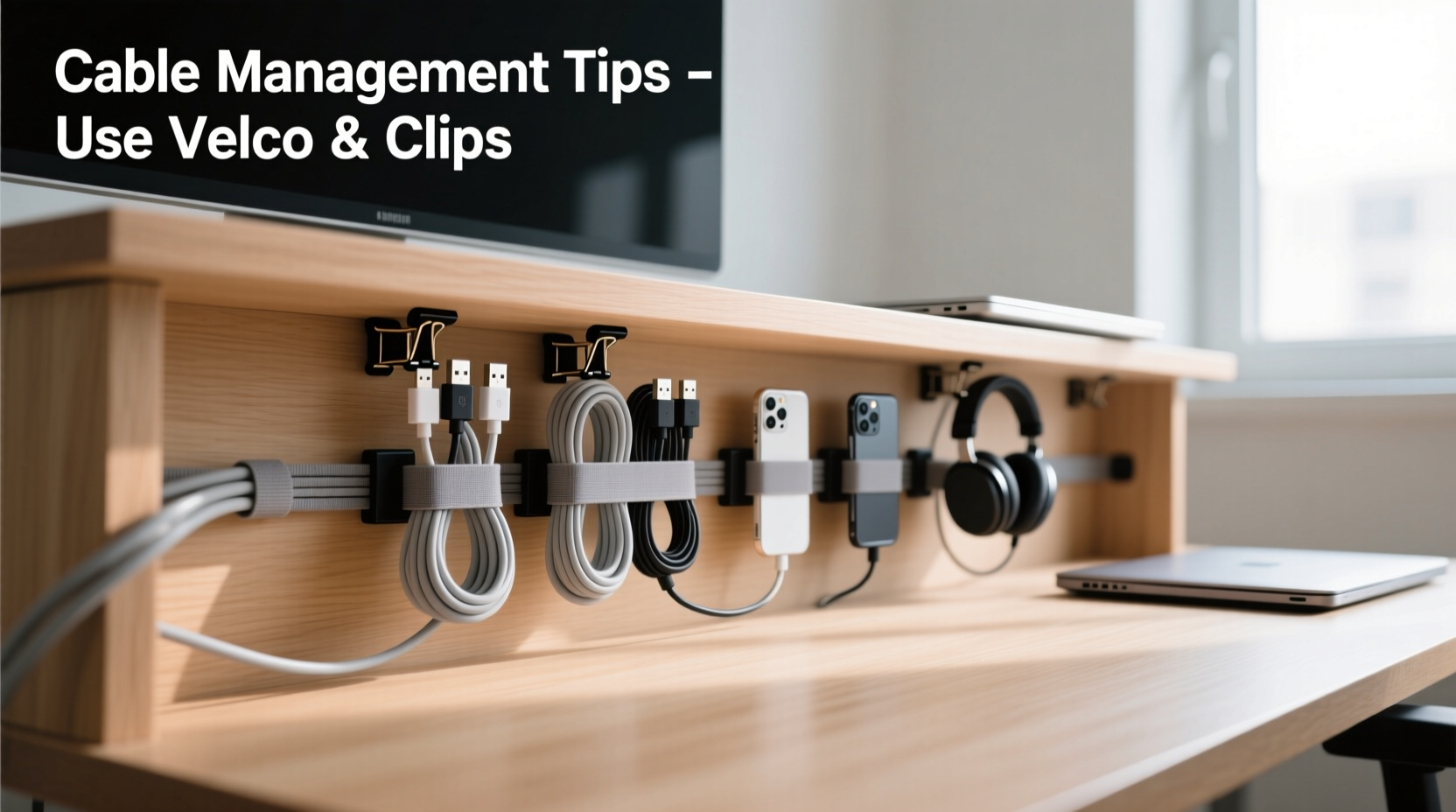
Velcro ties and cord clips solve these issues by enabling structured bundling and anchoring. They’re affordable, easy to install, and adaptable to any desk configuration, whether you're working from a compact apartment desk or a multi-monitor home office.
Essential Tools: Choosing the Right Velcro Ties and Clips
Not all velcro ties and clips are created equal. Selecting the right type ensures durability, ease of use, and compatibility with your setup.
Types of Velcro Ties
- Hook-and-loop wrap strips: Long strips (6–12 inches) ideal for wrapping around large bundles. Reusable and adjustable.
- Pre-cut velcro straps: Shorter lengths (4–8 inches) with sewn or heat-sealed ends. Best for small groupings like charging cables.
- Self-adhesive velcro dots: Sticky-backed patches that let you attach one side to a surface and the other to a cable for quick mounting.
Cord Clip Options
- Adhesive-backed clips: Easy to install on desks, walls, or monitor stands. Choose heavy-duty versions for thick power bricks.
- Screw-mounted clips: More permanent and secure, ideal for wooden desks or frequent adjustments.
- Cable raceways: Enclosed channels that house multiple cords along the desk leg or wall. Use clips inside to separate individual wires.
| Product Type | Best For | Lifespan | Reusability |
|---|---|---|---|
| Velcro Wrap Strips | Large cable bundles | 2+ years | High |
| Pre-Cut Velcro Straps | Small devices, chargers | 1–2 years | High |
| Adhesive Cord Clips | Routing along desk edges | 6–12 months* | Medium |
| Screw-Mounted Clips | Permanent installations | 3+ years | High |
*Adhesive lifespan depends on surface type and temperature. Avoid humid areas.
Step-by-Step: Organizing Your Cords with Velcro and Clips
Follow this six-phase approach to achieve a clean, lasting result.
- Unplug and Remove All Cables
Turn off and unplug every device. Gently pull everything from behind the desk. Lay them out on the floor or a table to assess each wire individually. - Label Each Cord
Use masking tape or small labels to mark each cable with its device (e.g., “Monitor,” “Laptop Charger,” “WiFi Router”). This prevents confusion during reassembly. - Group by Function and Frequency of Use
Create three categories:- Always connected: Power strips, desktop PC, monitor.
- Frequently swapped: Laptop charger, phone dock, headphones.
- Rarely used: External hard drive, printer, backup cables.
- Route Cables Using Clips
Plan a path from each device to the outlet or surge protector. Install adhesive or screw-mounted clips along desk edges, legs, or wall surfaces to guide cables smoothly. Avoid sharp bends or pinching. - Secure Bundles with Velcro
Wrap velcro ties around grouped cords every 6–8 inches. Don’t overtighten—leave slight slack to prevent strain on connectors. Use different colored ties for different zones if desired. - Test and Adjust
Plug everything back in. Check that all devices power on and function correctly. Ensure cords aren’t stretched or blocked by chair movement. Make minor clip or tie adjustments as needed.
Real-World Example: Transforming a Home Office Setup
Consider Sarah, a freelance graphic designer working from a corner desk. Her space had two monitors, a desktop PC, a drawing tablet, a laptop, speakers, and a printer—all plugged into a single overloaded power strip. Behind the desk was a dense web of wires that made it impossible to move her chair fully back or quickly identify which cord belonged to which device.
She spent 75 minutes following the steps above. First, she labeled each cable. She grouped the monitor and PC cords together, separated the laptop and tablet chargers, and isolated rarely used items like the printer. Using 10-inch velcro wraps, she created three main bundles. She installed adhesive clips along the left desk leg and routed the main bundle down to the floor outlet. Smaller clips held stray cords in place near the monitor base.
The result? A clean, accessible setup. When her client called asking for a last-minute screen share, she could quickly unplug her personal laptop without disrupting her main workstation. Six months later, the system still holds up, and she reports fewer distractions and faster cleanup between projects.
Pro Tips for Long-Term Maintenance
Even the best organization fades without upkeep. These habits keep your system effective over time.
- Conduct quarterly audits: Unplug and inspect cords for wear, especially near connectors. Replace frayed cables immediately.
- Use velcro for modular setups: If you frequently change devices, avoid permanent zip ties. Velcro lets you add or remove cables effortlessly.
- Color-code by zone: Assign colors to different areas (e.g., blue for audio, red for networking) for instant visual identification.
- Keep spare velcro ties handy: Store a small pack in your desk drawer for quick fixes or new additions.
- Avoid daisy-chaining power strips: This creates fire hazards and complicates cable routing. Use a single high-quality surge protector with enough outlets.
“Cable management should be as dynamic as your work. Velcro gives you control without locking you in.” — Marcus Tran, IT Infrastructure Consultant
Frequently Asked Questions
Can I use velcro ties on hot power adapters?
Yes, but with caution. Most velcro is heat-resistant up to 185°F (85°C). If your adapter gets noticeably hot during use, leave it outside the main bundle or use a dedicated clip to mount it separately for better airflow.
Will adhesive clips damage my desk?
High-quality clips use removable adhesives designed to leave no residue. Test on a small area first. To remove, gently warm the adhesive with a hairdryer and peel slowly. Avoid use on porous or lacquered wood unless specified by the manufacturer.
How do I manage cords if I have a standing desk?
Moving desks require extra slack and flexible routing. Use braided velcro sleeves for continuous protection and install clips in S-shaped curves to allow vertical movement. Avoid clipping directly to moving parts. Instead, anchor cables to the floor or wall nearby.
Final Checklist Before You Begin
Before starting your cable cleanup, gather and verify the following:
- ✅ All devices unplugged and powered down
- ✅ Labels or tape for marking cords
- ✅ Assorted velcro ties (6\", 10\", 12\")
- ✅ Adhesive or screw-mounted cord clips (8–12 pieces)
- ✅ Scissors or utility knife (for trimming excess velcro)
- ✅ Microfiber cloth (to clean desk surface before clip installation)
- ✅ Surge protector with sufficient outlets
Conclusion: A Cleaner Desk Starts Behind It
Organizing cords behind your desk isn’t a one-time chore—it’s an investment in productivity, safety, and peace of mind. With velcro ties and clips, you gain a simple, scalable solution that adapts to your changing needs. No special tools, no permanent modifications, just smarter use of space and materials.
You don’t need a full weekend or a big budget. In less than an hour, you can eliminate cable chaos and create a workspace that works for you, not against you. Take the first step today: unplug, label, and begin grouping. The difference will be immediate—and lasting.




 浙公网安备
33010002000092号
浙公网安备
33010002000092号 浙B2-20120091-4
Comments
No comments yet. Why don't you start the discussion?