
Gaming consoles are precision-engineered devices designed for performance, longevity, and thermal efficiency. Over time, dust accumulates in the ventilation system, reducing airflow and increasing internal temperatures. This can lead to throttling, loud fan noise, or even permanent hardware damage. While cleaning is essential, many users hesitate—fearing that any tampering might void their warranty. The good news: you can maintain your console’s cooling system safely and effectively without breaking warranty terms. This guide outlines non-invasive, manufacturer-aligned techniques to keep your console running cool and quiet.
Why Vent Cleaning Matters for Console Longevity
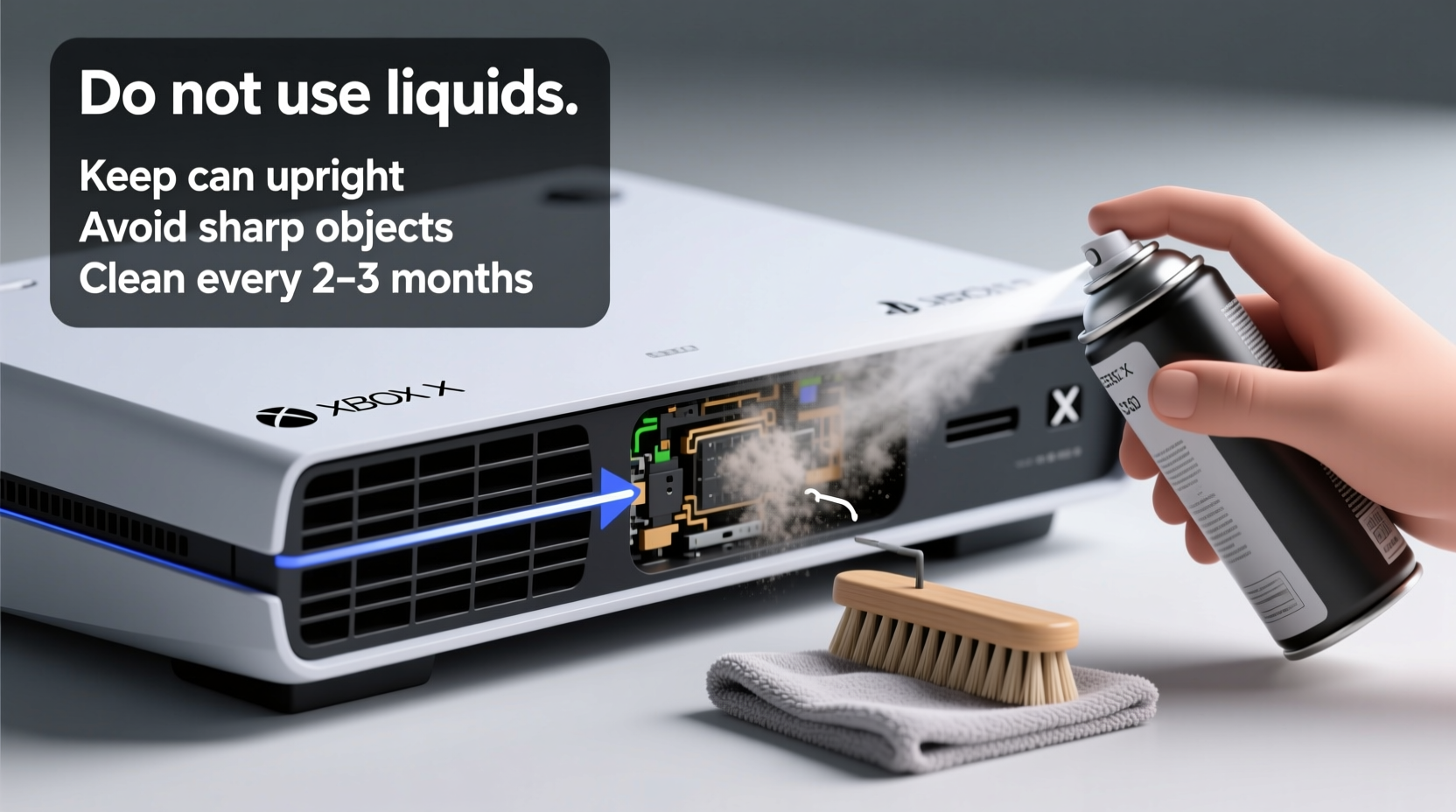
Dust buildup inside a gaming console acts like insulation around critical components such as the CPU, GPU, and power supply. As these parts generate heat during gameplay, restricted airflow forces the cooling fan to work harder. Prolonged overheating degrades solder joints, reduces component lifespan, and increases failure rates. According to a 2023 report by iFixit, over 40% of early-life console failures were linked to poor ventilation and inadequate maintenance—not manufacturing defects.
Regular vent cleaning helps prevent thermal throttling, maintains optimal performance, and reduces wear on moving parts like fans. It also minimizes the risk of unexpected shutdowns during intense gaming sessions. Most importantly, when done correctly, external cleaning does not constitute “unauthorized modification” under standard warranty agreements.
Understanding Warranty Terms and What You Can (and Can’t) Do
All major console manufacturers—including Sony (PlayStation), Microsoft (Xbox), and Nintendo (Switch)—offer limited warranties covering defects in materials and workmanship for one year from purchase. These warranties typically exclude damage caused by user error, liquid exposure, or unauthorized disassembly. However, they do not prohibit basic exterior maintenance.
The key distinction lies in access: opening the casing or removing screws usually voids the warranty unless performed by an authorized service provider. But simply cleaning the outer vents with compressed air or a soft brush? That’s considered routine care—similar to wiping down a screen or using a protective case.
“Console warranties protect against defects, not normal use. Keeping vents clear with non-invasive tools is not only safe—it's encouraged.” — David Lin, Senior Technician at GameSavvy Repair Network
Manufacturers often include disclaimers advising users to keep ventilation openings unobstructed. For example, PlayStation’s official support site states: “Ensure the air vents are not blocked and allow sufficient space around the console for proper ventilation.” This implies responsibility lies with the owner to maintain airflow—without requiring internal access.
Safe Cleaning Methods That Won’t Void Your Warranty
The safest way to clean your console’s vents is through external-only techniques that require no tools capable of penetrating the chassis. Below are proven, low-risk approaches endorsed by repair professionals and aligned with warranty policies.
1. Use Compressed Air (Canned Air)
Compressed air is the most effective and widely recommended method for clearing dust from vents. It delivers short bursts of dry air that dislodge particles without physical contact.
- Power off the console completely and unplug all cables.
- Hold the can upright—never tilt it—to avoid spraying liquid propellant.
- Aim the nozzle at each vent opening from a distance of 1–2 inches.
- Use short 1–2 second bursts to prevent moisture buildup.
- Rotate the console gently to access side and rear vents.
- Repeat until no visible dust is expelled.
2. Soft-Bristle Brush or Makeup Brush
A clean, dry, soft-bristle brush can remove surface dust before or after using compressed air. Never insert stiff objects like toothpicks or metal tools—these can scratch internal components if pushed too far.
- Use a small makeup or paintbrush with natural or synthetic fibers.
- Gently sweep across vent slats to loosen debris.
- Follow up with canned air to blow away loosened particles.
3. Vacuum Cleaner with Brush Attachment (Low Power Only)
While not ideal due to static risks, a vacuum with a soft brush attachment can help pull dust from vent surfaces—provided it’s used carefully.
| Tool | Safe Use? | Risks | Best Practice |
|---|---|---|---|
| Compressed Air | Yes | Liquid discharge if tilted | Hold can upright; use short bursts |
| Soft Bristle Brush | Yes | None if gentle | Never force into narrow slots |
| Vacuum Cleaner | Limited | Static discharge, suction damage | Use low setting; don’t touch vents directly |
| Toothpick / Metal Tool | No | Scratches, punctures, warranty violation | Avoid entirely |
If using a vacuum, keep the nozzle slightly above the vent and run it on the lowest suction setting. Never let the metal part touch the console. Anti-static vacuums designed for electronics are preferable but not required for external use.
Step-by-Step Cleaning Procedure
Follow this timeline-based routine to ensure thorough, safe cleaning every 3–6 months:
- Day Before: Let the console rest powered off for at least 12 hours to cool completely.
- Prep Area: Choose a well-ventilated space near a trash can or outside doorway. Lay down newspaper or a towel.
- Disconnect All Cables: Unplug power, HDMI, USB, and network cables to prevent accidental startup or electrical issues.
- Surface Dust Removal: Use a microfiber cloth to wipe the top and sides of the console. Remove loose debris from around the base.
- Brush Application: Gently sweep a soft brush across all visible vents—top, side, rear, and bottom (if elevated).
- Compressed Air Pass: Hold the can upright and apply short bursts into each vent at a 45-degree angle to maximize particle ejection.
- Rotate and Repeat: Turn the console to access different vent angles. Avoid shaking the can excessively.
- Final Wipe: Use a dry microfiber cloth to remove any residual dust from the housing.
- Rest Period: Wait 10 minutes before reconnecting cables and powering on.
- Monitor Performance: After rebooting, listen for reduced fan noise and check system temperature via settings (if available).
Mini Case Study: Preventing Overheating in a PS5 Living Room Setup
Mark, a PlayStation 5 owner in Phoenix, AZ, noticed his console was shutting down during extended gaming sessions. Ambient temperatures in his living room regularly exceeded 85°F (29°C), and the PS5 sat flat on a carpeted entertainment stand with minimal clearance. After two crashes within a month, he contacted Sony support, who confirmed the issue was likely thermal—but warned that opening the unit would void his warranty.
Instead, Mark followed the external cleaning protocol: he unplugged the console, used compressed air on all vents (especially the large side intake), and placed the unit vertically with rubber feet to improve airflow. He also relocated it to a shelf with at least six inches of clearance on all sides. Post-cleaning, internal fan speeds dropped by nearly 20%, and no further shutdowns occurred over the next eight months. Sony later extended his warranty due to regional heat advisories, validating that proper maintenance played a role in preserving device integrity.
What NOT to Do: Common Mistakes That Risk Damage or Warranty Loss
Avoid these practices—they increase the risk of hardware damage and may invalidate warranty coverage:
- Opening the casing: Removing screws or peeling warranty stickers breaks tamper-evident seals. Even reassembling perfectly won't restore coverage.
- Using household cleaners: Sprays containing alcohol, ammonia, or abrasives can damage plastic finishes and leave residues near vents.
- Blowing with your mouth: Moisture from breath introduces humidity inside the chassis, promoting corrosion.
- Inserting sharp objects: Paperclips, needles, or toothpicks can snag wires or puncture fan blades.
- Cleaning while powered on: Always disconnect power to prevent electrical hazards or fan injury.
“Warranty claims are denied not because users cleaned their consoles—but because they opened them. There’s a big difference between maintenance and modification.” — Lena Patel, Customer Advocacy Lead at ConsoleMedic
Frequently Asked Questions
Can I use a damp cloth on the vents?
No. Never apply liquids directly to vent areas. A slightly damp microfiber cloth can be used on the exterior casing, but must never penetrate openings. Water or moisture ingress can cause short circuits and immediate damage.
Is it safe to clean a Nintendo Switch dock or OLED screen vents?
Yes, but with extra caution. The Switch has smaller vents near the kickstand and dock. Use only a dry soft brush or very brief canned air bursts from a greater distance (3+ inches). Never spray directly into the screen hinge area.
How do I know if my console needs cleaning?
Signs include louder-than-normal fan noise, frequent thermal warnings, sudden shutdowns during gameplay, or visible dust buildup around vent grilles. On some models (like Xbox Series X), you can monitor system temperature in the settings menu under \"Devices & Connections\" > \"Accessories.\"
Checklist: Safe Console Vent Cleaning Routine
- ✅ Power off and unplug the console
- ✅ Work in a clean, dry, well-ventilated area
- ✅ Use compressed air (canned) held upright
- ✅ Apply short bursts—do not shake the can
- ✅ Gently brush vents with a soft, dry tool
- ✅ Avoid inserting any rigid objects
- ✅ Keep liquids and sprays away from openings
- ✅ Reconnect only after full drying time (10 mins)
- ✅ Monitor fan behavior post-cleaning
- ✅ Schedule next cleaning in 3–6 months
Conclusion: Maintain Performance Without Risk
Keeping your gaming console’s vents clean is a simple yet powerful way to extend its life, maintain peak performance, and avoid costly repairs. The process doesn’t require technical skill or invasive steps—just consistent care using the right tools. By sticking to external cleaning methods like compressed air and soft brushes, you stay within warranty guidelines while protecting your investment.
Your console works hard for you. Return the favor with regular, thoughtful maintenance. Start today—your future self (and your framerate) will thank you.




 浙公网安备
33010002000092号
浙公网安备
33010002000092号 浙B2-20120091-4
Comments
No comments yet. Why don't you start the discussion?