
Working from home has become a permanent fixture for many professionals, but carving out a dedicated workspace in a compact apartment can feel like an impossible puzzle. The challenge isn’t just about fitting a desk and chair into a corner—it’s about creating a functional, inspiring, and sustainable environment that supports focus, comfort, and work-life balance. With thoughtful planning and strategic choices, even the tiniest studio or one-bedroom unit can host a highly effective home office. The key lies not in square footage, but in smart design, multifunctional solutions, and disciplined organization.
Assess Your Space and Prioritize Function
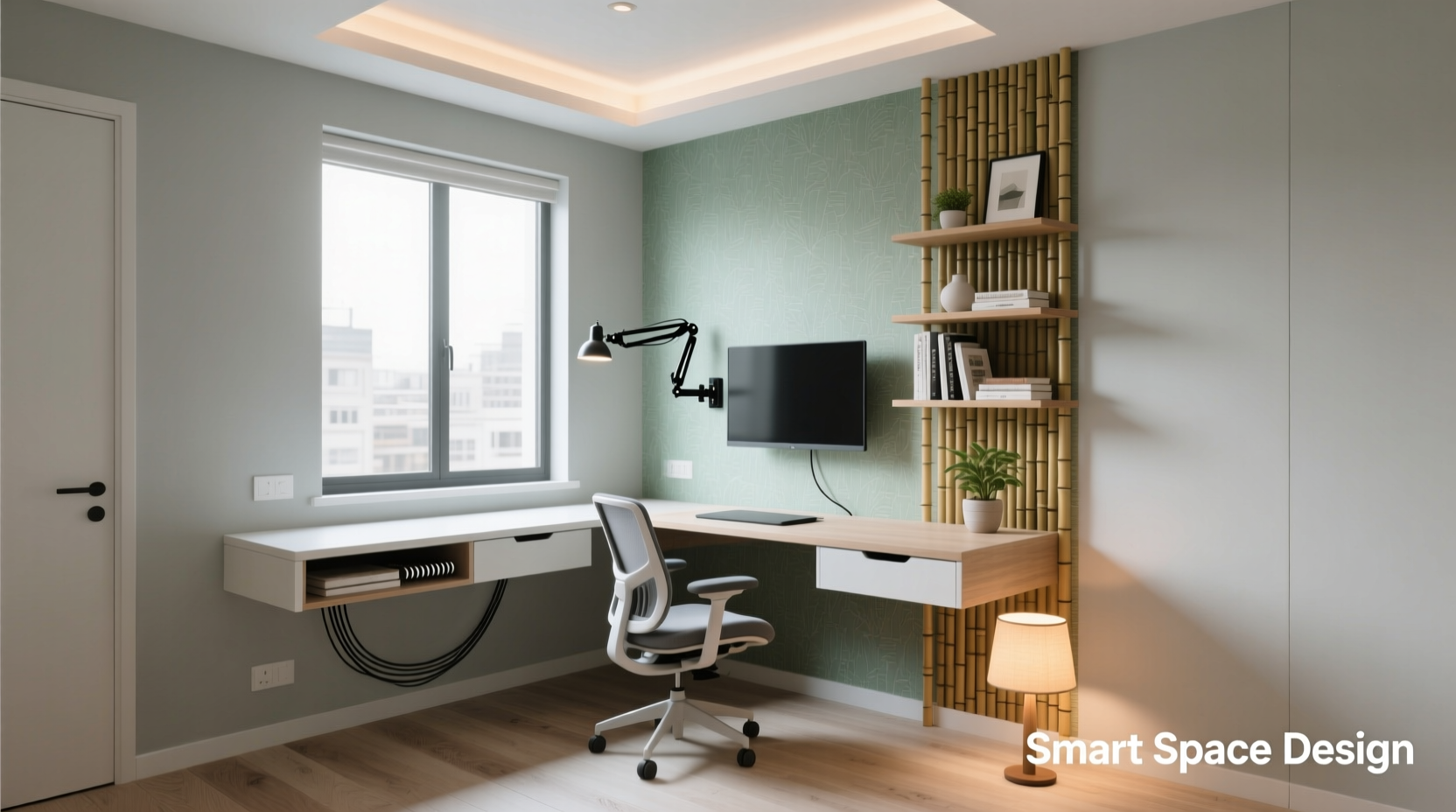
Before purchasing any furniture or supplies, take a close look at your apartment’s layout. Identify underutilized areas: a narrow hallway, an alcove beside the kitchen, or even a section of your bedroom that could double as a workspace. Avoid setting up directly on your bed or sofa—these locations blur boundaries between rest and work, reducing both productivity and sleep quality.
Begin by listing your non-negotiables: Do you need two monitors? A printer? Standing desk capability? Frequent video calls? These requirements will shape your setup. For example, someone managing graphic design projects will need more surface area and lighting than a freelance writer who primarily uses a laptop.
Measure every dimension carefully. Note door swings, outlet locations, and natural light sources. A north-facing window may provide consistent indirect light, while a south-facing one could cause glare on screens. Proximity to high-traffic zones (like the front door or kitchen) should be balanced against privacy needs.
Choose Multifunctional Furniture Wisely
In a small apartment, every piece of furniture must earn its place. Opt for items that serve multiple purposes and scale with your needs. A fold-down wall desk, for instance, offers a full work surface when open but disappears when closed, freeing up floor space for movement or exercise.
Consider these smart furniture options:
- Convertible desks: Models that transform from dining tables to standing workstations.
- Built-in shelving with desk: Custom or modular units that integrate storage, display, and a work surface.
- Storage ottomans or benches: Double as seating and hidden file storage.
- Nesting furniture: Desks or chairs that tuck neatly under larger pieces when not in use.
Material choice also matters. Light-colored woods or white laminates reflect light and make spaces feel larger. Glass-topped desks reduce visual bulk. Avoid oversized executive-style desks—they dominate small rooms and create psychological clutter.
“Small-space workspaces thrive on adaptability. The best home offices aren’t defined by size, but by intentionality.” — Lena Torres, Interior Designer & Remote Work Consultant
Optimize Ergonomics Without Sacrificing Space
A cramped desk doesn’t mean compromising on ergonomics. Poor posture leads to fatigue, discomfort, and long-term health issues. Even in tight quarters, prioritize a setup that supports your body.
Follow these guidelines:
- Your monitor should be at eye level, about an arm’s length away.
- The top of the screen should align with your eyebrows.
- Elbows should form a 90-degree angle when typing, with wrists straight.
- Feet should rest flat on the floor or on a footrest.
In limited spaces, consider a laptop riser with a separate keyboard and mouse. This allows screen elevation without needing a tall desk. Wall-mounted monitor arms are another excellent solution—they free up desk real estate and offer flexible positioning.
If a full-sized ergonomic chair won’t fit, explore compact alternatives: drafting chairs with adjustable height and lumbar support, or even well-designed stools with backrests. Avoid dining chairs unless they’re specifically designed for prolonged sitting.
Space-Saving Desk Options Compared
| Furniture Type | Footprint (approx.) | Best For | Drawbacks |
|---|---|---|---|
| Fold-down wall desk | 24” x 30” (open) | Tiny studios, renters | Limited storage, fragile installation |
| Corner desk | 48” x 48” L-shape | Dual monitors, multitaskers | Requires corner access, less portable |
| Console table desk | 36” x 18” | Entryway or living room integration | Shallow depth limits equipment |
| Under-window desk | Custom-fit | Natural light access | Potential glare, cold drafts |
| Nesting rolling cart | 18” x 12” per tier | Mobile setups, vertical storage | Less stable for heavy gear |
Create Visual and Psychological Boundaries
One of the biggest challenges in small apartments is maintaining separation between work and personal life. Without physical cues, it’s easy to overwork or lose focus. Designate your workspace with intentional boundaries—even subtle ones.
Use a room divider such as a slim bookshelf, folding screen, or tall plant to segment your office zone. A change in flooring (e.g., adding a rug) or lighting (a focused task lamp) can signal a mental shift into “work mode.” Paint an accent wall behind your desk in a calm, professional color like soft gray or muted blue to visually define the area.
Sound management is equally important. If your desk is near shared spaces, noise-canceling headphones help maintain concentration. Conversely, playing ambient background noise during work hours can condition your brain to enter “focus mode,” especially if you live alone.
Smart Storage and Cable Management
Clutter kills productivity, and nowhere is this truer than in a small home office. Every exposed cord, stack of papers, or dangling adapter adds visual noise. Implement a strict “one in, one out” rule: for every new item you bring in, remove an old one.
Vertical storage is your ally. Install floating shelves above your desk for books, supplies, or decorative inspiration. Use magnetic strips to hold metal tools like scissors or headsets. Drawer organizers keep cables, thumb drives, and stationery sorted.
Cable chaos is a common issue. Instead of letting cords dangle, use:
- Cable sleeves or braided wraps
- Adhesive clips to route wires along desk edges
- Power strips with USB ports to reduce plug load
- Label each cable with mini tags
For those using laptops, consider a docking station that consolidates connections. Plug everything in once, then connect your laptop with a single cable. When it’s time to pack up, unplug just one line.
Home Office Setup Checklist
- Measure available space and sketch a layout
- Select a multifunctional desk that fits your footprint
- Choose an ergonomic chair or seating alternative
- Elevate your screen to eye level
- Install task lighting (preferably adjustable)
- Add vertical storage (shelves, pegboards, or cabinets)
- Organize cables with sleeves, clips, and labels
- Define the workspace with a rug, screen, or paint
- Stock essentials: notebook, pens, charger, headset
- Test the setup for comfort and workflow efficiency
Real-World Example: Maya’s Studio Apartment Transformation
Maya, a freelance copywriter living in a 450-square-foot Brooklyn studio, struggled with distractions and back pain after transitioning to remote work. Her initial setup—a folding table in front of the couch—left her hunched over and constantly interrupted by household noise.
She reimagined a neglected nook beside her bathroom doorway. Using a 30-inch wall-mounted drop-leaf desk, she created a compact workstation. She mounted her monitor on an articulating arm, paired with a wireless keyboard stored in a drawer when not in use. A slim bookshelf above holds client files and a small plant. A sheer curtain on a tension rod separates the area from her sleeping zone.
The result? A dedicated space that takes up less than 3% of her apartment yet feels entirely distinct. Maya reports improved focus, fewer neck strains, and clearer mental separation between work and relaxation. Most importantly, she reclaimed her evenings—no more working from bed.
FAQ: Common Questions About Small Home Offices
Can I use my bedroom as a home office?
Yes, but with caution. If space forces this arrangement, use physical dividers and avoid placing your desk facing the bed. Establish strict work hours and never conduct late-night tasks in the same space where you sleep. The goal is to preserve the bedroom as a rest sanctuary.
How do I stay productive without a door for privacy?
Use auditory and visual cues. Noise-canceling headphones signal focus to others and block distractions. A “Do Not Disturb” sign during meetings helps. Structured routines—like starting work at the same time daily—train your brain to enter work mode regardless of surroundings.
What if I don’t have natural light?
Maximize artificial lighting with layered options: overhead ambient light, a warm-toned floor lamp for general use, and a cool-white LED task lamp directed at your desk. Full-spectrum bulbs mimic daylight and reduce eye strain. Position mirrors opposite light sources to amplify brightness.
Final Thoughts: Design for How You Work, Not Just Where You Are
A small apartment doesn’t limit your potential—it challenges you to design smarter. The most successful home offices aren’t the largest, but the most thoughtfully curated. By choosing adaptable furniture, respecting ergonomics, and defining psychological boundaries, you create a workspace that enhances both performance and peace of mind.
Start small. Pick one change—repositioning your desk, decluttering cables, or adding a boundary—and build from there. Over time, these adjustments compound into a system that supports your career without overwhelming your living space.




 浙公网安备
33010002000092号
浙公网安备
33010002000092号 浙B2-20120091-4
Comments
No comments yet. Why don't you start the discussion?