
Working from home has become a permanent fixture for millions, but not everyone has the luxury of a spare room or expansive layout. When your workspace must fit within 100 square feet—sometimes even less than 80—the challenge shifts from simply having a desk to designing a space that supports focus, comfort, and efficiency without sacrificing livability.
The key isn’t more space; it’s smarter use of what you have. With thoughtful planning, strategic furniture choices, and behavioral habits that reinforce productivity, a compact home office can outperform larger, disorganized setups. This guide walks through how to build a functional, inspiring workspace in tight quarters—without compromising on ergonomics, storage, or mental clarity.
Design Around Function, Not Square Footage
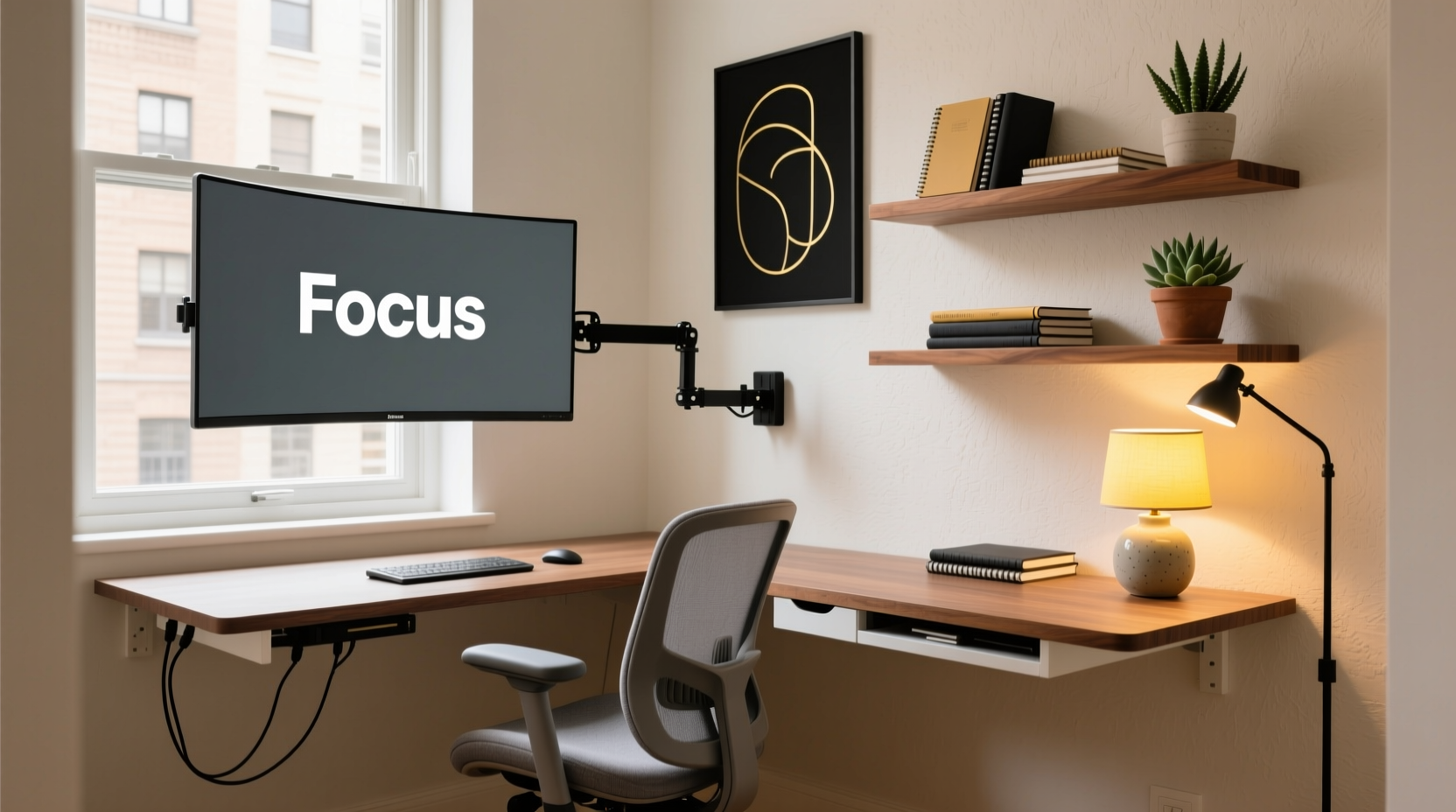
In small spaces, every inch must serve a purpose. Start by defining your primary work activities. Are you typing most of the day? On video calls frequently? Managing physical files or inventory? Your workflow determines the layout priorities.
A writer might prioritize quiet and screen visibility, while a graphic designer needs color-accurate lighting and tablet access. A consultant logging hours on Zoom requires clean acoustics and an uncluttered background. Identify your top three daily tasks and let them guide your setup.
Once function is clear, sketch a rough floor plan. Use free tools like SketchUp Free or graph paper to visualize traffic flow, outlet locations, and natural light. Avoid blocking windows or doorways. In micro-offices, circulation matters as much as surface area.
Choose Space-Smart Furniture
Furniture makes or breaks a small office. Oversized desks, bulky filing cabinets, and overstuffed bookshelves turn cozy into cramped. Instead, opt for multi-functional, scaled-down pieces designed for efficiency.
A wall-mounted drop-leaf desk can fold away when not in use, freeing floor space for movement or exercise. Adjustable-height standing desks in narrow profiles (30–48 inches wide) support posture without dominating the room. Look for models with built-in cable management to reduce visual clutter.
Storage should be vertical. Floating shelves above the desk hold books, supplies, or decor without taking up floor space. Pegboards are ideal for customizing tool organization—use them for headphones, notebooks, or cords. For seated work, select chairs that support lumbar health but don’t sprawl—compact ergonomic chairs like the Herman Miller Sayl or Side Chair 2 are built for smaller frames and tighter rooms.
“Small doesn’t mean compromised. The best compact offices are intentional down to the last centimeter.” — David Lin, Interior Designer & Small Space Specialist
Furniture Selection Checklist
- Desk depth no greater than 24 inches unless dual monitors require more
- Chair with adjustable arms and breathable fabric
- At least one piece with dual function (e.g., ottoman with storage)
- Shelving mounted above eye level to preserve visual openness
- Cable trays or sleeves to prevent tangling
Optimize Lighting and Acoustics
Poor lighting strains eyes and disrupts circadian rhythms, especially in windowless corners. Natural light is ideal, but if your space lacks access, layer artificial sources effectively.
Start with ambient lighting—a ceiling fixture or recessed lights set at 3000K to 4000K color temperature for balanced warmth and alertness. Add task lighting: an adjustable LED desk lamp with dimming controls lets you fine-tune brightness without glare. Finally, include accent lighting—such as a slim floor lamp behind the chair—to reduce contrast and create depth.
Acoustics are equally critical. Hard surfaces like bare walls, wood floors, or glass reflect sound, making video calls echoey and concentration difficult. Soften the space with practical additions:
- Rugs with rubber backing (prevents slipping)
- Thick curtains or cellular shades
- Fabric-covered pinboards or acoustic panels disguised as art
- Indoor plants in woven baskets (they absorb mid-frequency noise)
Create Zones Without Walls
In studios or shared rooms, the absence of physical separation between living and working areas blurs boundaries and reduces mental focus. You don’t need drywall to create psychological separation—use design cues to signal “work mode” versus “rest mode.”
One effective method is flooring differentiation. Place a textured rug or interlocking foam tiles under your desk to define the workspace. Alternatively, orient your desk to face a different direction than seating areas, using furniture placement to imply division.
Visual barriers also help. A tall plant, open shelving unit, or folding screen blocks sightlines without enclosing the space. These partitions maintain airflow and light while offering privacy during meetings or deep work sessions.
Color psychology plays a role too. Paint the wall behind your desk in a calm, energizing hue—soft blues enhance focus, sage greens reduce stress, and warm grays add sophistication without distraction. Keep surrounding walls neutral to prevent sensory overload.
Do’s and Don’ts of Zone Creation
| Do | Don't |
|---|---|
| Use directional lighting to spotlight your desk | Place your back to high-traffic areas |
| Align desk orientation with natural focal points (window, artwork) | Allow cables to cross walkways |
| Add a dedicated task lamp only for work hours | Mix personal clutter (laundry, snacks) into the workspace |
| Store non-work items outside the zone (e.g., living room closet) | Use bright reds or intense patterns behind your monitor |
Maximize Storage with Hidden Systems
Clutter kills productivity, especially in confined environments. The solution isn’t minimalism for its own sake—it’s intelligent storage that keeps essentials accessible yet invisible.
Built-in solutions win in tiny offices. Under-desk drawers slide out neatly for pens, notepads, or charging cables. Wall niches recessed into stud cavities hold routers or power strips flush with the surface. Even closet interiors can be converted into slide-out command centers with fold-down desks and magnetic accessory strips.
For renters or those avoiding renovations, consider modular systems. Stackable bins labeled by category (bills, contracts, supplies) fit under desks or beside chairs. Magnetic strips on the side of a filing cabinet hold scissors, USB drives, or whiteboard markers. Over-the-door organizers provide quick access without permanent fixtures.
Digital decluttering complements physical order. Scan paper documents using apps like Adobe Scan or Microsoft Lens, then store them in cloud folders with clear naming conventions (e.g., “Invoices_2024_Q2”). Shred originals after verification to reclaim shelf space.
Step-by-Step: Build a Clutter-Free System in One Weekend
- Saturday Morning: Empty all surfaces and containers. Sort items into “Keep,” “Digitize,” “Donate,” and “Discard.”
- Saturday Afternoon: Assign homes for each “Keep” item. Use drawer dividers, labeled bins, or hanging pockets.
- Sunday Morning: Install wall storage—shelves, pegboards, or floating cabinets—following weight limits and stud alignment.
- Sunday Afternoon: Route and secure cables with adhesive clips or braided sleeves. Test device connections.
- Final Step: Take a photo of your finished setup. Use it as a reset reference when things drift over time.
“The most productive small offices aren’t the tidiest—they’re the ones where everything has a predictable place.” — Lena Park, Productivity Coach
Real Example: Transforming a 75-Square-Foot Bedroom Corner
Jamal, a freelance copywriter in Seattle, converted a corner of his studio apartment into a full-time office. His space measured just 75 square feet total, with his bed, kitchenette, and workstation sharing the same room.
He began by relocating his old L-shaped desk, which ate up valuable floor space. In its place, he installed a 42-inch wall-mounted desk with a lift mechanism, allowing him to raise it to standing height or lower it flat against the wall after work.
To separate zones, he placed a six-foot woven room divider between the bed and desk. He added a 3000K LED strip under the desk for evening ambiance and used a rolling cart beneath the desk to store client binders and backup drives. All cords run through a fabric-wrapped sleeve attached to the baseboard.
The result? A space that functions fully during work hours and visually recedes afterward. Jamal reports a 30% increase in daily output and fewer distractions during calls since implementing these changes.
Frequently Asked Questions
Can I have a comfortable home office in a closet?
Yes—many professionals convert unused closets into “office pods.” Key requirements include adequate ventilation, proper lighting (LED strips work well), and sufficient outlet access. Install a pull-down desk, swivel stool, and noise-dampening panels for a functional setup. Just ensure the door can remain open during use for safety and airflow.
How do I stay focused when my office is also my living space?
Establish behavioral rituals. Use a specific lamp or playlist only during work hours to signal focus mode. At day’s end, shut down devices, cover your desk with a decorative cloth, or fold it away. Physical transitions reinforce mental boundaries, reducing burnout and improving rest quality.
Is standing better than sitting in a small office?
Standing offers short-term energy boosts and improved posture, but prolonged standing can lead to fatigue and joint strain. The optimal approach is alternating positions. Use a sit-stand desk or set reminders to stand for 5–10 minutes every hour. Combine with a anti-fatigue mat for comfort during upright work.
Final Steps to Launch Your Compact Office
Creating a productive home office in under 100 square feet isn’t about compromise—it’s about precision. By aligning furniture with function, layering light and sound control, and enforcing smart storage habits, you build a space that works harder, not larger.
Begin with a single change: reposition your desk toward natural light or install a cable organizer. Then expand systematically. Measure progress not by square footage gained, but by focus achieved, tasks completed, and mental ease preserved.




 浙公网安备
33010002000092号
浙公网安备
33010002000092号 浙B2-20120091-4
Comments
No comments yet. Why don't you start the discussion?