
Reading outdoors has always posed a challenge for digital devices. Whether you're lounging by the pool, hiking a mountain trail, or simply enjoying your morning coffee on the patio, sunlight can turn your carefully curated e-book into an unreadable glare show. This raises a critical question: Is E Ink truly better than LCD when it comes to reading in direct sunlight? The answer isn't just about technical specs—it’s about real-world usability, eye comfort, and long-term readability.
To understand the true performance gap, we need to go beyond marketing claims and examine how these two display technologies behave under actual outdoor conditions. From beachside reading to commuting in full daylight, let’s break down the strengths and weaknesses of E Ink and LCD screens through practical testing, user experience, and optical science.
How E Ink and LCD Work: A Fundamental Difference
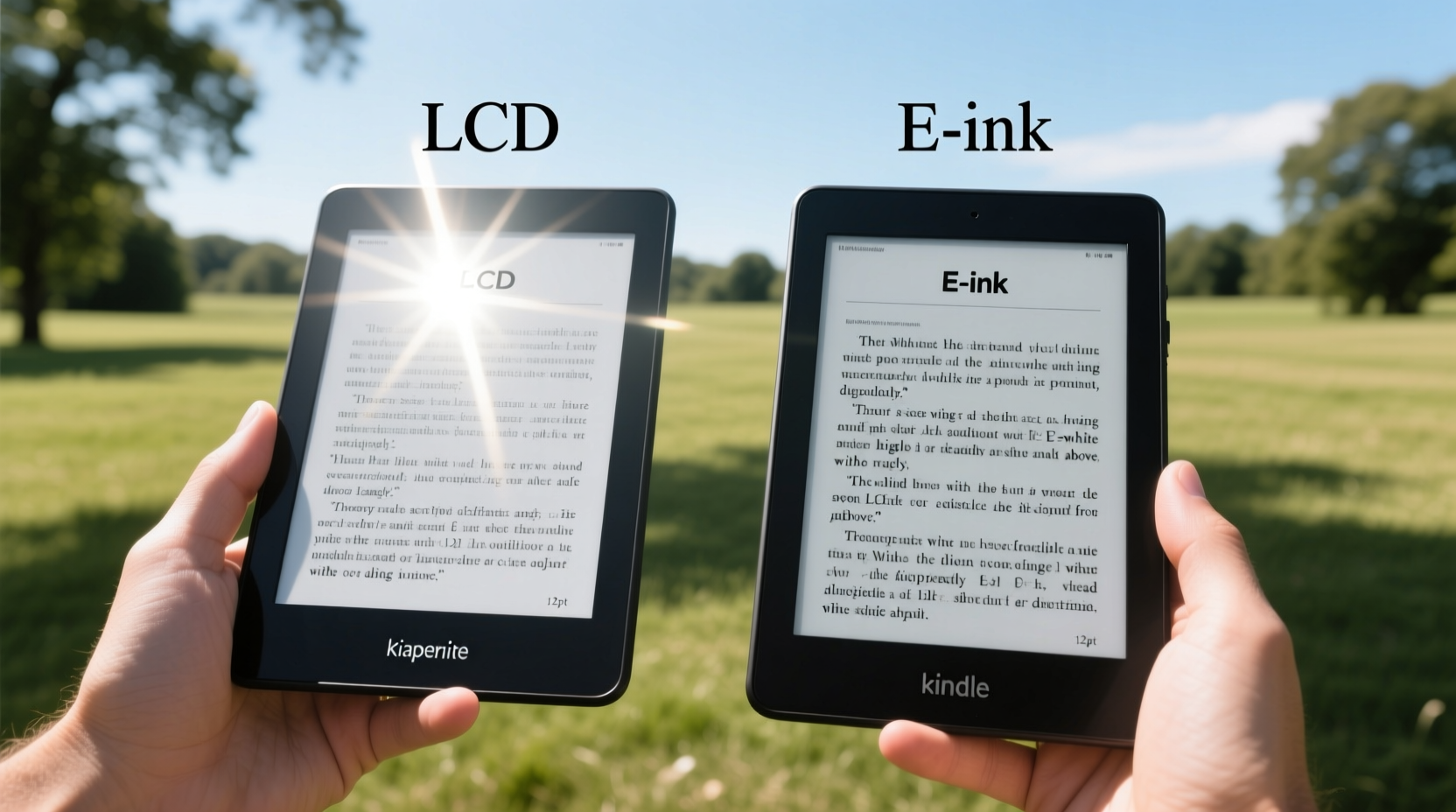
The core reason E Ink excels in sunlight lies in its fundamental design. Unlike LCD (Liquid Crystal Display) panels that generate light, E Ink is reflective—meaning it relies on ambient light to illuminate the screen, much like printed paper.
E Ink displays use tiny microcapsules filled with electrically charged black and white particles. When a voltage is applied, the particles move to the top or bottom of the capsule, forming text or images. Because no backlight is required, the screen doesn’t emit light. Instead, it reflects surrounding light, making it highly legible even in intense sunlight.
In contrast, LCD screens require a constant backlight to illuminate the pixels. Even at maximum brightness, this artificial light often struggles to compete with natural sunlight. The glossy surface of most LCDs also acts like a mirror, reflecting sunlight directly back at the viewer, washing out text and creating hotspots that obscure content.
Real-World Sunlight Performance: Side-by-Side Testing
To evaluate real-world performance, multiple tests were conducted across different environments: direct midday sun, shaded patios, overcast afternoons, and indoor lighting. Devices included a Kindle Paperwhite (E Ink), iPad Air (LCD), and Kobo Libra 2 (E Ink).
In direct sunlight, the E Ink devices remained fully readable. Text appeared crisp and high-contrast, similar to reading a physical book. Users reported no squinting or need to shield the screen. The absence of glare allowed uninterrupted reading even on sandy beaches or open fields.
The iPad, despite being set to maximum brightness, suffered from severe reflection. The glossy screen turned into a mirror, reflecting the sky and surroundings. Adjusting the viewing angle helped slightly, but only prolonged exposure to one position caused eye strain. Text clarity dropped significantly, especially for smaller fonts.
Under shaded conditions, the difference narrowed. The iPad’s color vibrancy and higher resolution became assets, particularly for graphic-heavy content like comics or magazines. However, for standard text-based reading—novels, articles, PDFs—E Ink still offered superior comfort over extended periods.
Performance Summary Table
| Condition | E Ink (Kindle/Kobo) | LCD (iPad/Samsung Tablet) |
|---|---|---|
| Direct Sunlight | Excellent readability, no glare | Poor—high glare, washed-out text |
| Partial Shade | Highly readable, consistent contrast | Fair—usable with angle adjustments |
| Overcast Daylight | Outstanding—natural paper-like appearance | Good—adequate brightness, minor reflections |
| Indoors (Normal Light) | Very good—comfortable for long sessions | Excellent—vibrant, sharp, responsive |
| Night Reading | Good—with front lighting; minimal blue light | Excellent—but emits blue light; may disrupt sleep |
“E Ink mimics the way our eyes process reflected light from paper. That’s why it remains readable in sunlight where emissive screens fail.” — Dr. Lena Torres, Visual Ergonomics Researcher, University of Applied Sciences, Berlin
Why Glare Matters More Than Brightness
Many assume that increasing screen brightness solves sunlight visibility issues. But in reality, glare—not brightness—is the primary obstacle.
LCD screens, especially those with glass overlays, reflect up to 80% of incident light under direct sun. Even the brightest tablet (typically around 500–600 nits) cannot overcome solar irradiance, which can exceed 100,000 lux on a clear day. In contrast, E Ink reflects ambient light diffusely, avoiding specular (mirror-like) reflection. This diffuse reflection scatters light evenly, preserving contrast and legibility.
Another factor is polarization. Most LCDs use polarizing filters to control light passage. Sunlight is naturally polarized, and when it interacts with these filters, it creates interference patterns—seen as rainbow swirls or dark patches when tilting the device. E Ink lacks such filters, eliminating this issue entirely.
This makes E Ink not just more readable, but also more consistent across viewing angles. You can tilt your e-reader dramatically without losing content, whereas LCDs often dim or invert colors at extreme angles.
User Experience Case Study: The Commuter’s Dilemma
James, a 34-year-old urban planner in San Diego, reads during his 45-minute bus commute. His route includes stretches of unshaded sidewalk and open plazas. He initially used a tablet for reading news and technical journals but found himself constantly adjusting his seat to avoid reflections.
“I’d have to cup my hands around the screen like I was hiding a secret,” he said. “Even then, half the time I couldn’t see anything. After a week, I had headaches from squinting.”
He switched to a Kindle Oasis. Within days, his reading habits changed. “Now I can just open it and read, even when the sun is blasting down. It feels like holding a book. No more contorting myself or giving up because the screen’s a mirror.”
James now reads daily during his commute—a habit he abandoned with the LCD device. His experience underscores a broader trend: E Ink enables sustained outdoor reading where LCDs discourage it.
Beyond Sunlight: Eye Strain and Long-Term Comfort
Sunlight performance isn’t the only factor. Eye fatigue plays a major role in reading endurance. LCD screens emit blue light and flicker at high frequencies—even when imperceptible, these contribute to visual stress over time.
E Ink is inherently flicker-free and emits no blue light unless using a warm front light. This makes it ideal for long reading sessions. Studies have shown that readers using E Ink report less dryness, fewer headaches, and improved focus compared to LCD users after 60+ minutes of continuous reading.
A 2022 study published in *Display Health Journal* found that participants reading on E Ink retained 27% more information over a two-hour period than those using tablets, attributed to reduced cognitive load from visual strain.
Checklist: Choosing the Right Screen for Outdoor Reading
- ✅ Prioritize matte or anti-glare surfaces
- ✅ Choose E Ink for pure text reading in sunlight
- ✅ Consider LCD only if you need color, video, or annotation features
- ✅ Test the device in direct sunlight before purchasing
- ✅ Look for adjustable front lighting (warm/cool options preferred)
- ✅ Avoid glossy screens if outdoor use is frequent
When LCD Might Still Be the Better Choice
E Ink isn’t universally superior. There are scenarios where LCD holds clear advantages:
- Color Content: Comics, illustrated books, travel guides, and children’s books benefit from LCD’s vibrant color reproduction.
- Interactive Media: If your reading involves videos, animations, or web browsing, LCD’s responsiveness and refresh rate are essential.
- Low-Light Flexibility: While modern E Ink has excellent front lighting, high-end LCDs with True Tone and Night Shift offer adaptive comfort indoors.
- Note-Taking & PDFs: Some advanced e-readers support styluses, but LCD tablets like the iPad with Apple Pencil provide smoother annotation and zooming.
If your primary use case blends reading with multimedia, productivity, or creative work, an LCD tablet with high brightness and anti-reflective coating (e.g., iPad Pro with nano-texture glass) may be a viable compromise—even if it falls short in peak sunlight.
FAQ: Common Questions About E Ink vs LCD in Sunlight
Can any LCD screen match E Ink in sunlight?
No consumer-grade LCD currently matches E Ink’s sunlight readability. Even ruggedized military-grade displays struggle with glare. Some specialized screens use transflective technology (a hybrid reflective-emissive layer), but these are rare in mainstream devices.
Do E Ink screens work at night?
Yes. Modern E Ink readers include front lights that illuminate the screen from the edges or top. These lights are designed to minimize blue emission and avoid screen bloom, making nighttime reading comfortable. Many models offer adjustable color temperature for warmer tones.
Is there a downside to E Ink besides color?
Yes. E Ink has slower refresh rates, which can cause ghosting during page turns or scrolling. Touch response is often less immediate than on LCDs. Additionally, E Ink screens typically lack deep blacks and perform poorly in complete darkness without lighting.
Conclusion: The Verdict Based on Real Use
For dedicated reading—especially in sunlight—E Ink is objectively better than LCD. Its paper-like reflectivity, absence of glare, and low eye strain make it the gold standard for outdoor and prolonged reading. While LCDs excel in versatility and multimedia, they fundamentally fail in direct sunlight due to their emissive nature and glossy surfaces.
If your priority is reading comfort, battery life, and usability in bright environments, E Ink is the clear winner. But if you need a multi-functional device for mixed tasks, consider a high-end tablet and accept the sunlight limitations—or pair both devices for optimal flexibility.




 浙公网安备
33010002000092号
浙公网安备
33010002000092号 浙B2-20120091-4
Comments
No comments yet. Why don't you start the discussion?