
For fans of portable Nintendo gaming, choosing between the Switch Lite and the Switch OLED can feel like a balancing act between form and function. Both are designed with handheld play in mind, but they serve different priorities. The Switch Lite is compact, lightweight, and built exclusively for on-the-go use. The Switch OLED, while also handheld-first, brings a larger screen, improved audio, and better build quality to the table. But if you're not planning to dock your console or use it with a TV, is that extra screen real estate truly worth the premium price?
The answer depends on what kind of experience you value most: pure portability or immersive handheld gameplay.
Design and Portability: Size Matters
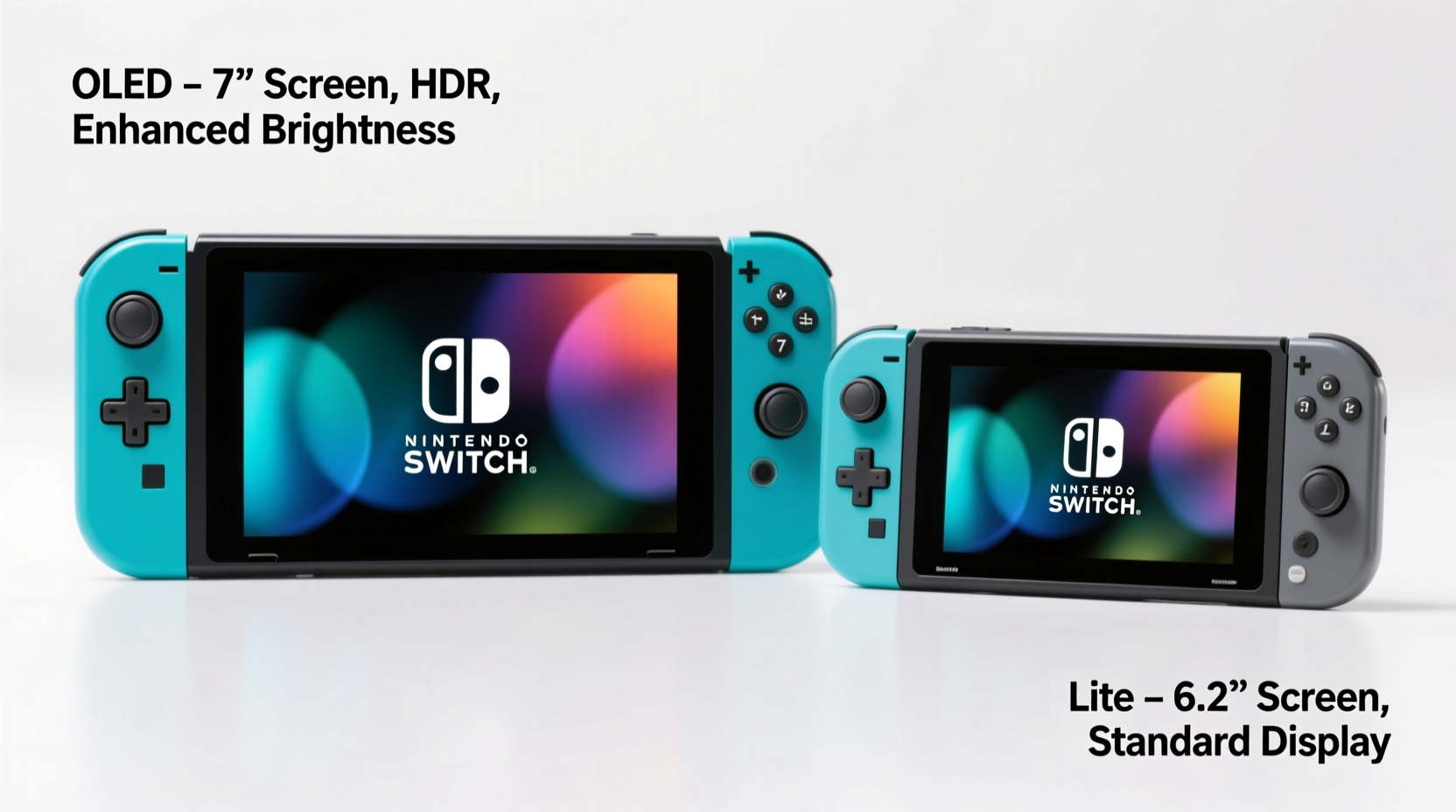
The most immediate difference between the two models is physical design. The Switch Lite measures 8.2 x 3.6 x 0.5 inches and weighs just 0.59 pounds (275 grams). Its smaller footprint makes it ideal for slipping into a backpack, holding comfortably during long subway rides, or playing one-handed when needed. It was engineered from the ground up as a dedicated handheld—no detachable Joy-Cons, no kickstand, no TV output.
In contrast, the Switch OLED is noticeably larger at 9.4 x 4.1 x 0.5 inches and weighs 0.72 pounds (320 grams). While still eminently portable, its size requires both hands for extended sessions. However, this added bulk comes with benefits: a wider 7-inch OLED screen (up from the Lite’s 5.5-inch LCD), a more durable adjustable kickstand, and slightly better speaker placement for stereo separation.
The Lite’s fixed controls mean games requiring motion controls or HD Rumble may feel less immersive, especially titles like Zelda: Breath of the Wild or Ring Fit Adventure. Meanwhile, the OLED model retains full Joy-Con functionality, allowing for gyro aiming and rumble feedback even in handheld mode. For purists who want the complete Switch experience without docking, this matters.
Screen Quality: Clarity, Color, and Comfort
This is where the OLED model shines—literally. Its 7-inch organic light-emitting diode display delivers deeper blacks, richer colors, and higher contrast than the standard LCD on the Switch Lite. In bright environments, both screens are legible, but the OLED’s superior brightness and anti-reflective coating make it easier to see outdoors or near windows.
When playing visually dense games like Metroid Dread, Hollow Knight: Silksong, or open-world titles such as Pikmin 4, the extra screen space reduces eye strain and improves situational awareness. You simply see more of the game world at once, which enhances immersion.
“The jump from a 5.5-inch LCD to a 7-inch OLED panel is one of the most noticeable upgrades in any handheld console refresh.” — David Ng, Senior Editor at Portable Play Magazine
However, there’s a trade-off. The larger screen demands more power. Despite having a slightly larger battery (4310 mAh vs. 3570 mAh), the OLED model doesn’t always offer longer playtime due to the increased energy draw of the brighter, higher-resolution display. In practice, both systems deliver about 3–7 hours depending on the game, so battery life shouldn’t be a deciding factor.
Performance and Game Compatibility
Under the hood, both devices share identical hardware: NVIDIA’s Tegra X1+ chip, 4GB RAM, and support for the same library of Nintendo Switch games. There’s no difference in frame rates, load times, or graphical fidelity when playing in handheld mode. Any performance gains come purely from visual presentation—not processing power.
That said, some games are better suited to the OLED’s screen. Titles with intricate UIs—such as RPGs (Octopath Traveler II) or strategy games (Fire Emblem: Engage)—benefit significantly from the additional screen real estate. Text is easier to read, menus are less cramped, and map navigation feels smoother.
Conversely, fast-paced platformers like Super Mario Bros. Wonder or arcade-style racers like Mario Kart 8 Deluxe work perfectly well on the smaller Lite screen. Many younger players or casual gamers don’t notice—or care about—the downgrade in visual clarity.
One limitation of the Switch Lite remains relevant: it cannot play games that require detached Joy-Cons. This includes titles like 1-2-Switch, Just Dance (without a smartphone app), or certain fitness games. While these exclusions affect only a small portion of the library, they’re worth noting if multiplayer party games are part of your rotation.
Real-World Use Case: A Student’s Daily Routine
Meet Lena, a college sophomore who plays Nintendo during her daily commute and study breaks. She owns a Switch Lite and uses it almost exclusively on buses and in campus lounges. Her main games are Animal Crossing: New Horizons, Stardew Valley, and puzzle titles like Tetris 99.
Lena values how easily she can pull out her Switch Lite between classes. It fits in her messenger bag alongside notebooks and a water bottle. When studying in crowded spaces, she appreciates being able to mute the speakers and rely on headphones—something both models handle equally well.
Last winter, she borrowed a friend’s Switch OLED for a weekend trip. While she loved the screen quality and kickstand during hotel downtime, she found it cumbersome to hold during long bus rides. “It felt like I was carrying a mini tablet,” she said. “Great for lounging, but not for moving around.”
Still, after seeing Legend of Zelda: Tears of the Kingdom rendered on the OLED screen, she admitted the visual upgrade was compelling. “I could spot distant towers and enemies much earlier. It changed how I explored the world.”
Lena ultimately decided to keep her Lite—but upgraded her headphones to compensate for the smaller visuals. Her story reflects a common dilemma: convenience versus immersion.
Price and Value Comparison
| Feature | Switch Lite | Switch OLED |
|---|---|---|
| Price (MSRP) | $199.99 | $349.99 |
| Screen Size | 5.5\" LCD | 7\" OLED |
| Battery Life | 3–7 hours | 3–7 hours |
| Storage | 32GB internal | 64GB internal |
| Expandable Storage | Yes (microSD) | Yes (microSDXC) |
| Docking Support | No | No* |
| Detachable Controllers | No | Yes (built-in) |
| Kickstand | No | Yes (adjustable) |
| Wi-Fi & Bluetooth Audio | Limited (firmware-dependent) | Full support |
*Note: While the OLED model lacks TV output ports, it supports wireless display via compatible apps and streaming setups, though not officially by Nintendo.
The $150 price gap is significant. For budget-conscious buyers, the Switch Lite offers access to nearly the entire Switch library at a fraction of the cost. It’s also available in multiple fun colors (yellow, coral, gray, blue, mint), appealing to collectors and younger audiences.
The OLED model justifies its cost through long-term usability. The sturdier build, better speakers, expandable storage, and superior screen make it a more future-proof investment—especially if you plan to keep your device for five years or more.
Step-by-Step Guide: Choosing Based on Your Lifestyle
- Assess your primary play environment. Do you mostly play while traveling, standing, or in tight spaces? Choose the Lite. If you usually sit down—on a couch, bed, or desk—the OLED’s size becomes an asset.
- List your favorite games. Check whether they require motion controls or separate Joy-Cons. If yes, lean toward the OLED.
- Test screen comfort. Visit a store if possible. Spend 10 minutes playing the same game on both models. Note which feels easier on your eyes over time.
- Set a budget. If under $250, the Lite is the clear choice. Above $300, the OLED starts making sense—especially if you value media consumption (e.g., YouTube, Netflix via browser hacks).
- Think long-term. Will you still be using this device in three years? If so, prioritize durability and screen quality—favoring the OLED.
Frequently Asked Questions
Can I connect external controllers to the Switch Lite?
Yes. While the Lite has built-in controls, you can pair Pro Controllers, third-party Bluetooth pads, or even Joy-Cons for games that benefit from traditional layouts. This helps bridge the gap with the OLED for certain genres.
Does the Switch OLED have better audio than the Lite?
Slightly. Both have stereo speakers, but the OLED’s are louder and clearer, with improved bass response. In handheld mode, the difference is subtle but noticeable during cinematic sequences or music-heavy games like Theatrhythm Final Bar Line.
Is the OLED screen worth $150 more for handheld-only use?
It depends. If you play visually complex or exploration-heavy games regularly, yes. For casual or short-session gaming, probably not. The value is subjective but strongest for players who treat handheld gaming as a primary hobby rather than a secondary pastime.
Checklist: Make Your Decision Confidently
- ✅ I primarily play in short bursts or on the move → Lean toward Switch Lite
- ✅ I play AAA adventures or open-world games often → Lean toward Switch OLED
- ✅ My budget is under $250 → Switch Lite is the practical pick
- ✅ I want the best possible screen and sound in handheld mode → OLED wins
- ✅ I plan to keep my console for 4+ years → Consider OLED’s longevity
- ✅ I enjoy local multiplayer with detachable controllers → OLED supports this natively
Final Verdict: Bigger Isn't Always Better—But Sometimes It Is
The Nintendo Switch Lite remains one of the most efficient handheld consoles ever made. It’s affordable, pocketable, and perfect for gamers whose lives are in constant motion. If your priority is convenience and low cost, it continues to deliver exceptional value.
Yet, the Switch OLED redefines what portable Nintendo gaming can feel like. That larger, vibrant screen transforms how you interact with beloved worlds. Navigation is easier, visuals pop, and the overall experience feels more premium. For those who view handheld gaming as a core part of their entertainment routine—not just a backup option—the upgrade is justified.
Ultimately, the question isn’t just about screen size. It’s about how you play, where you play, and what kind of experience you’re willing to invest in. The bigger screen isn’t automatically “worth it”—but for many serious handheld gamers, it comes close.




 浙公网安备
33010002000092号
浙公网安备
33010002000092号 浙B2-20120091-4
Comments
No comments yet. Why don't you start the discussion?