
Indoor trees add life, texture, and tranquility to modern interiors. When enhanced with programmable LED strips, they become dynamic centerpieces that shift in mood and atmosphere with the time of day, season, or occasion. Unlike static lighting, programmable LEDs offer full control over color, brightness, animation, and scheduling—allowing you to transform a simple fiddle-leaf fig or weeping fig into a living art installation. The key lies not just in installation, but in thoughtful customization of color themes that complement your space and lifestyle.
Whether you're illuminating a tall potted rubber plant in your living room or wrapping soft glows around a bonsai display, understanding how to tailor LED themes elevates both aesthetics and ambiance. This guide walks through the technical and creative aspects of customizing programmable LED strips for indoor trees, from choosing the right hardware to designing emotionally resonant lighting scenes.
Selecting the Right Programmable LED Strips
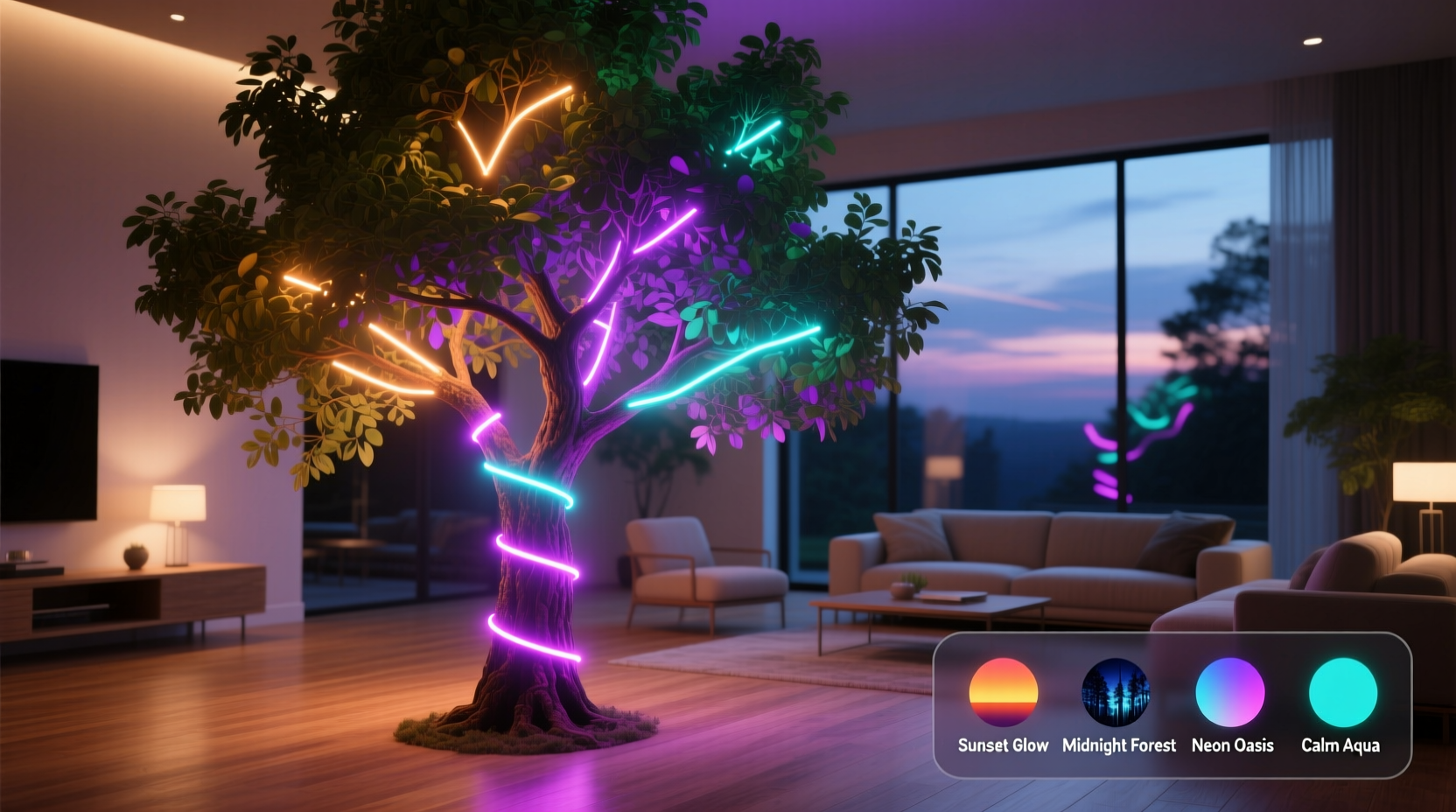
Not all LED strips are created equal. For indoor trees, flexibility, color accuracy, and ease of control matter most. The most common type used for decorative applications is the WS2812B (also known as NeoPixel), which offers individually addressable RGB LEDs. Each diode can be set to any color, allowing for intricate gradients, chases, and synchronized effects.
Consider these factors when selecting your strip:
- Color Range: Choose RGB or RGBW strips. RGB provides red, green, and blue combinations; RGBW adds a dedicated white LED for more natural whites and pastels.
- Density: Measured in LEDs per meter (e.g., 30, 60, or 144). Higher density gives smoother light transitions but consumes more power.
- Water Resistance: While indoor trees don’t require waterproofing, IP65-rated silicone-coated strips resist dust and minor moisture from watering.
- Voltage: 5V strips are safer and easier to manage for beginners. 12V versions allow longer runs without voltage drop but need sturdier power supplies.
- Controller Compatibility: Ensure your strip works with platforms like Arduino, ESP8266, ESP32, or commercial systems such as Philips Hue or Nanoleaf.
Essential Components for Customization
Beyond the strip itself, a complete setup includes several supporting elements:
- Microcontroller: Devices like the ESP32 offer Wi-Fi connectivity, enabling remote control via smartphone apps or voice assistants.
- Power Supply: Match the voltage and amperage to your strip’s length and LED count. A 5V/10A supply can handle up to 6 meters of 60-LED/meter strip at full brightness.
- Driver Software: Platforms like WLED (open-source firmware) provide intuitive web interfaces for creating and managing themes without coding.
- Mounting Accessories: Use adhesive clips, transparent zip ties, or magnetic rails to secure strips along trunks and branches discreetly.
Wiring should follow a daisy-chain pattern from the controller to the strip, with power injected at multiple points for longer installations to prevent dimming at the far end.
Step-by-Step Guide to Creating Custom Color Themes
Customizing themes isn’t just about picking colors—it’s about designing lighting experiences. Follow this sequence to build personalized effects:
- Map Your Tree Structure: Sketch the tree’s form—trunk path, major branches, height. Decide where lights will emphasize depth or symmetry.
- Install the Strip: Begin at the base and spiral upward. For multi-branch trees, run separate segments to each limb for independent control.
- Connect Hardware: Wire the strip to the controller and power supply. Test for continuity and correct polarity before powering on.
- Flash Firmware: Install WLED or similar software onto your microcontroller. Access the interface via local network IP.
- Create a Base Theme: In the software, select a static color (e.g., warm white) to evaluate overall coverage and brightness balance.
- Design Dynamic Effects: Experiment with built-in modes like “Rainbow Cycle,” “Fire Flicker,” or “Twinkle.” Adjust speed, intensity, and transition smoothness.
- Save Custom Presets: Name and save your favorite combinations—“Sunset Glow,” “Midnight Forest,” “Holiday Sparkle”—for quick recall.
- Schedule Themes: Use the scheduler to automate changes. Set “Morning Light” (soft amber) at 7 AM and “Evening Calm” (deep blue fade) at 8 PM.
For advanced users, integrate sensors: a light sensor can dim LEDs during daylight, while a motion sensor triggers a gentle glow when someone enters the room.
Creative Color Themes and Their Psychological Impact
Color influences mood. Thoughtfully chosen themes can make a space feel energized, calming, or festive. Here are four curated themes with design rationale:
- Forest Dawn (Soft Gold + Pale Green): Mimics early sunlight filtering through leaves. Ideal for morning spaces like sunrooms or home offices.
- Twilight Canopy (Deep Blue + Violet Pulse): Evokes nightfall in a woodland. Perfect for bedrooms or meditation corners.
- Autumn Embers (Amber, Rust, Slow Fade): Reflects fall foliage. Use seasonally or during gatherings to create warmth.
- Urban Jungle (RGB Shift with Low Saturation): Subtle color drifts suggest movement without distraction—great for modern lofts or studios.
“Lighting transforms plants from decor to experience. A well-programmed LED tree can anchor a room’s emotional tone throughout the day.” — Lena Torres, Interior Lighting Designer
Comparison: DIY vs. Commercial Smart LED Systems
| Feature | DIY (ESP32 + WLED) | Commercial (e.g., Nanoleaf, Govee) |
|---|---|---|
| Initial Cost | Low to moderate ($20–$50) | Moderate to high ($60–$150+) |
| Customization Depth | High (full code access, custom animations) | Medium (preset effects, limited scripting) |
| User-Friendliness | Requires technical setup | Plug-and-play, app-based control |
| Integration | Works with Home Assistant, MQTT, Alexa | Limited to brand ecosystem |
| Scalability | High (supports multiple zones, long runs) | Varies by product line |
DIY solutions win on flexibility and cost for tech-savvy users, while commercial kits offer simplicity and polished apps for those prioritizing convenience.
Mini Case Study: Transforming a Living Room Fiddle-Leaf Fig
Sophie, a graphic designer in Portland, wanted her 7-foot fiddle-leaf fig to serve as a focal point in her minimalist living room. She installed a 5-meter WS2812B strip spiraling from pot to canopy, powered by an ESP32 running WLED.
She created five presets:
- Morning Clarity: Cool white (6500K) from 7–9 AM
- Daytime Neutral: Dimmed warm white (3000K) during work hours
- Evening Wind Down: Slow blue-to-purple gradient after 6 PM
- Dinner Mode: Soft amber with slight flicker, synced to dinner playlist
- Party Pulse: Rhythmic rainbow waves activated via voice command
The tree now shifts seamlessly with her routine. Guests often mistake it for an art piece. “It’s not just a plant anymore,” she says. “It breathes with the house.”
Checklist: Setting Up Your Programmable LED Tree
- Measure your tree’s height and branch span
- Purchase addressable LED strip (60 LEDs/m recommended)
- Select a compatible controller (ESP32 preferred)
- Obtain adequate power supply (calculate total current draw)
- Secure strip using non-damaging fasteners
- Wire and test connections before final placement
- Flash WLED or equivalent firmware
- Access interface and calibrate LED count
- Design and save at least three custom themes
- Set up automation based on time or sensor input
- Test long-term stability and heat dissipation
Frequently Asked Questions
Can I cut programmable LED strips to fit my tree?
Yes, most strips have designated cut points between every 3 LEDs (for 5V) or longer intervals (for 12V). Always cut at marked lines and seal ends with silicone if exposed to moisture.
Do programmable LEDs get hot on trees?
Individually, LEDs run cool, but long strips at full brightness can generate noticeable heat. Avoid direct contact with dry foliage, ensure airflow, and limit maximum brightness to 50–70% for continuous use.
Can I control multiple trees together?
Absolutely. Use a central controller like ESP32 with multiple data lines, or sync several devices via MQTT or WLED’s synchronization feature. This allows coordinated light shows across rooms.
Conclusion: Bring Your Indoor Trees to Life with Light
Programmable LED strips unlock a new dimension of interior expression. When applied to indoor trees, they merge nature and technology in a way that feels organic rather than artificial. The ability to customize color themes means your space can evolve—calm in the evening, vibrant during celebrations, subtle during work. With accessible tools like WLED and affordable hardware, even non-engineers can create sophisticated lighting narratives.
The most impactful designs aren’t the brightest or flashiest—they’re the ones that respond to human rhythm. A slow dawn simulation that eases you into the day. A gentle pulse that mirrors your breathing during quiet moments. These details transform décor into presence.




 浙公网安备
33010002000092号
浙公网安备
33010002000092号 浙B2-20120091-4
Comments
No comments yet. Why don't you start the discussion?