
The evolution of gaming controllers has shifted from plug-and-play simplicity to high-performance tools tailored for elite gameplay. For PS5 owners, especially those competing in fast-paced titles like *Call of Duty*, *Fortnite*, or fighting games such as *Street Fighter 6*, the choice between the standard PS5 DualSense controller and the premium DualSense Edge is more than just budget—it's about precision, adaptability, and control. While both share core functionality, their customization capabilities diverge sharply, making one a clear winner for competitive players who demand total command over their gear.
Core Differences: Design Philosophy and Target Audience
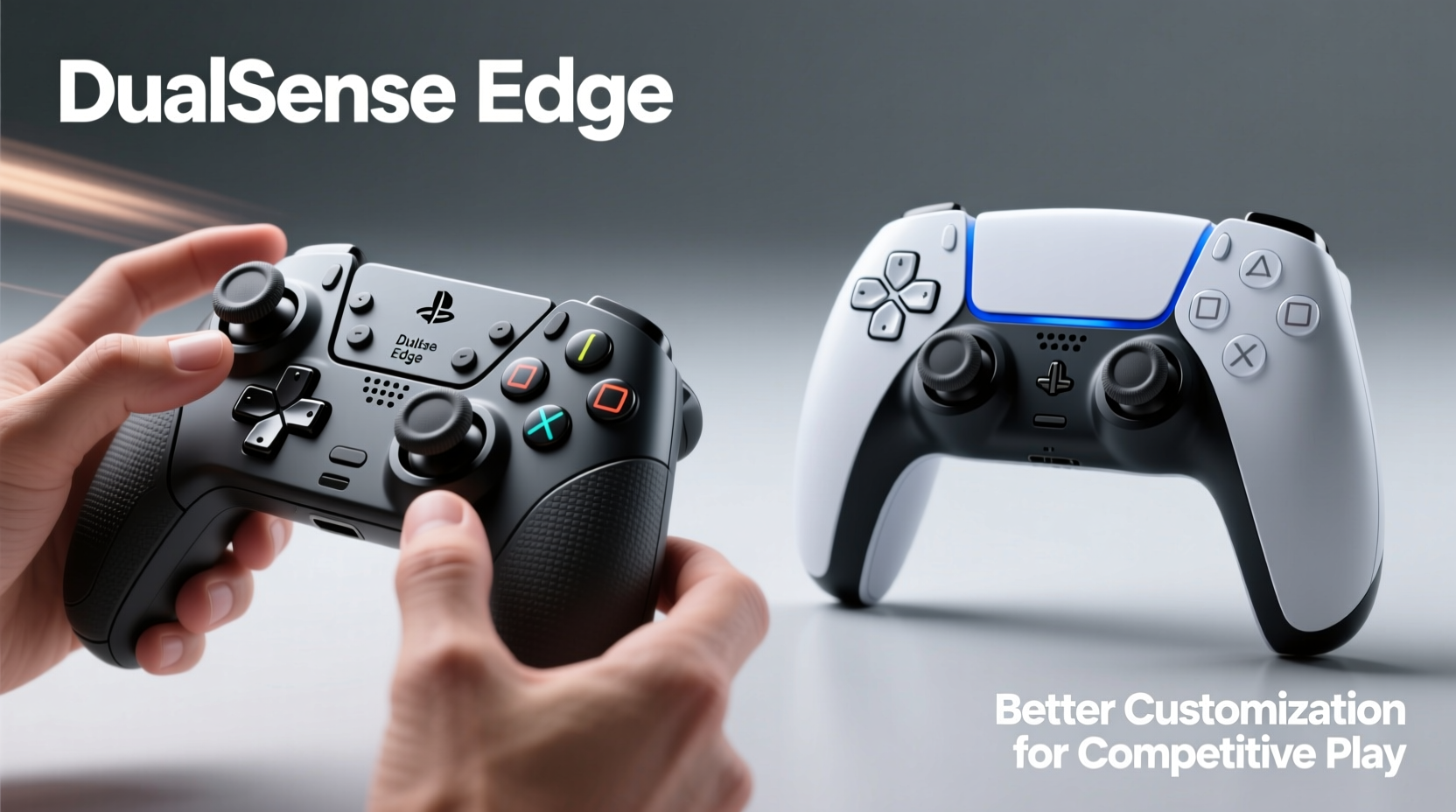
The standard DualSense controller introduced with the PS5 brought haptic feedback, adaptive triggers, and an elegant form factor that redefined immersion. However, its design prioritizes broad appeal—comfort for long sessions, accessibility for casual gamers, and seamless integration across genres. Customization options are limited to minor adjustments via the PS5 settings menu: sensitivity tweaks for sticks, trigger dead zones, and button remapping through system-level software.
In contrast, the DualSense Edge was developed with a different ethos: modularity for mastery. Marketed as Sony’s first “pro” controller, it targets serious players who treat input devices as extensions of their reflexes. The Edge isn’t just an upgraded DualSense—it’s a platform engineered for deep personalization. From swappable stick caps to onboard profile storage, every element invites fine-tuning.
Customization Showdown: What You Can Actually Change
To understand where each controller stands, we need to dissect the types of customization available—not just what’s advertised, but what matters in real matches.
Button Mapping and Remapping
The base DualSense allows basic button remapping through the PS5 system menu. You can swap functions (e.g., assign R3 to a different button), but only within software-defined limits. There’s no support for complex macros or multi-function buttons. Once set, mappings apply globally unless manually changed—a limitation when switching between game genres.
The DualSense Edge, however, includes dedicated software via the PlayStation Accessories app. This enables per-profile remapping. Create one layout for shooters (with aim-down-sight on a rear paddle), another for racing games (accelerate mapped to a thumb paddle), and save them directly to the controller. Switching profiles takes seconds using a physical switch on the back.
Trigger Sensitivity and Dead Zones
Both controllers feature adaptive triggers, but only the Edge gives granular control over their behavior. On the standard DualSense, you can disable adaptive tension entirely or leave it on—but not adjust how much resistance builds before actuation.
The Edge introduces adjustable trigger stops. You can shorten the pull distance on L2/R2 so they register inputs faster—an advantage in FPS games where millisecond differences matter. For example, setting a \"short\" stop means pulling the trigger halfway fires your weapon instantly, mimicking the responsiveness of mechanical buttons.
| Feature | DualSense (Standard) | DualSense Edge |
|---|---|---|
| Button Remapping | Limited, system-wide only | Full, per-profile with onboard memory |
| Trigger Pull Adjustment | No | Yes – short, medium, long stops |
| Rear Paddles | No | Yes – 4 assignable paddles |
| Onboard Profiles | No | Up to 3 saved configurations |
| Stick Sensitivity Curves | No | Adjustable via app (linear, aggressive, etc.) |
| Interchangeable Components | No | Swappable stick caps, back covers |
Ergonomics and Physical Adaptability
For competitive players, comfort under pressure is non-negotiable. Long tournament sessions demand controllers that reduce fatigue without sacrificing control.
The standard DualSense has a fixed shape. Its smooth curves fit most hands well, but there’s no way to modify grip texture, weight distribution, or thumbstick placement. Players with smaller or larger hands may struggle to maintain consistent accuracy over time.
The Edge addresses this with modular accessories. It ships with two sets of stick caps—standard domes and taller concave versions—allowing users to choose based on finger reach and preferred contact point. The back includes interchangeable lever covers that let you adjust the angle and resistance of the rear paddles. Additionally, the textured grip coating enhances stability during intense gameplay.
More importantly, the Edge supports third-party accessories. Though not officially endorsed by Sony, some manufacturers now offer replacement joysticks with lower throw ranges or alternative spring tensions—something impossible with the sealed design of the standard model.
“High-level players don’t just react—they anticipate. A controller must disappear into muscle memory. That requires more than good parts; it demands configurability.” — Marcus Tran, Esports Hardware Analyst at GameFrame Labs
Performance Tuning: Real-World Impact in Competitive Scenarios
Let’s examine how these differences translate in actual gameplay.
FPS Games: Trigger Stops and Paddle Usage
In *Call of Duty: Warzone*, firing speed often determines survival. With the standard DualSense, even with adaptive triggers disabled, you still have to press the full length of L2/R2. On the Edge, setting a short trigger stop reduces travel by up to 40%. This means quicker shot initiation without sacrificing accidental fire prevention.
Additionally, mapping jump or crouch to a rear paddle frees up your thumbs for movement and aiming. Elite players frequently use “paddle jumping,” allowing them to vault obstacles while maintaining precise crosshair control—a technique difficult without extra inputs.
Fighting Games: Precision Inputs and Response Consistency
In *Tekken 8* or *Street Fighter 6*, frame-perfect inputs decide rounds. The standard DualSense works adequately, but inconsistent stick drift and lack of dead zone adjustment can lead to unintended dashes or blocked special moves.
The Edge allows calibration of joystick sensitivity curves. Selecting an “aggressive” curve makes small stick movements register faster, ideal for quarter-circle motions. A “linear” curve offers smoother transitions for characters requiring subtle positioning. These settings sync to profiles, so you can load your fighting setup instantly.
Racing and Sports Titles: Granular Control Needs
Games like *Gran Turismo 7* benefit from analog precision. While both controllers offer analog sticks and triggers, only the Edge lets you tweak how acceleration and braking respond across the trigger’s range. Reducing the initial pull distance for braking can help execute sharper turns without locking up wheels.
Mini Case Study: Pro Player Transition to DualSense Edge
Jessica Lin, a top-ranked *Fortnite* player in the Oceanic Championship Series, used the standard DualSense throughout Season 4. Despite strong mechanical skill, she noticed inconsistencies in building placement during heated fights. After analyzing her gameplay, her coach identified delayed input registration due to suboptimal stick sensitivity and reliance on thumb-only controls.
She switched to the DualSense Edge mid-season. Within two weeks, she configured a custom profile: shortened R2 trigger stop for instant build activation, rear paddles assigned to edit and jump, and increased right-stick sensitivity for faster camera turns. Her average actions-per-minute (APM) rose by 18%, and she credited the hardware shift for helping secure a top-five finish at the regional finals.
“It wasn’t just about having more buttons,” she said in a post-match interview. “It was about reducing mental load. My fingers weren’t scrambling anymore. Everything felt synchronized.”
Step-by-Step Guide: Setting Up Your DualSense Edge for Competitive Play
If you’ve decided to invest in the Edge, follow this sequence to optimize it for high-level performance:
- Install the PlayStation Accessories App – Available on mobile and PC, this is essential for configuration.
- Create Game-Specific Profiles – Start with three: one for shooters, one for platform/fighting games, and one for racing/sports.
- Map Rear Paddles Strategically – Assign frequently used actions that require minimal thumb movement (e.g., crouch, melee, jump).
- Adjust Trigger Stops – In shooters, use “short” stops. In racing games, consider “medium” for balanced control.
- Calibrate Stick Sensitivity – Use aggressive curves for fast responses, linear for smoother control.
- Test in Practice Mode – Spend at least 30 minutes per profile adjusting until movements feel natural.
- Save Profiles to Onboard Memory – Ensure quick access without needing the app every time.
- Disable Unnecessary Features – Turn off haptics and speaker audio to reduce latency and distraction.
Checklist: Is the DualSense Edge Right for You?
- ✅ Do you compete online or in tournaments regularly?
- ✅ Do you switch between multiple game genres that require different control schemes?
- ✅ Are you frustrated by the lack of rear buttons or trigger customization on your current controller?
- ✅ Are you willing to spend extra for long-term performance gains?
- ✅ Do you value being able to save and swap configurations instantly?
If you answered yes to three or more, the Edge is likely worth the investment. If you primarily play casually or focus on story-driven games, the standard DualSense remains excellent—and significantly cheaper.
Frequently Asked Questions
Can I use the DualSense Edge on PC?
Yes. The DualSense Edge works over USB or Bluetooth on Windows PCs. The PlayStation Accessories app is also available for Windows, allowing full customization including profile syncing and firmware updates.
Does the Edge have better battery life than the standard DualSense?
No—battery life is nearly identical, averaging 8–10 hours depending on usage. Haptics and wireless audio drain power fastest. Both controllers use USB-C charging, though the Edge includes a braided cable in the box.
Are replacement parts expensive or hard to find?
Sony sells official stick cap kits and back lever sets directly. Third-party alternatives are emerging, but quality varies. Expect to pay $15–$25 for genuine accessories. Joystick modules themselves are not user-replaceable without voiding warranty.
Final Verdict: Customization Wins in Competition
When comparing the PS5 DualSense and DualSense Edge for competitive play, the outcome hinges on one factor: control. The standard controller delivers exceptional out-of-the-box experience with immersive feedback and reliable performance. But it treats all players the same.
The DualSense Edge acknowledges that elite play isn’t uniform. It empowers players to tailor response timing, hand positioning, and input logic to match individual biomechanics and strategic preferences. In environments where reaction windows measure in milliseconds, that level of customization isn’t luxury—it’s necessity.
While the higher price tag may deter some, consider the return: reduced input lag, fewer misclicks, enhanced endurance, and the confidence that your equipment won’t hold you back. For anyone serious about climbing leaderboards or representing in esports, the Edge isn’t just better—it’s built for victory.




 浙公网安备
33010002000092号
浙公网安备
33010002000092号 浙B2-20120091-4
Comments
No comments yet. Why don't you start the discussion?