
In today’s digital world, government services are increasingly moving online — including the issuance of official identification cards. Whether you're renewing a driver's license, applying for a state ID, or obtaining a federal identification document, doing it online can save time, reduce in-person wait times, and streamline verification. However, navigating the process correctly is essential to avoid delays, rejection, or security risks. This guide walks you through each stage of ordering your identification card online, ensuring speed, accuracy, and safety every step of the way.
1. Determine Your Eligibility and Required Document Type
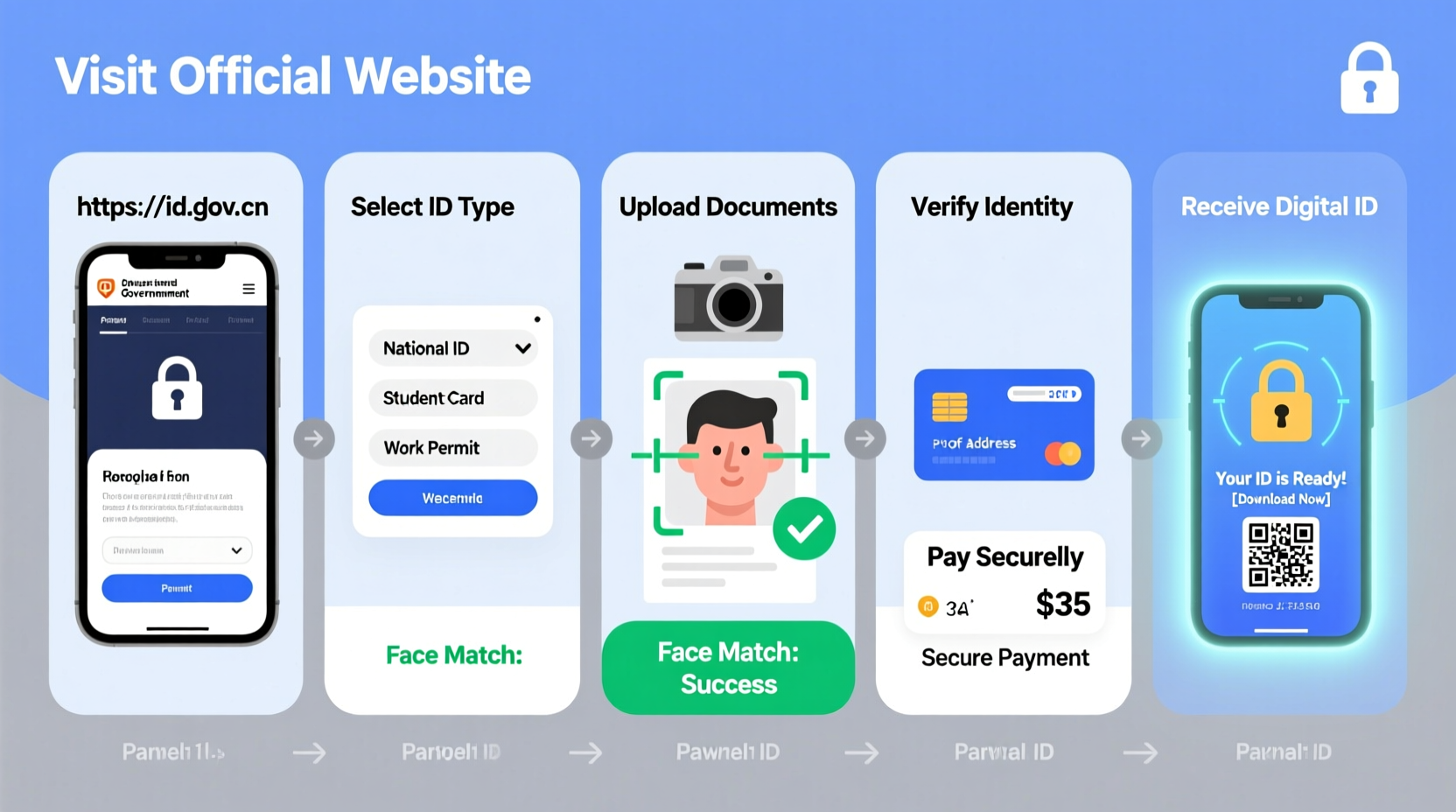
Not all identification cards can be ordered online, and eligibility varies by jurisdiction. Before starting, confirm whether your specific ID type qualifies for online processing. Common IDs available online include:
- Driver’s license renewal (non-commercial)
- State-issued photo ID cards
- REAL ID upgrades (in select states)
- Learner’s permit renewals
Each U.S. state and many international regions maintain different rules. For example, California allows online renewal for eligible drivers, while New York requires in-person visits for first-time applicants but permits renewals under certain conditions.
2. Gather Required Documentation Digitally
To complete your application, you’ll need to provide proof of identity, residency, and legal presence. Most online systems require scanned or photographed copies uploaded during submission. Ensure documents meet these criteria:
| Document Type | Acceptable Examples | Digital Requirements |
|---|---|---|
| Proof of Identity | Current/expired ID, passport, birth certificate | Clear scan, full corners visible, no glare |
| Proof of Residency | Utility bill, lease agreement, bank statement | Issued within last 90 days, legible address |
| Social Security Number | SSN card, W-2 form, tax return | Redact unnecessary personal info except SSN |
| Legal Presence (if applicable) | Green card, visa, employment authorization | Front and back, unaltered file |
Files should typically be in PDF, JPEG, or PNG format, under 5–10 MB in size. Use a scanner or smartphone app like Adobe Scan or Google Drive to create clean digital versions.
“Digital documentation must mirror in-person standards — blurry, cropped, or expired files are the top reason for application rejection.” — Sarah Lin, State DMV Process Analyst
3. Step-by-Step Guide to Submitting Your Application Online
Follow this timeline-tested sequence to submit your ID application efficiently and without errors:
- Visit the Official Government Portal: Never use third-party websites. Search “[Your State] DMV online services” or go directly to sites ending in .gov.
- Create a Secure Account: Register using your email, phone number, and a strong password. Enable two-factor authentication if available.
- Select Your ID Type: Choose from options like “Renew Driver’s License,” “Apply for State ID,” or “Upgrade to REAL ID.”
- Enter Personal Information: Input your full name, date of birth, SSN, and current address exactly as they appear on existing records.
- Upload Documents: Attach required files one by one, double-checking clarity and completeness.
- Review and Confirm: Carefully read all entered data. A single typo in your name or ZIP code can delay processing.
- Pay Fees Securely: Use a credit or debit card via encrypted payment portals. Avoid public Wi-Fi when submitting financial details.
- Submit and Save Confirmation: After submission, download or screenshot your confirmation number and estimated delivery date.
Processing times vary from 7–14 business days, though some states offer expedited shipping for an additional fee.
4. Protect Your Data: Security Best Practices
Submitting sensitive personal information online demands vigilance. Cybercriminals often mimic government websites to steal identities. Follow these measures to stay protected:
- Always verify the URL begins with
https://and ends in.gov. - Avoid clicking links from emails claiming to be from the DMV — navigate manually.
- Use private browsing mode to prevent tracking and autofill errors.
- Never save login credentials in your browser for government accounts.
- Delete temporary files and cache after completing your session.
5. Real Example: How Maria Renewed Her ID in Under 48 Hours
Maria, a resident of Arizona, needed to renew her state ID ahead of a domestic flight. With only three days before travel, she opted for the online renewal system offered by the Motor Vehicle Division (MVD).
She began by checking her eligibility on the AZ MVD website and discovered she qualified due to her previous ID being issued in person and still within the renewal window. She gathered a recent utility bill and her old ID, scanned them using her phone, and logged into her MVD account.
After uploading documents, paying the $25 fee with her chip-enabled credit card, and confirming submission, she received an email confirmation within minutes. The system indicated standard processing would take 10 days — too long for her trip.
She returned to the portal and selected the expedited shipping option (+$15), which guaranteed delivery in 2–3 business days. Her new ID arrived two days later, just in time for airport check-in.
Maria’s success came from acting early, using correct documents, and upgrading to fast shipping — a model approach for urgent needs.
Checklist: Order Your ID Online Without Delays
Before you begin, ensure you’re fully prepared:
- ✅ Confirmed online eligibility with official agency
- ✅ Collected original documents for scanning
- ✅ Created clear digital copies (PDF/JPEG/PNG)
- ✅ Verified internet connection is secure and private
- ✅ Identified correct fees and payment method
- ✅ Bookmarked official .gov website
- ✅ Allocated 20–30 minutes for uninterrupted application
Frequently Asked Questions
Can I order a first-time ID online?
In most cases, no. First-time applicants are typically required to appear in person to verify identity biometrically (e.g., fingerprint or photo capture). However, some jurisdictions allow minors with parental consent or disabled individuals to apply via mail or assisted digital forms.
What if my online application is rejected?
If rejected, you’ll usually receive an email explaining the reason — often due to mismatched information or poor-quality uploads. Correct the issue, re-upload documents, and resubmit. If unresolved, schedule an in-person appointment to resolve discrepancies.
Is it safe to upload my birth certificate online?
Yes — if done through a legitimate government portal with HTTPS encryption. These systems store data in secure, access-controlled environments compliant with privacy laws like FERPA and the Privacy Act. Avoid sharing these files over email or cloud links.
Conclusion: Take Control of Your Identification Process
Ordering an identification card online doesn’t have to be stressful or risky. By understanding eligibility, preparing documents in advance, and using trusted government platforms, you can complete the process quickly and securely — often from the comfort of your home. The key is preparation, attention to detail, and awareness of digital safety.




 浙公网安备
33010002000092号
浙公网安备
33010002000092号 浙B2-20120091-4
Comments
No comments yet. Why don't you start the discussion?