
Printer paper jams are among the most common frustrations in both home offices and corporate environments. While they may seem random, recurring jams—especially those tied to misalignment or environmental conditions like humidity—are rarely accidental. These issues often stem from a combination of mechanical wear, improper handling, and overlooked environmental factors. Understanding the root causes and applying targeted solutions can significantly reduce downtime and improve print quality. This guide breaks down the science behind paper jams, explains how humidity affects paper behavior, and delivers actionable strategies to keep your printer running smoothly.
The Mechanics Behind Paper Jams
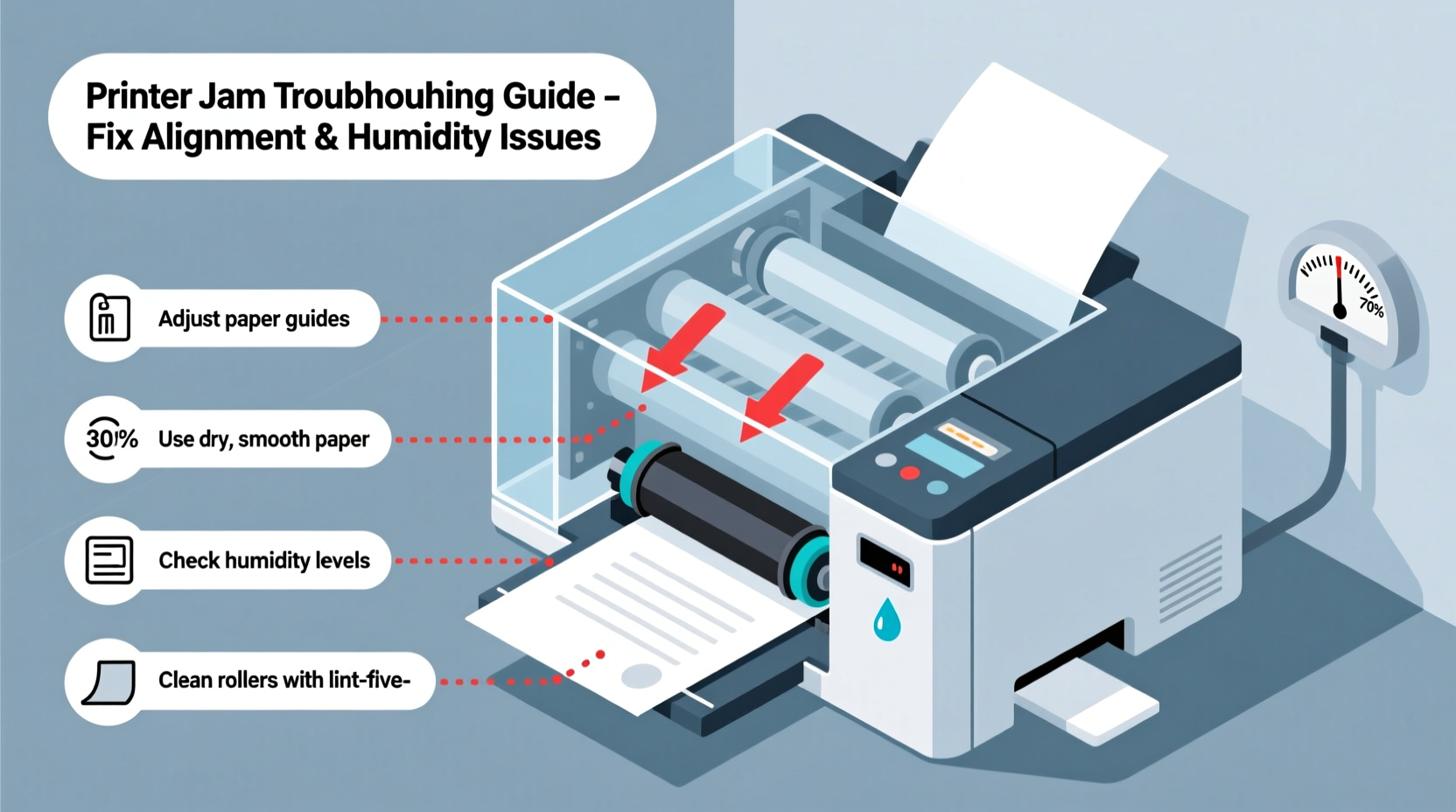
Every time you hit \"print,\" your printer initiates a complex sequence: pickup rollers grab a sheet from the tray, feed it through internal pathways, align it with precision, and deposit toner or ink before ejecting the finished page. Any disruption in this process can cause a jam. The most frequent culprits include worn rollers, incorrect paper loading, debris buildup, and poor paper quality.
Paper alignment issues typically arise when sheets aren’t fed straight into the printer. If the paper stack is uneven, overloaded, or skewed in the tray, the pickup roller may grab multiple sheets at once or pull one in at an angle. Once misaligned, the paper can rub against internal guides, snag on components, or fail to pass through narrow rollers—resulting in a jam.
“Over 60% of paper jams originate at the input stage—often due to simple user error in loading paper.” — James Reed, Senior Technician at OfficeTech Maintenance Group
Common Causes of Misalignment
- Overfilled paper trays: Exceeding the recommended capacity increases friction and misfeeds.
- Curling or warped paper: Stored improperly, paper can develop a curve that disrupts smooth feeding.
- Damaged or dirty rollers: Accumulated dust, paper fibers, or oil reduces grip and control.
- Incorrect tray adjustment: Side guides that are too loose allow lateral movement; too tight, and they restrict motion.
How Humidity Affects Paper and Printers
Humidity plays a surprisingly powerful role in paper performance. Paper is hygroscopic—it absorbs and releases moisture based on ambient air conditions. In high-humidity environments, paper fibers swell, making sheets slightly thicker, heavier, and more prone to sticking together. This increases the likelihood of multi-sheet feeds and resistance during transport.
In contrast, low humidity creates dry, brittle paper that generates static electricity. Static causes sheets to cling to each other or repel guiding mechanisms, leading to erratic feeding and jams. Both extremes compromise alignment and increase mechanical strain on rollers and sensors.
Seasonal changes often reveal these patterns. Offices in humid coastal regions report more jams during summer months, while winter heating systems in colder climates create dry indoor air, triggering static-related issues.
Real Example: The Seasonal Jam Cycle
A small accounting firm in Florida experienced weekly printer jams every July and August. After ruling out hardware faults, they monitored environmental data and discovered their office humidity regularly exceeded 70%. Switching to moisture-resistant paper and installing a dehumidifier near the printer reduced jams by over 90% within two weeks. The fix wasn’t mechanical—it was environmental.
Step-by-Step Guide to Preventing Alignment and Humidity-Related Jams
Preventing jams requires a systematic approach combining proper maintenance, correct usage, and environmental awareness. Follow this timeline to address current issues and build long-term resilience.
- Inspect and clean the printer (Weekly): Turn off the device and open accessible compartments. Use a lint-free cloth lightly dampened with water or isopropyl alcohol to wipe pickup and separation rollers. Remove any paper fragments or debris from the feed path.
- Check paper condition (Before each load): Ensure sheets are flat, dry, and free of curls. Fan the stack thoroughly to eliminate static adhesion.
- Load paper correctly: Adjust side and rear guides snugly against the paper without forcing them. Do not overload the tray—stay under the marked line.
- Monitor room conditions: Use a digital hygrometer to track humidity. Ideal levels for printing are between 40% and 50%. If outside this range, take corrective action.
- Store paper properly: Keep unused reams sealed in their original packaging or in airtight containers. Store vertically in a climate-controlled area away from windows, vents, or exterior walls.
- Rotate stock: Use older paper first. Paper stored beyond six months may degrade in consistency, especially in fluctuating environments.
- Schedule professional servicing (Every 6–12 months): Technicians can inspect internal components, calibrate sensors, and replace worn parts before failure occurs.
Do’s and Don’ts: Paper Handling Best Practices
| Do’s | Don’ts |
|---|---|
| Fan paper before loading to separate sheets | Stack paper loosely or haphazardly in the tray |
| Use paper rated for your printer type (inkjet vs. laser) | Mix different paper types or weights in the same tray |
| Store paper in a cool, dry, dark place | Leave reams open in humid basements or garages |
| Wipe rollers monthly with a dry or slightly damp cloth | Use abrasive cleaners or sharp tools on internal parts |
| Replace consumables per manufacturer schedule | Ignore recurring jam messages or error codes |
Expert-Backed Fixes for Persistent Problems
When standard cleaning doesn’t resolve recurring jams, deeper intervention may be necessary. Here are three advanced but practical fixes endorsed by printer service professionals.
1. Calibrate Paper Sensors
Modern printers use optical or mechanical sensors to detect paper position and movement. Dust or misalignment can cause false readings. Access the calibration menu via the printer’s control panel or connected computer. Run the “Paper Path” or “Sensor Check” utility to ensure accurate detection.
2. Upgrade to Climate-Stable Paper
Some manufacturers produce humidity-resistant paper treated with coatings that minimize moisture absorption. Brands like HP Premium Plus and Canon Pro Platinum are engineered for consistent performance in variable conditions. Though slightly more expensive, they reduce jams and improve print fidelity.
3. Install a Localized Dehumidifier or Humidifier
If your workspace experiences extreme humidity swings, consider placing a compact climate control unit near the printer. Units like the Eva-dry E-333 or Honeywell TP50WK can maintain stable micro-environments without affecting the entire room.
Troubleshooting Checklist: Eliminate Jams for Good
Use this checklist whenever jams recur. Tick off each item to systematically rule out causes.
- ✅ Clean all accessible rollers and paper paths
- ✅ Fan and realign paper before loading
- ✅ Verify paper is compatible with your printer model
- ✅ Adjust tray guides to fit paper snugly
- ✅ Check for error codes and consult the manual
- ✅ Test with a fresh ream of known-good paper
- ✅ Measure room humidity and adjust if outside 40–50%
- ✅ Inspect for torn paper remnants inside the machine
- ✅ Update printer firmware to the latest version
- ✅ Schedule technician inspection if jams persist
“The best printer maintenance isn’t reactive—it’s preventive. A five-minute weekly check saves hours of frustration later.” — Linda Cho, Field Engineer at PrintLogic Systems
Frequently Asked Questions
Why does my printer jam only with certain paper types?
Different paper weights and finishes interact uniquely with rollers and feed mechanisms. Heavy cardstock or glossy photo paper requires slower feeding speeds and higher roller pressure. Using such paper in a printer not designed for it—or failing to adjust settings—increases jam risk. Always confirm compatibility and select the correct media type in your print driver.
Can humidity really warp paper enough to cause jams?
Yes. Relative humidity above 60% can cause paper to absorb up to 5–8% more moisture by weight. This leads to slight expansion and curling, particularly along the edges. Even a 1–2mm warp can throw off alignment as the sheet enters tight rollers. Conversely, paper in dry air (<30% RH) becomes electrostatically charged, causing sheets to stick together or veer off course.
How often should I replace printer rollers?
Pickup and separation rollers typically last 10,000–20,000 pages under normal conditions. Signs they need replacement include frequent multi-sheet feeds, slipping, or visible cracking/gloss loss on the rubber surface. Consult your printer’s service manual for part numbers and replacement intervals.
Conclusion: Take Control of Your Printing Environment
Recurring paper jams aren’t inevitable—they’re signals. Each jam points to a mismatch between your equipment, materials, and environment. By addressing paper alignment with disciplined loading habits and combating humidity with smart storage and climate awareness, you transform a frustrating routine into a reliable workflow. These fixes don’t require technical expertise, just consistency and attention to detail. Start today: clean the rollers, check the hygrometer, and load your next ream with care. The result will be fewer interruptions, sharper prints, and a machine that works as hard as you do.




 浙公网安备
33010002000092号
浙公网安备
33010002000092号 浙B2-20120091-4
Comments
No comments yet. Why don't you start the discussion?