
In today’s fast-paced world, losing or dropping your phone is more than an inconvenience—it can be costly and disruptive. Whether you're commuting, traveling, working out, or simply navigating a busy day, a wrist strap adds a crucial layer of security. It keeps your phone tethered to your hand, reducing the risk of accidental drops and theft. However, improperly installed straps offer false confidence and may fail when needed most.
This guide walks through every detail of selecting, preparing, and installing a wrist strap on your phone case with precision and safety. By following these steps, you’ll ensure a secure attachment that lasts, without damaging your device or compromising its functionality.
Why a Wrist Strap Matters
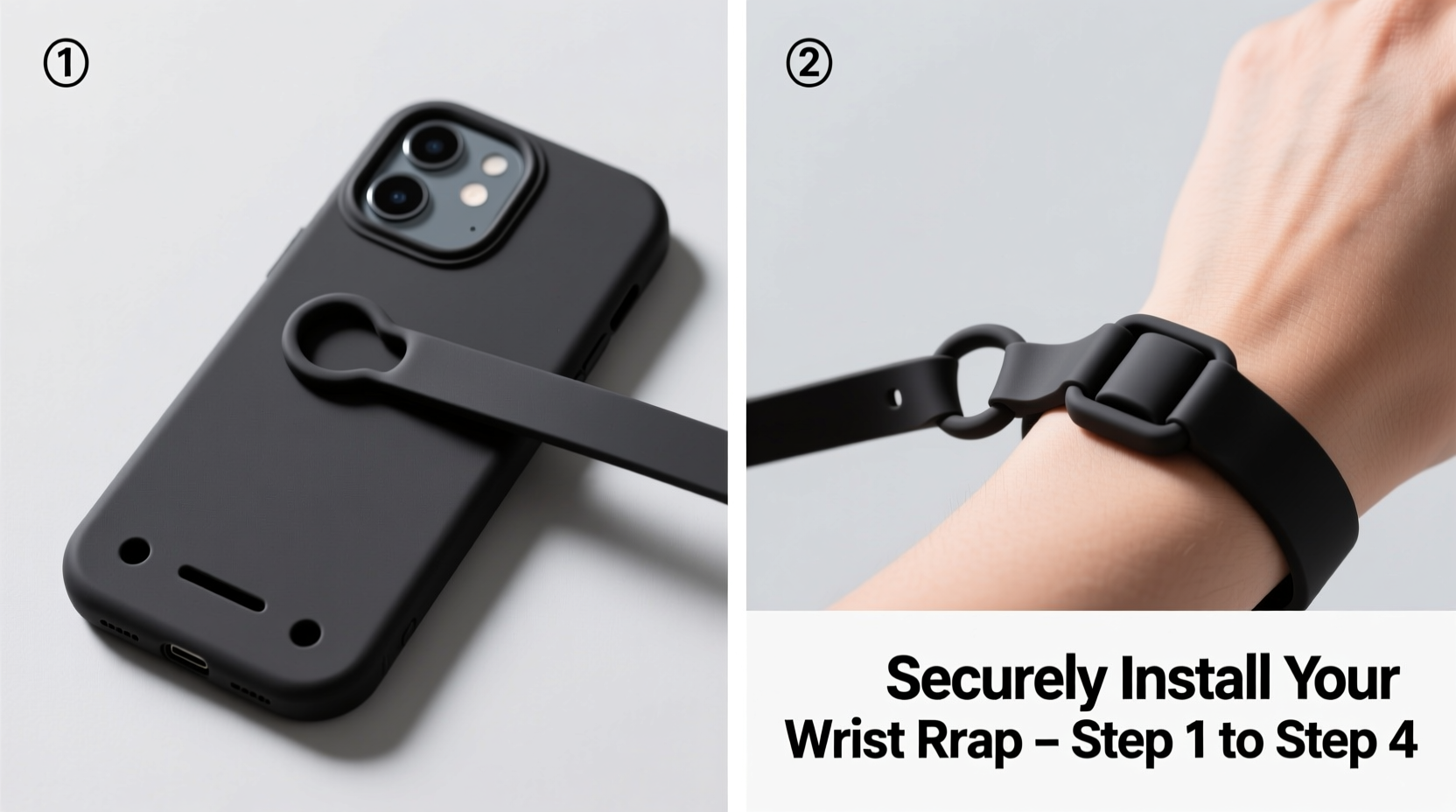
Phones are now essential tools for communication, navigation, finance, and productivity. Yet their sleek designs often make them slippery and prone to slipping from hands. According to the Consumer Electronics Association, over 20 million smartphones are dropped annually in the U.S. alone, with many resulting in cracked screens or irreparable damage.
A wrist strap acts as both a physical safeguard and psychological reassurance. When properly installed, it allows you to use your phone confidently in dynamic environments—on escalators, public transit, crowded markets, or while biking. The key, however, lies in correct installation. A poorly attached strap can snap, detach, or even pull components loose from your phone’s housing.
“Security accessories are only as strong as their weakest point. If the strap isn’t anchored correctly, it defeats the purpose.” — Jordan Lee, Mobile Device Safety Consultant
Selecting the Right Wrist Strap and Compatible Case
Not all wrist straps or phone cases are created equal. Before installation, confirm compatibility between your case and the chosen strap. Here's what to look for:
- Loop or Lanyard Attachment Points: Choose a case with built-in loops, anchor points, or reinforced corners designed for lanyards.
- Material Strength: Opt for cases made from polycarbonate, TPU, or hybrid materials known for durability.
- Strap Material: Nylon, polyester, or braided steel-core straps offer superior tensile strength compared to elastic or fabric cords.
- Adjustability: Look for straps with sliding buckles or quick-release clips for ease of use and comfort.
| Feature | Recommended | Avoid |
|---|---|---|
| Case Type | Rugged case with lanyard holes | Slim silicone sleeves without anchors |
| Strap Material | Nylon webbing with metal clasp | Elastic bands or thin cotton cord |
| Attachment Method | Carabiner or bolt snap through loop | Tie-on knots or adhesive pads |
Step-by-Step Installation Process
Follow this detailed sequence to install your wrist strap securely and safely.
- Inspect Your Phone Case: Check for designated lanyard holes near the top corners. These are usually small, reinforced openings meant for cords or clips. If absent, consider switching to a compatible case.
- Clean the Attachment Area: Use a dry microfiber cloth to wipe around the hole(s). Dust or debris could interfere with clip alignment or cause abrasion over time.
- Choose the Attachment Side: Most users prefer attaching the strap to the upper left or right corner based on dominant hand usage. For right-handed users, the left-top hole offers balanced weight distribution.
- Thread the Carabiner or Bolt Snap: Open the clasp and insert it through the lanyard hole from the outside inward. Ensure the curved side faces toward the phone to prevent snagging.
- Secure the Strap End: Attach the other end of the strap to the carabiner. If using a looped strap, double-check that no fraying edges exist. Trim carefully if necessary.
- Test Tension and Movement: Gently tug the strap in multiple directions—up, down, diagonally. There should be no wobbling of the clasp or stretching of the case material.
- Adjust Length for Comfort: Slide the adjuster (if available) so the strap fits snugly around your wrist without restricting circulation. You should be able to rotate your phone freely but not swing it wildly.
Common Mistakes and How to Avoid Them
Even experienced users make errors during setup. Awareness helps prevent failures.
- Mistake: Using Non-Reinforced Cases – Attaching a strap to a standard plastic or glass-backed case risks cracking under stress.
- Mistake: Over-Tightening Clips – Excessive force on the carabiner can warp the case hole or deform the metal.
- Mistake: Ignoring Wear and Tear – Straps fray, clasps loosen. Inspect weekly for signs of fatigue.
- Mistake: Wrapping Around Ports or Buttons – Never route the strap through charging ports or button gaps; this invites internal damage.
“Most strap failures occur due to improper anchoring, not strap quality. Always anchor to structural points, never temporary fixes.” — Lena Patel, Product Durability Analyst
Real-World Example: Commuter Protection Upgrade
Sarah, a graphic designer in Chicago, frequently takes the 'L' train to work. After replacing her phone twice in one year due to platform drops, she invested in a rugged OtterBox case with integrated lanyard loops and a 3-foot nylon wrist strap. She followed the installation steps meticulously, choosing a bolt snap over a basic hook for added security.
Three months later, while rushing off a crowded train, her phone slipped from her hand. Thanks to the strap, it dangled safely mid-air instead of falling onto the tracks. She retrieved it without damage. Since then, she’s recommended the setup to five colleagues—all of whom have avoided similar incidents.
Essential Maintenance Checklist
To maintain long-term reliability, follow this monthly maintenance routine:
- ✅ Inspect the strap for fraying, especially near connection points.
- ✅ Test the carabiner spring mechanism—should snap shut firmly.
- ✅ Clean the strap with mild soap and water if visibly dirty.
- ✅ Verify case integrity around the lanyard hole—no cracks or warping.
- ✅ Rotate straps every 6–8 months, even if no visible wear appears.
Frequently Asked Questions
Can I install a wrist strap on any phone case?
No—not all cases support wrist straps. Only cases with reinforced lanyard holes or built-in loops are suitable. Attempting to modify non-compatible cases (e.g., drilling holes) voids warranties and weakens structural integrity.
Will a wrist strap interfere with wireless charging?
Generally, no. As long as the strap is detached or loosely draped away from the charging pad, Qi charging works normally. However, metal-reinforced straps placed directly on the back may disrupt the magnetic field.
Is it safe to sleep with a wrist-strapped phone?
It’s not recommended. While the strap prevents falls, having a taut cord connected during sleep increases entanglement risk and may stress the attachment point if pulled abruptly.
Final Thoughts and Action Steps
Installing a wrist strap correctly transforms how you interact with your phone—adding peace of mind in motion. The process is simple but demands attention to detail: the right case, proper hardware, and careful execution. Once set up, regular inspection ensures lasting performance.
Don’t wait until after a drop to act. Take five minutes today to evaluate your current setup. If you’re still relying on grip alone, upgrade to a secure wrist strap system. Your future self—and your wallet—will thank you.




 浙公网安备
33010002000092号
浙公网安备
33010002000092号 浙B2-20120091-4
Comments
No comments yet. Why don't you start the discussion?