
In an era where speed, accuracy, and customer experience define business success, the point-of-sale (POS) system is no longer just a cash register—it’s the operational brain of retail and hospitality businesses. The Clover Station Duo has emerged as a leading all-in-one solution designed for high-volume environments such as full-service restaurants, fast-casual eateries, cafes, and boutique retailers. With dual touchscreen displays, robust hardware integration, and seamless cloud-based software, it streamlines ordering, payment processing, inventory management, and staff coordination. For business owners evaluating modern POS systems that balance power with usability, the Clover Station Duo represents a significant upgrade from legacy setups and even many competing platforms.
Definition & Overview
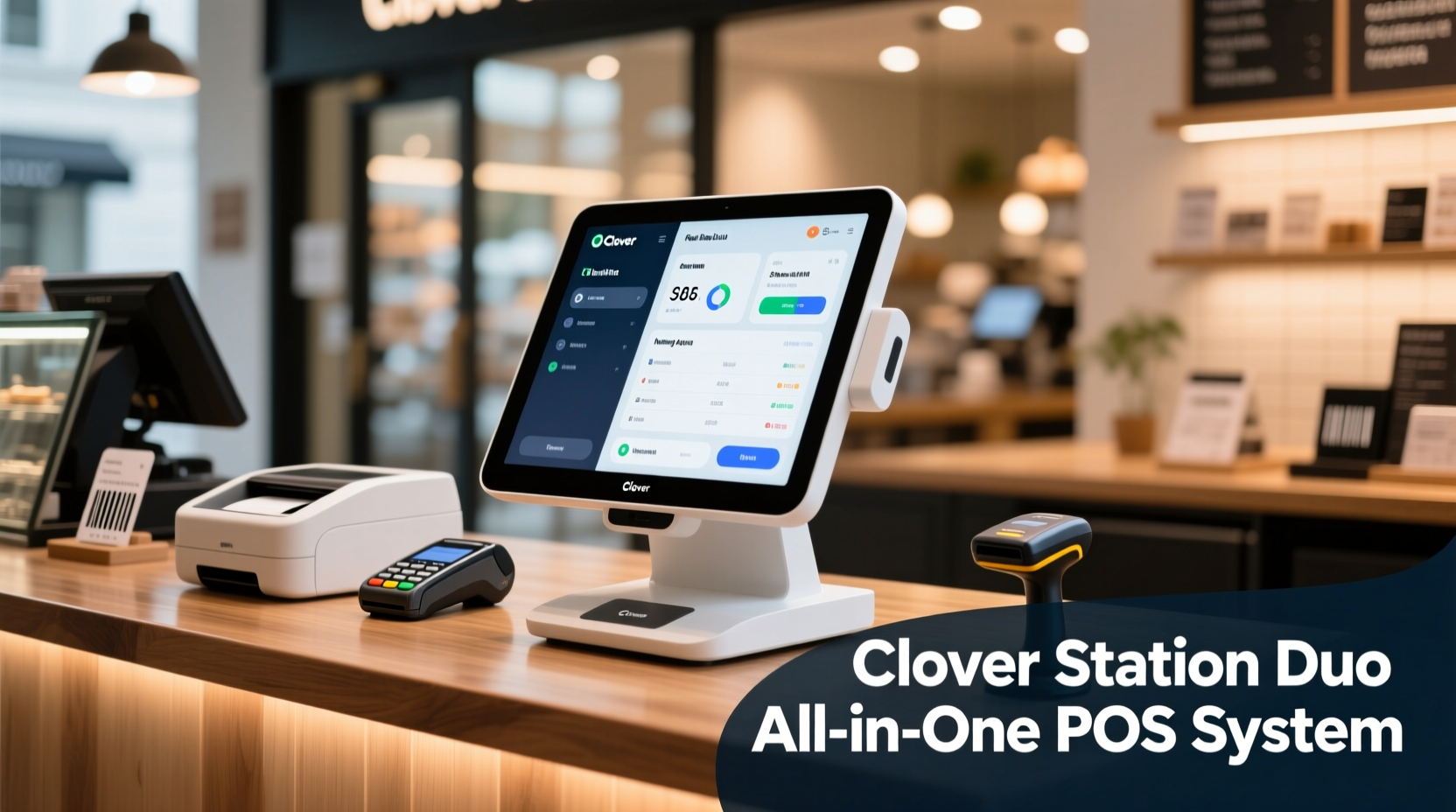
The Clover Station Duo is a countertop, all-in-one POS terminal developed by Clover Network, Inc., a subsidiary of Fiserv—a global leader in financial services technology. Unlike mobile or tablet-based systems, the Clover Station Duo is engineered as a permanent fixture at service counters or host stations, offering enhanced durability, processing power, and multi-user functionality. Its defining feature is the dual-display design: a 15-inch primary touchscreen for employees and a secondary 15-inch customer-facing display that shows order details, promotions, and payment prompts in real time.
Built on Android architecture, the system runs the Clover OS, which supports a wide ecosystem of apps available through the Clover App Market. This allows businesses to customize their operations with add-ons for loyalty programs, kitchen display systems (KDS), online ordering integrations, advanced reporting, and more. The Station Duo connects via Wi-Fi, Ethernet, or optional LTE, ensuring reliability even during internet disruptions thanks to offline mode capabilities.
Originally targeted at medium to large-scale foodservice operations, the Clover Station Duo has expanded into retail, salons, and entertainment venues due to its versatility and scalability. It functions not only as a transaction processor but also as a central hub for managing labor, tracking sales trends, monitoring inventory levels, and engaging customers through digital receipts and marketing campaigns.
Key Characteristics
| Feature | Description |
|---|---|
| Dual Touchscreens | Two 15-inch HD displays (employee-facing and customer-facing), both capacitive touch-enabled for smooth interaction. |
| Processor & RAM | Quad-core processor with 4GB RAM, enabling fast app switching and multitasking under heavy load. |
| Storage | 32GB internal storage (expandable via microSD), sufficient for apps, reports, and cached data. |
| Operating System | Clover OS (Android-based), updated regularly with security patches and new features. |
| Payment Compatibility | EMV chip card reader, NFC/Apple Pay/Google Pay support, magstripe fallback, and contactless payments. |
| Peripheral Integration | Supports receipt printers, cash drawers, barcode scanners, scales, kitchen printers, and third-party devices via USB, Bluetooth, or Ethernet. |
| Connectivity | Ethernet (Gigabit), dual-band Wi-Fi (2.4GHz / 5GHz), optional LTE backup module. |
| Security | End-to-end encryption (E2EE), tokenization, PCI compliance, and secure boot process. |
| Cloud Management | Remote access via Clover Web Dashboard for real-time monitoring, employee scheduling, and reporting. |
| Offline Mode | Processes transactions locally when internet fails; syncs automatically once connection resumes. |
Practical Usage
The Clover Station Duo excels in environments requiring rapid order entry, clear communication between front and back of house, and consistent branding at the point of sale. In a busy restaurant setting, servers can input complex orders—modifications, split checks, table transfers—with minimal lag. The customer-facing screen enhances transparency by displaying each item added, subtotal updates, and suggested upsells like desserts or premium beverages.
For example, consider a brunch café serving 200 guests during peak hours. A server uses the primary screen to ring up a table of four, adding omelets with substitutions, coffee refills, and a shared waffle platter. As items are entered, they appear instantly on the customer display. When ready to pay, the guest sees the final total and can tap “Pay Now” directly on their screen using a contactless method. No physical handoff of the device is needed, reducing friction and improving hygiene.
Behind the scenes, the system sends kitchen tickets wirelessly to designated printers—eggs to the hot line, pastries to the bake station—based on predefined routing rules. Managers receive live alerts if certain menu items run low on inventory, allowing proactive restocking before shortages occur.
Pro Tip: Use the customer-facing display strategically—not just for payments, but to promote daily specials, collect email signups, or prompt tipping with customizable messaging. During slow periods, rotate branded content or social media handles to strengthen brand presence.
Retailers benefit equally. A boutique clothing store can use the Clover Station Duo to scan barcodes, apply discount codes, process returns, and print detailed receipts—all while showing the shopper a visual summary of their purchase. Integrated CRM tools allow staff to look up past purchases and offer personalized recommendations (“Last month you bought navy slacks—this blazer would pair well”).
Integration with major delivery platforms like DoorDash, Uber Eats, and Grubhub enables centralized order management. Incoming online orders appear directly on the Clover dashboard, eliminating the need to juggle multiple tablets or printers. Kitchen staff see digital tickets in sequence, helping maintain timing and accuracy.
Variants & Types
While the Clover Station Duo stands as the flagship countertop model, Clover offers several other form factors tailored to different business needs. Understanding these variants helps determine whether the Duo is the optimal choice—or if another system better fits your operation.
- Clover Station: The original single-screen version of the Duo. Lacks the customer-facing display, making it less ideal for direct customer engagement but suitable for back-office or warehouse use.
- Clover Flex: A portable, handheld POS with a 7-inch screen. Ideal for tableside ordering, curbside pickup, or pop-up events. Runs same OS and integrates seamlessly with Station Duo for hybrid setups.
- Clover Mini: Compact countertop device with a 7-inch screen. Best for low-counter spaces like coffee shops or concession stands where space is limited.
- Clover Mobile: Smartphone-sized device with built-in printer and card reader. Fully mobile, accepts payments anywhere within cellular range.
- Clover Go: Entry-level plug-in card reader for smartphones/tablets. Lowest cost option, best for very small vendors or sole proprietors.
The Clover Station Duo occupies the premium tier—offering maximum functionality for fixed-location, high-throughput businesses. It can serve as the central node in a multi-device network, syncing with Flex units used by runners or hosts, while feeding data to back-end analytics dashboards.
Comparison with Similar POS Systems
Several competitors aim to match the Clover Station Duo’s capabilities, including Square Register, Toast POS, and Lightspeed Restaurant. While all offer modern interfaces and cloud management, key differences impact long-term usability, cost, and flexibility.
| Feature | Clover Station Duo | Square Register | Toast POS | Lightspeed Restaurant |
|---|---|---|---|---|
| Customer Display | Dual 15\" HD screens | Single 15.6\" screen with split view | Optional add-on (extra cost) | Requires separate device |
| App Ecosystem | Over 200 apps in Clover App Market | Limited third-party integration | Extensive but locked-in ecosystem | Strong retail focus, fewer foodservice options |
| Hardware Lock-in | Moderate (uses standard peripherals) | High (proprietary accessories) | Very high (closed system) | Moderate |
| Offline Functionality | Full offline mode with auto-sync | Basic offline capability | Limited without subscription | Available with higher plans |
| Pricing Model | Upfront hardware cost + monthly service fee | Lower upfront, higher per-transaction fees | High monthly fee, volume-based pricing | Subscription-heavy, tiered access |
| Best For | Medium to large restaurants, retail stores | Small businesses, startups | Dedicated restaurants seeking deep KDS integration | Multi-location retailers with complex inventories |
“We switched from Square to Clover Station Duo because we needed better kitchen integration and wanted to avoid being locked into one payment processor. The ability to route orders digitally and accept tips on the customer screen increased our average check size by 14%.”
— Maria Tran, Operations Manager, City Bistro Group
Practical Tips & FAQs
Is the Clover Station Duo worth the investment?
Yes, for businesses processing over $10,000 monthly in sales. The upfront cost ranges from $1,499 to $1,799 per unit, depending on configuration. However, reduced transaction fees (especially with integrated merchant accounts), improved order accuracy, and faster throughput typically yield ROI within 6–12 months. Smaller vendors may find lower-tier models more appropriate.
Can I integrate it with my existing accounting software?
Absolutely. The Clover Station Duo syncs with QuickBooks Online, Xero, and FreshBooks via direct integrations. Sales data, tax summaries, and expense reports export automatically, minimizing manual reconciliation.
How do I manage employees and permissions?
Use the Clover Web Dashboard to create user profiles with role-based access. Define who can open cash drawers, issue refunds, adjust prices, or run end-of-day reports. Time clock functionality tracks hours worked and integrates with payroll systems.
What about tip distribution?
Tips are captured electronically during payment processing and can be allocated per shift. Support for pooled tipping ensures fair distribution among servers, bartenders, and support staff. Reports break down cash vs. card tips for accurate tax filing.
Does it work without internet?
Yes. Offline mode allows continued order entry and payment processing using stored credentials. Transactions queue securely and sync once connectivity resumes. Critical for locations with unreliable broadband.
How often does it receive updates?
Clover pushes automatic OS and security updates approximately every 4–6 weeks. These include performance improvements, new compliance standards, and occasional UI enhancements. Updates install during off-hours unless urgent.
Can I customize the interface for my brand?
Yes. Upload custom logos, color themes, and startup animations. Design tailored welcome messages and promotional banners that appear on the customer display. Some third-party developers offer advanced skinning tools for deeper customization.
What kind of support is available?
Clover provides 24/7 technical support via phone, chat, and email. Premium support packages include dedicated account managers and faster response times. Community forums and knowledge bases supplement official channels.
Checklist: Before Installing Your Clover Station Duo
- Verify stable internet connection (wired Ethernet preferred)
- Obtain compatible receipt printer and cash drawer
- Set up merchant account or confirm processor compatibility
- Train staff on basic navigation and troubleshooting
- Install essential apps (e.g., KDS, loyalty, delivery aggregators)
- Configure tax rates, modifiers, and menu categories
- Test offline mode and payment processing thoroughly
Summary & Key Takeaways
The Clover Station Duo is more than a POS—it’s a comprehensive business operations platform built for efficiency, scalability, and customer engagement. Its dual-screen interface sets it apart in transparency and service quality, particularly in dining environments where trust and clarity matter. Powered by a robust Android foundation, it supports extensive customization and integrates smoothly with hundreds of third-party tools.
Businesses gain tangible advantages: faster checkout times, reduced human error, real-time inventory oversight, and enhanced data-driven decision-making. Compared to alternatives like Square or Toast, the Clover Station Duo offers greater hardware flexibility, broader app support, and superior offline resilience—making it ideal for midsize to large establishments demanding reliability and control.
While the initial investment exceeds budget systems, the long-term operational savings, improved revenue capture, and staff productivity justify the cost. When paired with strategic use of the customer-facing display and cloud analytics, the Clover Station Duo becomes a silent partner in growth—processing payments today while building customer relationships tomorrow.
Ready to optimize your point of sale? Evaluate how the Clover Station Duo aligns with your workflow, volume, and growth goals. Request a demo or trial unit to experience firsthand how dual-screen intelligence transforms everyday transactions into opportunities for service excellence.




 浙公网安备
33010002000092号
浙公网安备
33010002000092号 浙B2-20120091-4
Comments
No comments yet. Why don't you start the discussion?