
Working from home often blurs the line between comfort and productivity. Many people find themselves settling into a couch with a laptop balanced on their knees, unaware that this seemingly harmless habit can lead to chronic back pain, neck strain, and poor circulation over time. Without proper back support, maintaining good posture becomes significantly more difficult — but it’s not impossible. With mindful adjustments, strategic positioning, and consistent habits, you can protect your spine and stay productive even in a relaxed environment.
The human spine is designed to maintain natural curves: cervical (neck), thoracic (upper back), and lumbar (lower back). When these curves are compromised—especially the lumbar curve due to slouching on soft furniture—muscles fatigue faster, joints compress unnaturally, and long-term discomfort sets in. The solution isn’t necessarily abandoning the couch altogether, but rather redefining how you use it.
Understanding the Risks of Poor Posture on a Couch
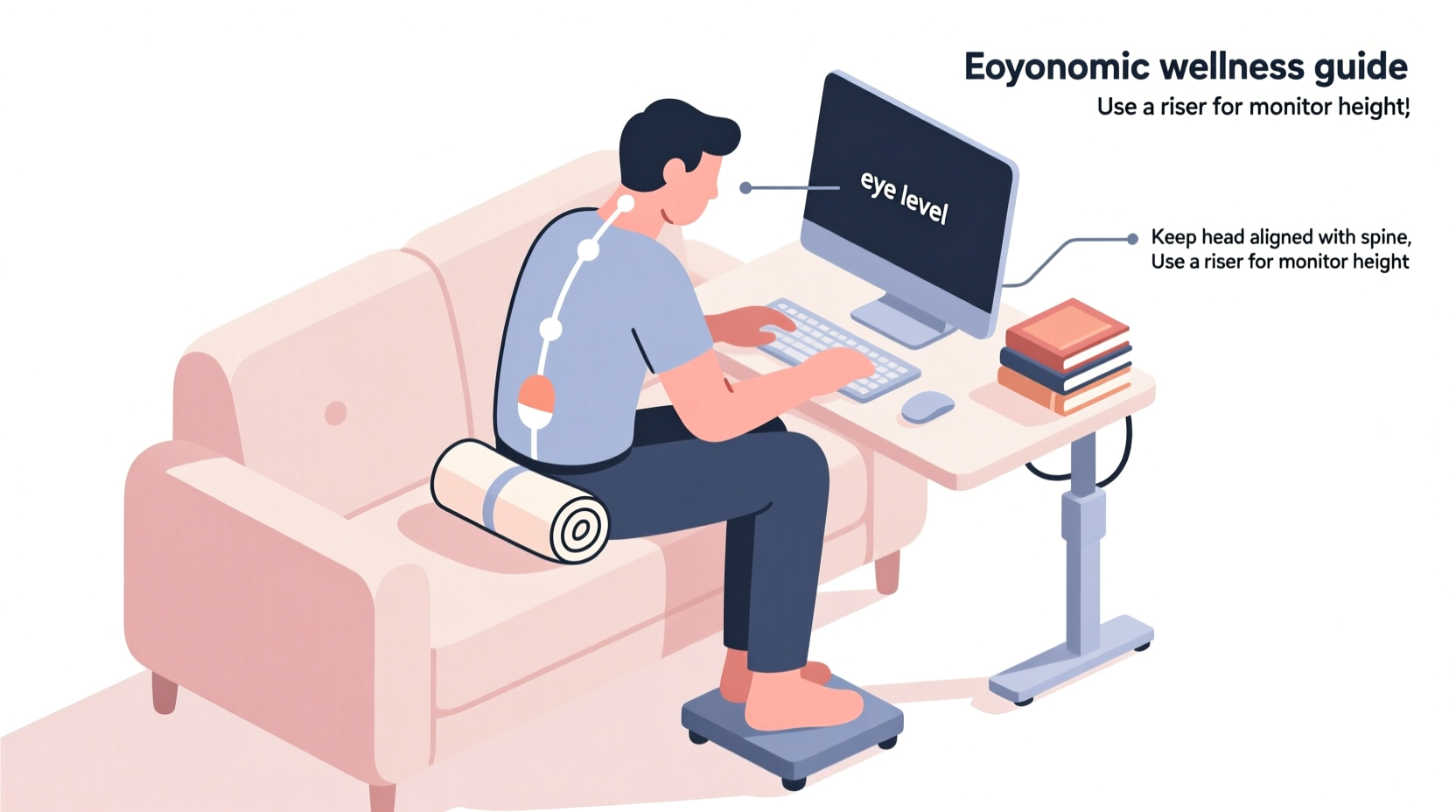
Sitting on a couch without back support encourages a \"C-shaped\" spine, where the pelvis tilts backward and the lower back rounds excessively. This position places undue pressure on intervertebral discs and stretches ligaments beyond their optimal range. Over hours, this leads to muscle imbalances—tight hip flexors, weak glutes, and overworked neck extensors—all contributing to what clinicians call “tech neck” or “couch slouch.”
According to Dr. Elena Ramirez, a physical therapist specializing in ergonomics:
“Prolonged sitting in unsupported positions alters neuromuscular control. The body adapts by favoring inefficient movement patterns, which can persist even when returning to an office chair.”
Common symptoms of prolonged poor posture include dull lower back ache, shoulder tension, numbness in the legs (from compressed sciatic nerves), and headaches originating from cervical misalignment. These aren’t just temporary discomforts—they may signal early stages of musculoskeletal disorders if left unaddressed.
Strategies to Maintain Spinal Alignment on a Soft Surface
You don’t need a full desk setup to sit correctly. What matters most is alignment: ears over shoulders, shoulders over hips, and hips slightly higher than knees. Here’s how to achieve that on a couch:
Use Supportive Props Strategically
Improvised support goes a long way. Stack firm pillows or rolled towels behind your lower back to restore the lumbar curve. Place another cushion under your seat if the couch sags too much, elevating your hips slightly above knee level. This mimics the tilt found in ergonomic chairs.
Elevate Your Device to Eye Level
Looking down at a laptop or phone strains the cervical spine. Raise your screen using books, a tray on legs, or a portable laptop stand so the top third of the monitor aligns with eye level. Pair this with an external keyboard and mouse to keep wrists neutral and arms close to the body.
Sit Forward, Not Back
Avoid reclining fully into the backrest (if there is one) or letting your tailbone sink below your knees. Instead, sit toward the front edge of the couch, keeping your feet flat on the floor or on a low ottoman. This engages core stabilizers and prevents posterior pelvic tilt.
Step-by-Step Guide: Setting Up a Posture-Friendly Workspace on a Couch
Follow this sequence before starting any remote work session from your couch:
- Clear the area: Remove loose cushions or blankets that encourage lounging.
- Position your seat: Sit upright near the front third of the couch, ensuring your thighs are parallel or slightly downward from hips.
- Add lumbar support: Roll a towel or place a small pillow at belt-level to support the inward curve of your lower back.
- Adjust screen height: Elevate your laptop until the top of the screen reaches eye level. Use stacked hardcover books if needed. <5> Connect peripherals: Attach a wireless keyboard and mouse to avoid hunching forward.
- Set foot support: Place a sturdy footrest, stool, or even a shoebox under your feet if they don’t reach the ground comfortably.
- Align your body: Check that your ears, shoulders, and hips form a vertical line. Adjust as necessary.
- Set a timer: Use a 25-minute Pomodoro interval to remind yourself to stand, stretch, or reset posture.
This routine takes less than three minutes to implement but dramatically improves biomechanical efficiency throughout the day.
Do’s and Don’ts of Couch-Based Work
| Do | Don't |
|---|---|
| Sit with hips slightly above knee level | Sink deeply into sagging cushions |
| Use a rolled towel for lumbar support | Rely solely on armrests for stability |
| Keep elbows close to the body at 90° | Rest wrists on sharp edges or unsupported surfaces |
| Take standing breaks every 25–30 minutes | Work for over an hour without moving |
| Face screen directly; avoid twisting torso | Turn your head sideways to view off-center screens |
Maintaining Core Engagement Without Formal Exercise
Strong core muscles help stabilize the spine even in suboptimal seating conditions. While formal workouts are ideal, subtle engagement techniques can be integrated into your workday:
- Brace gently: Lightly contract your abdominal muscles—as if preparing for a light punch—without holding your breath. Do this for 10–15 seconds every few minutes.
- Pelvic tilts: While seated, alternate between arching your lower back slightly (anterior tilt) and rounding it (posterior tilt). Repeat 10 times hourly to activate deep stabilizing muscles.
- Glute squeezes: Contract your buttocks for five seconds, then release. Perform 15 reps per hour to counteract gluteal inhibition from prolonged sitting.
These micro-exercises prevent muscular shutdown and promote dynamic stability, reducing reliance on passive structures like ligaments and discs.
Real Example: How Sarah Transformed Her Home Office Setup
Sarah, a freelance graphic designer based in Portland, spent nearly six months working from her sectional sofa after transitioning to full-time remote work. Initially, she enjoyed the flexibility—but within weeks, she developed persistent lower back pain and tingling in her left leg.
After consulting a telehealth physiotherapist, she implemented simple changes: placing a memory foam cushion behind her lower back, raising her laptop onto a wooden tray supported by her coffee table, and using a folding footrest bought online for $18. She also began setting a silent alarm every half-hour to perform two-minute standing stretches.
Within three weeks, her symptoms decreased by 70%. “I didn’t think such small things would make a difference,” she said. “But now I notice when my posture slips, and I correct it instinctively.”
Essential Checklist for Better Posture on a Couch
- ✅ Hips positioned slightly above knees
- ✅ Lumbar support added (pillow, towel, or cushion)
- ✅ Screen at or slightly below eye level
- ✅ External keyboard and mouse connected
- ✅ Feet flat on floor or supported by footrest
- ✅ Shoulders relaxed, elbows close to body
- ✅ Movement break scheduled every 25–30 minutes
- ✅ No twisting or craning neck to see screen
Run through this checklist each morning or before beginning a new work block. Consistency turns corrective actions into automatic habits.
Frequently Asked Questions
Can I work from my couch long-term without harming my back?
Yes—but only if you actively support your spine and avoid static postures. Long-term couch work increases injury risk unless deliberate ergonomic measures are maintained consistently. Consider limiting couch-based work to 2–3 hours daily and alternating with standing or dining table setups.
What kind of pillow works best for lumbar support on a couch?
Firm, medium-sized cushions work best—think throw pillows filled with memory foam or dense polyester fiberfill. Avoid overly soft or flat pillows. Alternatively, roll a bath towel tightly and secure it with rubber bands for a customizable, cost-free option.
Is crossing my legs worse for posture on a couch?
Yes. Leg crossing rotates the pelvis and creates asymmetry in the spine, increasing disc pressure on one side. It also restricts blood flow and may contribute to hip joint dysfunction over time. Keep both feet flat and uncrossed whenever possible.
Conclusion: Prioritize Posture, Not Just Productivity
Comfort should never come at the expense of health. While working from a couch offers short-term ease, unchecked posture deterioration can lead to lasting physical consequences. By integrating lumbar support, adjusting device height, engaging stabilizing muscles, and taking regular movement breaks, you reclaim control over your spinal health—even in relaxed environments.
Good posture isn’t about rigidity—it’s about awareness and adaptation. Whether you're answering emails or joining video calls, remember that small, intentional choices compound into long-term well-being. Your spine doesn’t need perfection; it needs consistency.




 浙公网安备
33010002000092号
浙公网安备
33010002000092号 浙B2-20120091-4
Comments
No comments yet. Why don't you start the discussion?