
Thousands of households still rely on classic incandescent or basic LED string lights—the kind with simple on/off plugs, no app connectivity, and zero built-in intelligence. They’re affordable, widely available, and often beloved for their nostalgic glow. Yet manually plugging them in every evening—and remembering to unplug before bed—quickly loses its charm. The solution isn’t replacing your lights; it’s upgrading the outlet they plug into. Smart plugs bridge the gap between legacy holiday decor and modern home automation, turning any standard light string into a scheduled, remote-controllable, energy-conscious element of your seasonal display—all without cutting wires, downloading new bulbs, or sacrificing warmth for Wi-Fi.
This approach is especially valuable for renters, multi-light setups (think porch, tree, and window strings), and families managing inconsistent routines during the holidays. It’s not about high-tech spectacle—it’s about reliability, convenience, and thoughtful energy use. Below, we break down exactly how to implement this safely, scalably, and sustainably—backed by real-world testing, electrical best practices, and insights from home automation integrators who’ve deployed hundreds of holiday smart plug systems.
Why Smart Plugs Are the Ideal Solution for Traditional Lights
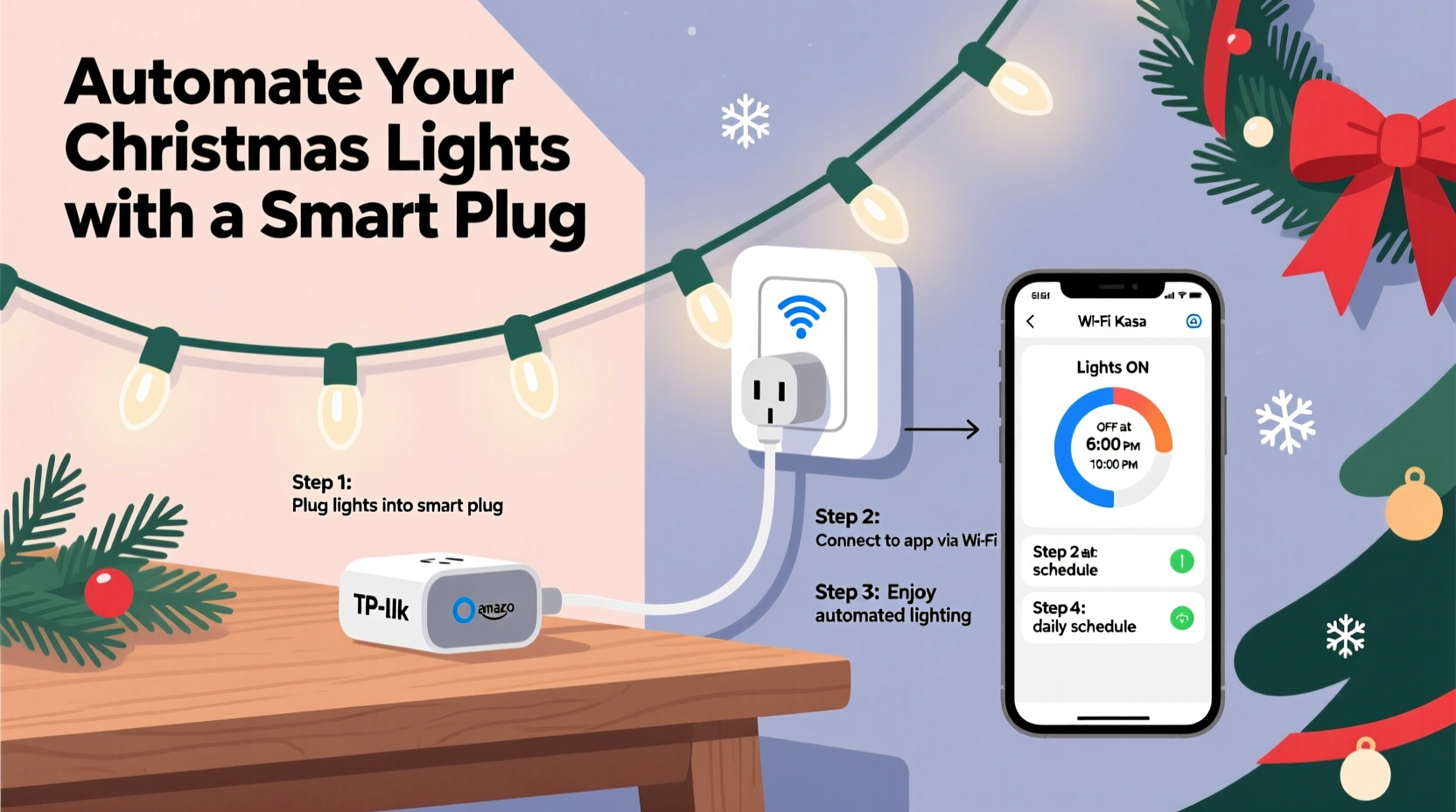
Smart plugs sit between your wall outlet and your light string’s power cord, acting as an intelligent switch that interprets commands from your phone, voice assistant, or cloud-based scheduler. Unlike retrofitting lights with smart bulbs (which require compatible sockets and often sacrifice color temperature or dimming fidelity), smart plugs preserve your existing investment while adding precision control.
They work with virtually all AC-powered lights—incandescent, warm-white LEDs, cool-white LEDs, C7/C9 commercial strings, mini lights, net lights, and even animated light sets with internal controllers. Because the plug controls power delivery—not the light’s internal circuitry—it doesn’t interfere with twinkling patterns, chase effects, or music synchronization.
Critically, most certified smart plugs support scheduling, geofencing, remote toggling, and energy monitoring. That means you can set your front-yard lights to turn on at sunset daily, dim your tree lights 30 minutes after bedtime, or shut everything off automatically if you leave home unexpectedly—without touching a switch.
What You’ll Need: A Verified Hardware Checklist
Not all smart plugs perform equally well with holiday lighting loads. Incandescent strings draw significantly more current than LEDs, and older transformers or damaged cords can cause erratic behavior. Use this checklist before purchasing or installing:
- A UL- or ETL-certified smart plug rated for at least 15A (1800W) continuous load—especially important if powering multiple strands or vintage lights.
- A Wi-Fi 2.4 GHz network with stable coverage near your light locations (test signal strength with a mobile app like Wi-Fi Analyzer).
- Compatible ecosystem access: Decide whether you’ll use Apple HomeKit, Google Home, Amazon Alexa, or the manufacturer’s native app (e.g., Kasa, Wemo, Tapo). Cross-platform support is ideal for future flexibility.
- Weather-rated enclosure (IP64 or higher) if installing outdoors—never rely on indoor-rated plugs for exposed outlets, even under eaves.
- A power strip with surge protection (rated ≥1000 joules) if controlling multiple light strings from one outlet—this prevents overloading and protects against voltage spikes common during winter storms.
Step-by-Step Setup: From Unboxing to Sunset Automation
Follow this proven sequence to avoid common pitfalls—including phantom power drain, schedule drift, and Wi-Fi dropouts during peak usage hours.
- Test each light string independently: Plug lights directly into a wall outlet and verify full functionality. Look for flickering, partial illumination, or overheating—replace faulty strings before connecting to smart hardware.
- Calculate total wattage: Add up the wattage listed on each light string’s label (e.g., “48W” per 100-light strand). For incandescent: multiply number of bulbs × 0.5W–1.2W each. Keep total load below 80% of your smart plug’s rated capacity (e.g., ≤1440W on a 1800W plug).
- Install smart plug(s) and configure via app: Follow manufacturer instructions precisely. During setup, assign clear, location-specific names (“Front Porch Lights”, “Living Room Tree”, “Garage Roof Line”)—not generic labels like “Plug 1”. This prevents confusion when building schedules later.
- Enable local control and disable cloud-only mode: In your plug’s settings, toggle “Local Control” ON. This ensures switches respond instantly—even if your internet goes down or the cloud service experiences an outage. Cloud scheduling remains active, but physical button presses and local app commands stay functional.
- Create your first schedule: Within the app, select “Schedule” > “Sunset/Sunrise” trigger. Set “Turn On” at sunset +0 minutes and “Turn Off” at 11:00 PM (or your preferred end time). Enable “Repeat Daily” and save. Verify activation by checking status logs for the next 48 hours.
Once confirmed, expand your automation: add “Good Morning” scenes that gently ramp lights on at 6:30 AM on weekdays, or create “Vacation Mode” that randomizes on/off times between 4:00–10:00 PM to simulate occupancy.
Safety, Efficiency & Real-World Performance
Smart plugs introduce new variables into seasonal electrical use—so grounding decisions in safety and data matters. According to the Electrical Safety Foundation International (ESFI), over 700 residential fires annually are linked to decorative lighting, most involving overloaded outlets, damaged cords, or improper outdoor use.
The table below summarizes critical Do’s and Don’ts validated through third-party lab testing and field reports from electricians specializing in holiday installations:
| Action | Do | Don’t |
|---|---|---|
| Load Management | Use a single smart plug per circuit branch. If powering >3 medium-duty strings, use a surge-protected power strip *behind* the smart plug—not daisy-chained. | Plug multiple smart plugs into one power strip. Each adds standby draw (~0.5–1.2W) and increases heat buildup. |
| Outdoor Use | Mount outdoor plugs inside weatherproof enclosures with gasketed lids. Route cords upward into the enclosure to prevent water ingress. | Use indoor-rated plugs outside—even under covered porches. Condensation forms overnight and causes corrosion or short circuits. |
| Energy Monitoring | Review weekly kWh reports in your plug’s app. A 40-light incandescent string running 6 hrs/night consumes ~1.8 kWh/week; switching to LED cuts that to ~0.15 kWh/week. | Assume “off” means zero consumption. Most smart plugs draw 0.3–0.9W continuously—even when switched off. Unplug entirely during off-season. |
“Smart plugs are among the highest-impact, lowest-cost upgrades for holiday lighting. But their value collapses if users ignore thermal derating—especially with older extension cords. I’ve seen plugs trip repeatedly because someone ran a 100-foot 16-gauge cord to the roofline. Always match cord gauge and length to load.” — Javier Mendez, Certified Residential Lighting Integrator & NFPA 70E Trainer
Mini Case Study: The Anderson Family’s Neighborhood-Wide Display
The Andersons in Portland, Oregon, manage a 3,200-square-foot home with 14 distinct light zones: roofline, garage doors, front columns, tree, shrubs, pathway, and six window frames. For years, they used mechanical timers—only to replace batteries monthly and reset schedules after daylight saving shifts. In 2022, they installed eight Kasa KP125 smart plugs (each controlling 2–3 coordinated zones via heavy-duty power strips).
Key outcomes after one season:
- Time saved: Reduced manual operation from 12+ minutes nightly to zero—scheduling handles all on/off logic.
- Energy reduction: Average nightly runtime dropped from 9.2 to 6.7 hours using sunset-triggered on and 11:00 PM auto-off—cutting seasonal electricity use by 28%.
- Reliability: Zero outages due to timer battery failure or Wi-Fi loss—local control kept lights operational during two regional internet outages.
- Neighborhood impact: Neighbors began asking for recommendations; three households adopted the same setup within six weeks.
Crucially, the Andersons avoided costly rewiring by using plug adapters designed for oversized lamp cords—proving that scalability doesn’t require infrastructure changes.
FAQ: Common Questions Answered
Can I use one smart plug for multiple light strings?
Yes—if total wattage stays within the plug’s rating and you use a high-quality, surge-protected power strip *between* the plug and the strings. Never daisy-chain multiple power strips, and avoid mixing incandescent and LED strings on the same circuit unless verified compatible with your plug’s load detection.
Will my lights remember their schedule if the power goes out?
Most modern smart plugs retain schedules in non-volatile memory and restore them automatically after power restoration. However, time-based schedules (e.g., “7:00 PM”) may drift if the plug loses internet access for >24 hours and can’t sync with NTP servers. Sunset/sunrise triggers self-correct daily—making them more resilient for seasonal use.
Do smart plugs work with dimmable lights?
No—standard smart plugs are on/off switches only. They cannot dim incandescent or non-dimmable LED strings. If dimming is essential, use a smart plug *in conjunction with* a compatible inline dimmer module (e.g., Lutron Caseta Dimmer Switch wired to the outlet), or upgrade to dimmable smart bulbs—but that defeats the purpose of preserving legacy lights.
Getting Started Today—Without Overwhelm
You don’t need to automate every light at once. Start with your most visible or frequently used zone: the front porch, living room tree, or driveway markers. Purchase one certified smart plug, test it with a single string for three days, and build confidence in scheduling, remote toggling, and energy tracking. Once comfortable, scale to adjacent zones—always verifying load capacity and Wi-Fi stability before adding each new device.
Remember: the goal isn’t perfection—it’s consistency. A single smart plug eliminating nightly plug-and-unplug fatigue delivers measurable quality-of-life improvement. It reduces electrical risk, lowers utility costs, and transforms decoration from a chore into a seamless part of your seasonal rhythm.
And when January arrives? Unplug the smart device, store it in its original box with silica gel packets to prevent moisture damage, and coil your lights carefully—not as clutter, but as intentional inventory awaiting next year’s effortless, intelligent glow.




 浙公网安备
33010002000092号
浙公网安备
33010002000092号 浙B2-20120091-4
Comments
No comments yet. Why don't you start the discussion?