
As remote work becomes more prevalent and awareness of workplace ergonomics grows, many professionals are reevaluating how they set up their home or office spaces. One of the most impactful changes is adopting a standing desk setup to reduce sedentary behavior, improve posture, and support long-term musculoskeletal health. But when it comes to choosing between a standing desk converter and a full standing desk, the decision isn’t always straightforward. Each option offers distinct advantages in terms of ergonomics, space, budget, and adaptability. This article provides a detailed comparison grounded in practical experience, expert insights, and real-world usability to help you make an informed decision.
Ergonomic Foundations: What Makes a Desk Setup Healthy?
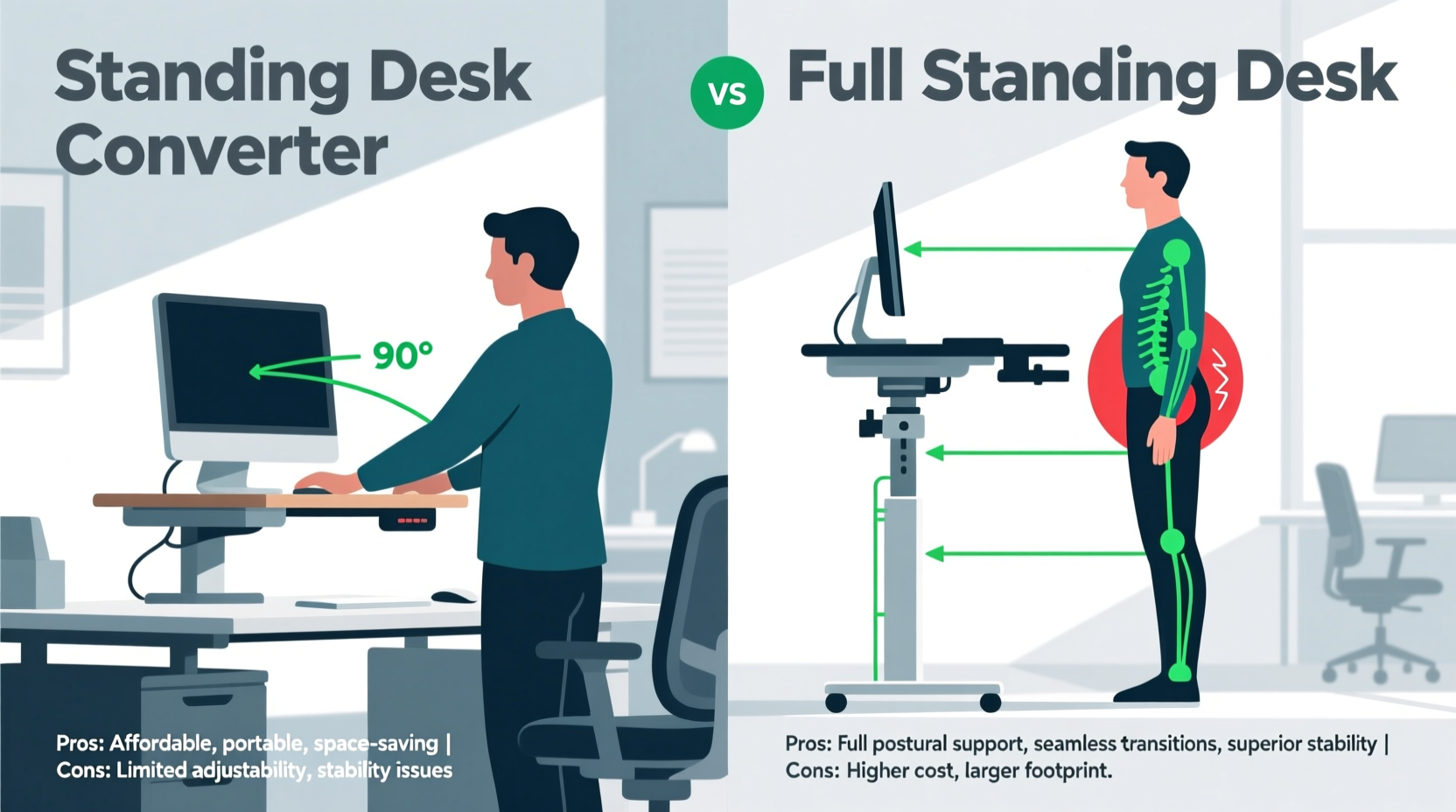
Before comparing specific products, it’s essential to understand what constitutes an ergonomically sound workstation. According to the Occupational Safety and Health Administration (OSHA), proper ergonomics involve aligning your body with your tools to minimize strain on muscles, tendons, and joints. Key principles include:
- Elbows bent at 90 degrees with forearms parallel to the floor
- Top of monitor at or slightly below eye level, about an arm’s length away
- Feet flat on the floor or on a footrest, knees at 90-degree angle
- Neutral wrist position while typing
- Ability to alternate between sitting and standing throughout the day
The goal is not to stand all day but to promote movement and postural variation. Both standing desk converters and full standing desks aim to support this dynamic approach, but they do so in different ways—and with varying degrees of success depending on individual needs.
Standing Desk Converters: Flexibility Meets Affordability
A standing desk converter sits on top of your existing desk and elevates your keyboard, monitor, or both to standing height. These units range from simple fixed risers to motorized platforms that smoothly transition between levels.
One of the biggest advantages of a converter is its compatibility with current furniture. If you already have a well-sized, sturdy desk, adding a converter avoids the need for replacement. This makes it a cost-effective solution—especially for renters or those working within tight budgets. Prices typically range from $100 to $400, significantly less than most full electric standing desks.
Converters also offer portability. You can move them between rooms, take them to a coworking space, or even use them temporarily at a colleague’s desk. Their modular nature supports flexible work environments.
However, ergonomic trade-offs exist. Most converters require sacrificing desktop space since they occupy the surface area needed for books, notebooks, or secondary monitors. Additionally, because they elevate equipment from an already seated-height desk, the maximum standing height may be insufficient for taller users (over 6'1\"). Conversely, shorter individuals might find the minimum height too high for comfortable seated use.
Real-World Example: Sarah’s Home Office Upgrade
Sarah, a freelance graphic designer, works from a small apartment with limited space. Her existing wooden desk fits perfectly in her nook but doesn’t allow room for a new unit. She purchased a dual-tier standing desk converter for $275. It allowed her to keep her Wacom tablet and notebook on the lower platform while raising her dual monitors to eye level when standing. Within two weeks, she reported reduced lower back stiffness and improved focus during afternoon hours. The only drawback? She had to remove items frequently to access drawers underneath, which occasionally disrupted workflow.
Full Standing Desks: Built for Movement and Long-Term Use
A full standing desk replaces your entire desk with a frame designed to adjust in height—either manually via crank or automatically with electric motors. These desks provide seamless transitions between sitting and standing, often with programmable presets for personalized heights.
From an ergonomic standpoint, full standing desks offer superior customization. They start low enough for seated use by shorter individuals and rise high enough for tall users to stand comfortably. Because the entire work surface moves, accessories like lamps, phones, and notebooks stay in place during transitions—unlike with converters, where some items must be removed or risk falling.
Stability is another key advantage. High-quality standing desks feature robust frames (often dual-motor systems) that eliminate wobble, even with heavy monitor setups. This stability reduces micro-tremors that can contribute to hand fatigue over time.
“Investing in a fully adjustable desk pays dividends in spinal alignment and shoulder tension reduction. When the whole surface moves, users maintain consistent spatial relationships with their tools.” — Dr. Alan Pierce, Physical Therapist & Workplace Ergonomics Consultant
Moreover, full standing desks encourage better long-term habits. With dedicated memory settings, users are more likely to switch positions regularly. A 2022 study published in *Applied Ergonomics* found that employees using electric sit-stand desks changed positions 40% more frequently than those using converters, largely due to ease of adjustment.
The downside? Cost and footprint. Quality electric models start around $400 and can exceed $1,000. Assembly takes time, and once installed, relocation is cumbersome. For shared workspaces or temporary setups, this lack of portability can be limiting.
Comparative Analysis: Key Factors Side-by-Side
| Factor | Standing Desk Converter | Full Standing Desk |
|---|---|---|
| Initial Cost | $100–$400 | $400–$1,200+ |
| Installation | None – place on existing desk | Assembly required; may need tools |
| Ease of Adjustment | Moderate – varies by model | High – smooth motorized lift |
| Stability | Variable – prone to wobble if overloaded | High – especially dual-motor frames |
| Desktop Space Efficiency | Low – occupies existing surface | High – full use of tabletop |
| Portability | High – easy to move or store | Low – permanent fixture |
| User Height Range | Limited by base desk height | Broad – accommodates 5'0\" to 6'6\"+ |
| Longevity & Durability | 3–5 years average | 7–10+ years with quality brands |
Step-by-Step Guide: Choosing the Right Option for Your Needs
Selecting between a converter and a full desk should be based on your unique circumstances. Follow this decision-making process:
- Assess your current desk. Is it sturdy, spacious, and at a good seated height (28–30 inches)? If yes, a converter could be viable. If it's flimsy or too high/low, replacement makes more sense.
- Measure your available space. Will a larger desk fit in your room? Do you share the area with others? Converters win in compact or multi-use environments.
- Determine your budget. If under $300, a converter is likely your only realistic option. Consider financing plans if investing in a premium standing desk.
- Evaluate your physical needs. Taller users (>6') or those with chronic back issues benefit more from the full height range and stability of a complete desk.
- Test usability. Simulate transitions: Can you easily switch modes multiple times a day? Does the converter block access to drawers or ports?
- Plan for the future. Are you in a temporary living situation? Do you anticipate changing jobs or locations soon? Portability may outweigh long-term benefits.
Common Mistakes and How to Avoid Them
Even with the right equipment, poor implementation can undermine ergonomic gains. Watch out for these pitfalls:
- Standing too long too soon. Begin with 15–20 minutes per hour and gradually increase. Sudden prolonged standing leads to foot pain and leg swelling.
- Incorrect monitor placement. Never place screens on stacked books or unstable surfaces. Use articulating arms or built-in tiers to achieve proper eye level.
- Ignoring cable management. Frequent height changes tangle cords. Use clips, sleeves, or vertical organizers to maintain clean connections.
- Skipping posture checks. Regularly assess your alignment. Shoulders should be relaxed, wrists neutral, and head balanced—not jutting forward.
Frequently Asked Questions
Can I add a standing desk converter to a glass-top desk?
Proceed with caution. Glass tops, especially thin or tempered ones, may not support the weight or pressure of a converter. Check manufacturer guidelines and consider reinforcing the structure or switching to a solid surface.
Do standing desk converters wear out faster than full desks?
Generally, yes. Converters often use smaller motors and lighter materials. With daily use, mechanical components may degrade in 3–5 years, whereas high-end standing desks can last a decade or more with minimal maintenance.
Is there a hybrid solution?
Yes. Some companies now offer “desktop lifts” that integrate into custom desks or retrofit kits for existing furniture. Others combine converter-style mobility with enhanced stability through weighted bases. While niche, these options bridge the gap for users wanting flexibility without sacrificing ergonomics.
Final Recommendation: Match the Tool to the User
There is no universal \"best\" choice between a standing desk converter and a full standing desk. The optimal selection depends on context: your budget, workspace constraints, physical stature, and long-term goals.
If you're testing the waters, live in a rental, or want a quick upgrade without replacing furniture, a standing desk converter delivers solid ergonomic value at a low entry point. Just ensure it meets your equipment load and height requirements.
For those committed to long-term wellness, working in a dedicated office, or experiencing discomfort from prolonged sitting, a full standing desk is worth the investment. Its seamless adjustability, superior stability, and broader ergonomic range support healthier work patterns over years of use.
Ultimately, the greatest ergonomic benefit comes not from the device itself—but from consistent movement. Whether you choose a converter or a full desk, prioritize regular transitions, mindful posture, and listening to your body’s signals.




 浙公网安备
33010002000092号
浙公网安备
33010002000092号 浙B2-20120091-4
Comments
No comments yet. Why don't you start the discussion?