
In today’s digital world, relying on a single email address is no longer practical. Whether you're separating personal communications from professional ones, running an online business, or managing marketing campaigns, having multiple email accounts improves focus, enhances privacy, and reduces clutter. However, juggling several inboxes can quickly become overwhelming without the right system. This guide walks through a structured approach to setting up and maintaining multiple email accounts efficiently, securely, and sustainably.
Why Use Multiple Email Accounts?
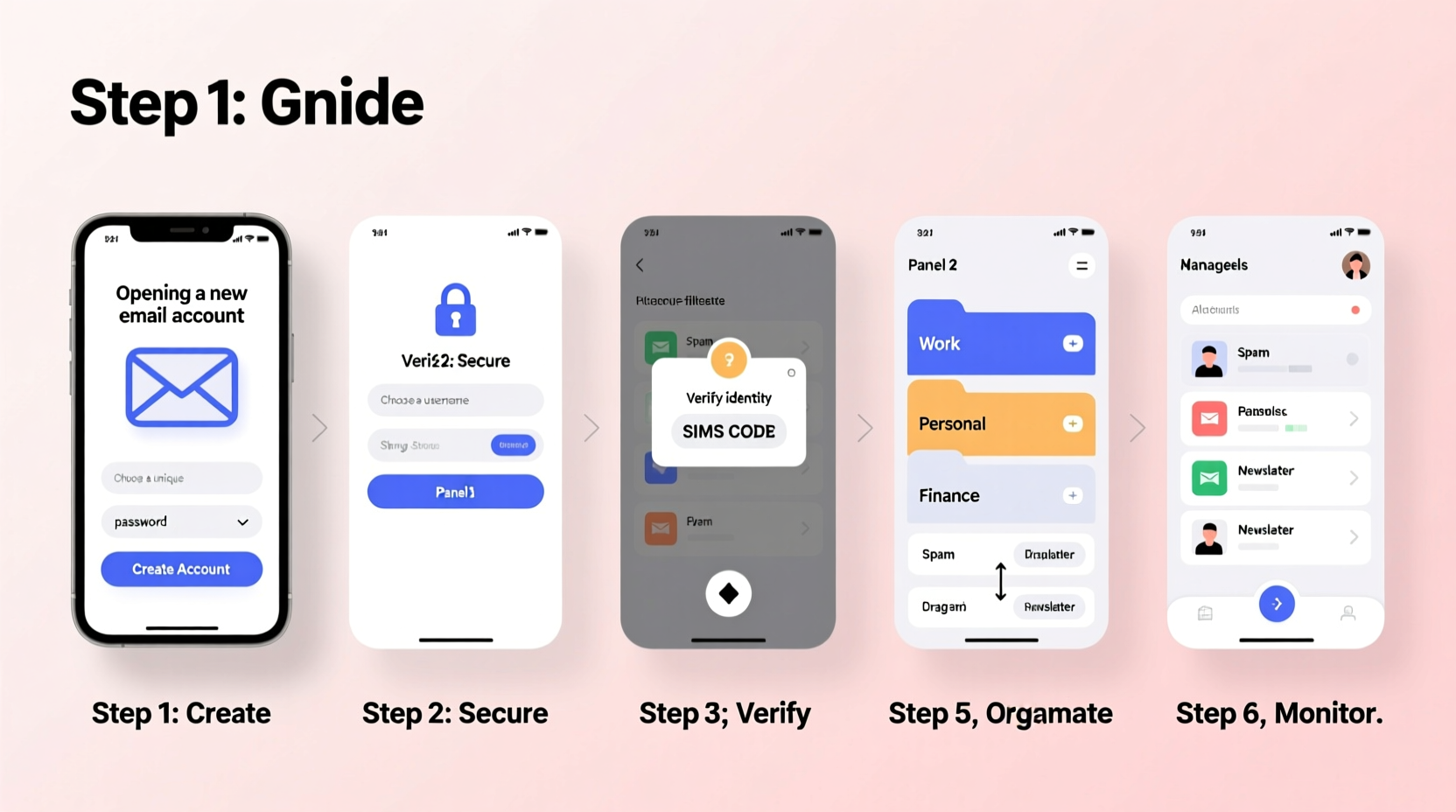
Using more than one email isn’t just for tech enthusiasts or entrepreneurs—it benefits anyone who values organization and digital hygiene. A dedicated work account keeps job-related messages separate from social invitations. A third account for online shopping minimizes spam in your primary inbox. Some even use temporary or alias emails for signing up to forums or trials.
According to cybersecurity expert Dr. Lena Torres, “Segmenting your digital identity across multiple secure email accounts significantly reduces exposure to phishing and data breaches.” When one account is compromised, others remain unaffected, limiting potential damage.
“Segmenting your digital identity across multiple secure email accounts significantly reduces exposure to phishing and data breaches.” — Dr. Lena Torres, Cybersecurity Researcher
Step-by-Step Guide to Creating Multiple Email Accounts
Creating additional email accounts is simple, but doing it strategically ensures long-term usability and safety. Follow this timeline to set up new accounts correctly.
- Define the Purpose: Assign a clear role to each account (e.g., job applications, freelance work, subscriptions).
- Choose Reliable Providers: Use reputable services like Gmail, Outlook, ProtonMail, or Zoho based on your needs.
- Create Strong, Unique Passwords: Never reuse passwords. Consider using a password manager to generate and store them.
- Enable Two-Factor Authentication (2FA): Add an extra layer of protection via SMS, authenticator apps, or hardware keys.
- Set Up Recovery Options: Provide backup email or phone number (if comfortable) to regain access if locked out.
- Verify Domain Ownership (Optional): For business emails using custom domains (e.g., you@yourbrand.com), verify ownership through DNS records.
- Label and Organize Early: Rename accounts in your email client (e.g., “Work – Main,” “Personal – Family”) for instant recognition.
Best Practices for Managing Multiple Inboxes
Once your accounts are live, the real challenge begins: staying on top of all of them without wasting time. The key lies in automation, categorization, and disciplined usage.
- Use a Unified Inbox Tool: Platforms like Gmail, Microsoft Outlook, or Spark allow you to add multiple accounts and view messages in one place.
- Apply Filters and Labels: Automatically sort incoming mail into folders based on sender, keywords, or domain.
- Schedule Check-Ins: Avoid constant switching by designating specific times to review each inbox (e.g., personal at 7 PM, work during office hours).
- Leverage Aliases and Plus Addressing: Gmail supports “plus addressing” (e.g., user+newsletters@gmail.com), which routes to your main inbox but helps track sign-ups.
- Archive Aggressively: Keep active inboxes lean by archiving resolved threads instead of deleting or leaving them unread.
Comparison of Top Email Providers for Multi-Account Use
| Provider | Free Storage | Custom Domains | Encryption | Best For |
|---|---|---|---|---|
| Gmail | 15 GB (shared with Drive) | No (requires Workspace) | Transport encryption only | General use, integration with Google apps |
| Outlook.com | 15 GB | Yes (via Microsoft 365) | End-to-end optional | Business users, calendar sync |
| ProtonMail | 1 GB (free tier) | Yes (paid plans) | End-to-end encrypted | Privacy-focused communication |
| Zoho Mail | 5 GB | Yes (free for up to 5 users) | SSL/TLS + optional PGP | Small businesses, startups |
Real Example: How Sarah Manages Her Five Email Accounts
Sarah runs a freelance graphic design business and uses five distinct email accounts. Her primary Gmail handles client contracts and invoices. A second Gmail with plus addressing (+shopping, +social) funnels promotions and personal updates. She created a Zoho account under her brand domain (hello@sarahdesigns.co) for professional correspondence. A temporary ProtonMail account is used for sensitive discussions with clients in regulated industries. Finally, she maintains an old Yahoo account solely for legacy logins that can’t be changed.
To manage them, Sarah uses the Outlook desktop app. All accounts sync there, categorized by color-coded labels. She checks her business inbox twice daily, scans her subscription folder every Sunday, and reviews security alerts immediately. By avoiding cross-login practices and never reusing passwords, she’s maintained full control without burnout.
Essential Checklist for Setting Up New Email Accounts
Checklist: Before Activating a New Email Account
- ☐ Define its purpose (work, personal, shopping, etc.)
- ☐ Choose a secure provider matching your needs
- ☐ Create a strong, unique password
- ☐ Enable two-factor authentication
- ☐ Set up recovery email or phone
- ☐ Configure forwarding or filters if needed
- ☐ Test sending and receiving messages
- ☐ Add to your unified email client
Frequently Asked Questions
How many email accounts should I have?
There’s no universal number, but most people benefit from 3–5 accounts: one for critical communications (job, banking), one for personal use, one for subscriptions, and optionally, a private or business-specific account. More than five may lead to management fatigue unless automated.
Is it safe to use multiple email services?
Yes, as long as each account follows security best practices—strong passwords, 2FA, regular monitoring. Using diverse providers also limits risk; a breach in one service won’t compromise all your identities.
Can I merge notifications from different accounts?
Absolutely. Mobile apps like Outlook, Edison, or Spark consolidate notifications and allow swipe actions across accounts. On desktop, browser extensions like Checker Plus for Gmail can monitor multiple inboxes simultaneously.
Final Tips for Long-Term Success
Maintaining multiple email accounts shouldn’t feel like a chore. Automate what you can, delete unused accounts annually, and audit permissions regularly. Periodically ask: Is this inbox still serving its purpose? Can it be merged or archived?
Also, consider using email aliases through services like SimpleLogin or AnonAddy. These forward messages to your main inbox while hiding your real address—ideal for minimizing exposure without multiplying actual accounts.




 浙公网安备
33010002000092号
浙公网安备
33010002000092号 浙B2-20120091-4
Comments
No comments yet. Why don't you start the discussion?