
A swollen laptop battery is more than just a cosmetic issue—it’s a red flag signaling potential danger. Lithium-ion batteries, which power most modern laptops, are engineered for efficiency and longevity, but under certain conditions, they can degrade in ways that compromise both performance and safety. When a battery begins to swell, gas builds up inside its sealed casing due to chemical instability. This expansion pushes against the internal structure of your laptop and increases the risk of fire, leakage, or even explosion. Ignoring the signs could lead to irreversible damage to your device—or worse, personal injury.
Understanding the causes, risks, and correct response to a swollen battery is essential for anyone who relies on their laptop daily. This article explores the science behind battery swelling, evaluates the dangers of continued use, and provides a clear action plan to protect yourself and your equipment.
What Causes a Laptop Battery to Swell?
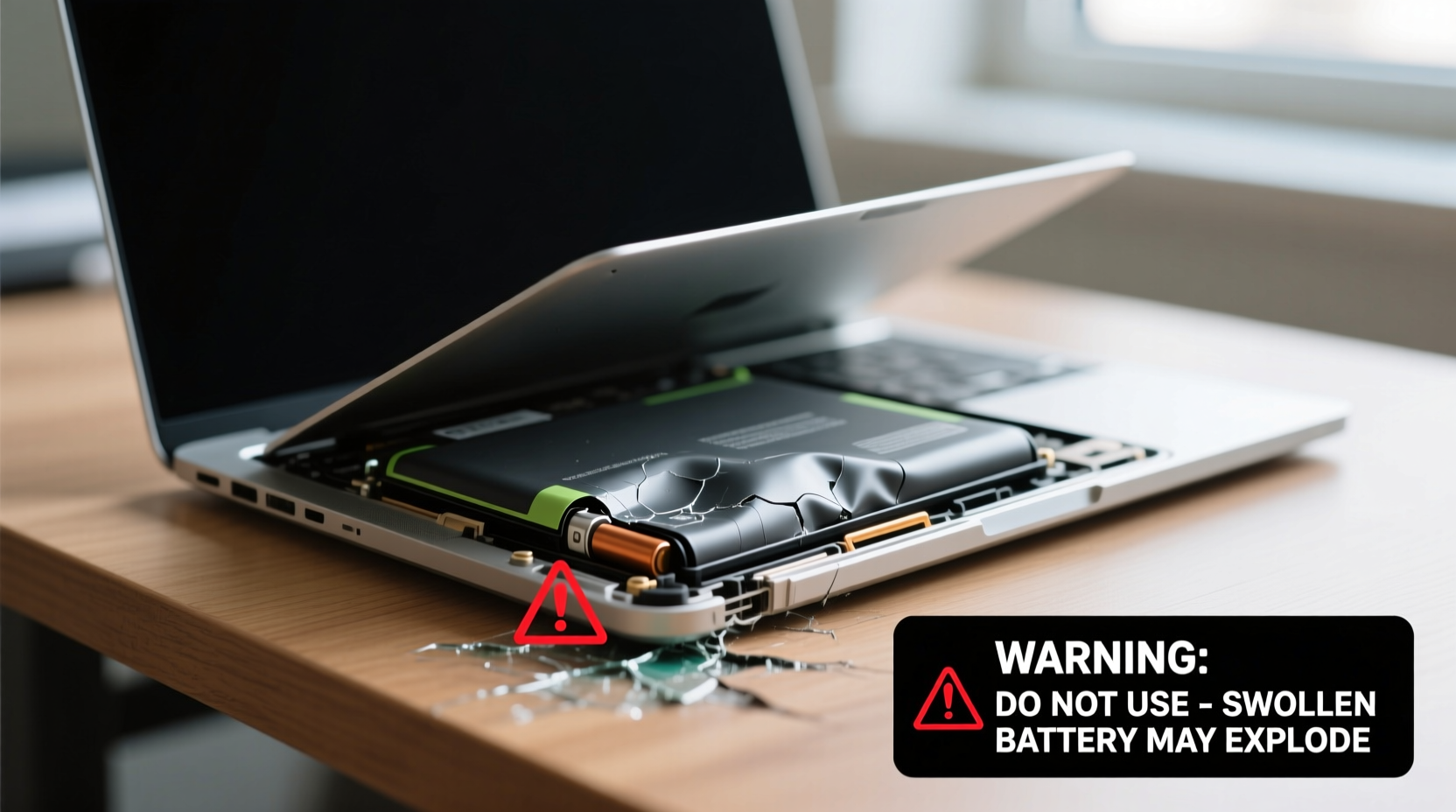
Lithium-ion batteries generate power through controlled electrochemical reactions. Over time, these reactions can become unstable due to several factors, leading to the production of gases such as carbon dioxide and oxygen within the sealed cell. As pressure builds, the battery casing expands—visibly distorting the shape of the battery and often pushing against surrounding components.
The primary causes of battery swelling include:
- Age and cycle degradation: Every battery has a finite number of charge-discharge cycles. After hundreds of cycles, internal materials break down, increasing the likelihood of gas formation.
- Overcharging: Leaving your laptop plugged in continuously, especially with poor power management, can stress the battery and accelerate chemical decomposition.
- Exposure to heat: High temperatures—whether from direct sunlight, poor ventilation, or intensive processing tasks—accelerate internal degradation and promote gas buildup.
- Physical damage: Dropping or puncturing the battery can compromise internal layers, creating short circuits and thermal runaway.
- Poor manufacturing or counterfeit cells: Low-quality batteries may lack proper separators or fail-safe mechanisms, making them prone to early failure.
Battery swelling is not reversible. Once expansion begins, the structural integrity of the cell is compromised permanently. The process may start slowly, with minor warping, but can escalate rapidly under continued use or adverse conditions.
Is It Dangerous to Use a Laptop with a Swollen Battery?
Yes, continuing to use a laptop with a swollen battery carries significant risks. While not every swollen battery will catch fire, the potential for hazardous outcomes increases substantially once swelling occurs.
The main dangers include:
- Fire or combustion: Swelling often indicates internal short circuits or thermal runaway—a self-sustaining reaction that generates intense heat. In extreme cases, this can ignite flammable electrolytes inside the battery.
- Chemical leakage: Ruptured cells may leak corrosive substances, including lithium compounds and organic solvents, which can damage internal electronics and pose health risks upon contact.
- Physical damage to the laptop: A bulging battery can warp the chassis, crack the keyboard, lift the trackpad, or damage connected circuitry, leading to costly repairs.
- Explosion risk: Though rare, pressurized gas buildup in a compromised cell can result in a small-scale rupture, ejecting shrapnel or igniting nearby materials.
“Once a lithium-ion battery starts to swell, it’s already entered a failure state. Continuing to charge or discharge it increases the chance of thermal events.” — Dr. Alan Reyes, Battery Safety Researcher at the National Institute of Advanced Electronics
Even if the laptop appears to function normally, the underlying instability makes it unpredictable. A battery that swells while charging poses an especially high risk, as input energy can exacerbate internal faults.
Step-by-Step Guide: What to Do If Your Laptop Battery Is Swollen
Immediate action is required when you notice battery swelling. Follow this timeline to minimize risk and protect your data and safety:
- Power off the laptop immediately. Do not attempt to restart or use it again until the battery is removed or evaluated by a professional.
- Unplug the charger. Disconnect all power sources to prevent further current flow into the unstable battery.
- Do not open or puncture the battery. Never try to deflate or disassemble a swollen cell. Physical manipulation can trigger ignition or chemical release.
- Remove the battery—if safe and accessible. On older laptops with user-replaceable batteries, carefully detach it using non-metallic tools. Avoid pressure or bending.
- Place the battery in a fire-safe container. Store it outdoors or in a non-flammable area like a ceramic bowl, away from combustible materials.
- Contact the manufacturer or authorized repair center. For built-in (non-removable) batteries, do not attempt removal yourself. Seek professional service.
- Dispose of the battery properly. Take it to a certified e-waste or hazardous waste facility. Many electronics retailers offer free recycling programs.
- Replace with a genuine OEM battery. Avoid third-party or generic replacements, which may lack safety certifications.
If the swelling has already damaged the laptop case or screen alignment, have a technician inspect the entire system before installing a new battery.
Do’s and Don’ts When Handling a Swollen Battery
| Do’s | Don’ts |
|---|---|
| Store the battery in a cool, dry, non-flammable location | Leave it plugged in or charging |
| Use non-conductive tools to remove the battery (if possible) | Touch leaking material with bare hands |
| Transport the battery upright in a protective case | Throw it in regular household trash |
| Take it to a certified recycling drop-off point | Apply pressure or try to “deflate” it |
| Report the incident to the manufacturer for warranty or safety tracking | Continue using the laptop until the issue is resolved |
Real-World Example: A Close Call with a Swollen Battery
In 2022, Sarah M., a freelance graphic designer in Portland, noticed her three-year-old laptop wouldn’t close fully. At first, she assumed the hinge was loose. But when the trackpad began lifting off the base and a faint chemical odor appeared after charging, she powered down the device. Upon removing the bottom panel, she discovered a severely bloated battery pressing against the motherboard.
She had been leaving her laptop plugged in 24/7 for rendering tasks. Although the battery indicator showed 100%, the constant trickle charging contributed to accelerated degradation. A local repair shop confirmed the battery was in an advanced failure state and advised immediate disposal.
“I didn’t realize how dangerous it was,” Sarah said later. “The technician told me that if I’d left it charging overnight one more time, it could have ignited. I now unplug mine when it hits 80% and monitor battery health monthly.”
Sarah’s experience underscores how easily swelling can go unnoticed until physical symptoms appear—and how quickly the situation can escalate.
How to Prevent Battery Swelling in the Future
While no battery lasts forever, proactive habits can significantly extend lifespan and reduce the risk of swelling:
- Maintain a 20–80% charge range: Avoid full discharges and prolonged full charges. Lithium-ion batteries perform best when kept in the middle state of charge.
- Enable battery health modes: Modern laptops (e.g., Apple MacBook, Dell XPS, Lenovo ThinkPad) offer settings to limit maximum charge to 80% for daily use.
- Ensure proper ventilation: Use your laptop on hard, flat surfaces. Avoid soft beds or cushions that block air intake.
- Update firmware and OS: Manufacturers often release updates that optimize charging patterns and thermal management.
- Monitor battery health: Use built-in tools (like macOS System Report or Windows' battery report via
powercfg /batteryreport) to check capacity and wear level.
“The single biggest factor in battery longevity is thermal management. Keeping your device cool during use and storage can double its usable life.” — Lin Zhao, Senior Engineer at Panasonic Energy Systems
Frequently Asked Questions
Can a swollen battery explode?
While explosions are rare, swollen batteries are at higher risk of thermal runaway, which can lead to fire or violent rupture. The pressurized gas inside the cell has nowhere to escape safely, increasing the chance of sudden failure, especially during charging or physical stress.
Is it safe to ship a laptop with a swollen battery?
No. Shipping companies classify swollen lithium-ion batteries as hazardous materials. Most carriers (including FedEx, UPS, and postal services) prohibit them unless packaged according to strict IATA regulations. If repair is needed, consult the manufacturer for approved procedures.
How much does it cost to replace a swollen laptop battery?
Costs vary by brand and model. OEM replacement batteries typically range from $80 to $200, with labor adding $50–$100 for built-in units. Third-party options may be cheaper but carry higher safety risks. Some manufacturers offer free replacements if the defect is part of a known recall.
Conclusion: Prioritize Safety Over Convenience
A swollen laptop battery is not a minor glitch—it’s a warning sign that demands immediate attention. The convenience of continuing to use a malfunctioning device is far outweighed by the risks of fire, data loss, and physical harm. By recognizing the symptoms early, acting swiftly, and adopting healthier charging habits, you protect not only your investment but also your personal safety.
Replace faulty batteries promptly with certified parts, dispose of them responsibly, and stay informed about your device’s health. Technology should serve you safely and reliably. Don’t ignore the signs when it starts to fail.




 浙公网安备
33010002000092号
浙公网安备
33010002000092号 浙B2-20120091-4
Comments
No comments yet. Why don't you start the discussion?