
A well-designed workspace does more than look good—it enhances focus, comfort, and productivity. One often overlooked but essential element is the desk mat. More than just a decorative surface cover, a desk mat protects your desk from scratches, reduces friction for mouse movement, and adds visual cohesion to your setup. But choosing the wrong size can disrupt ergonomics or make your desk feel cluttered. The key lies in selecting the right dimensions based on your desk layout, equipment, and usage patterns.
Why Desk Mat Size Matters
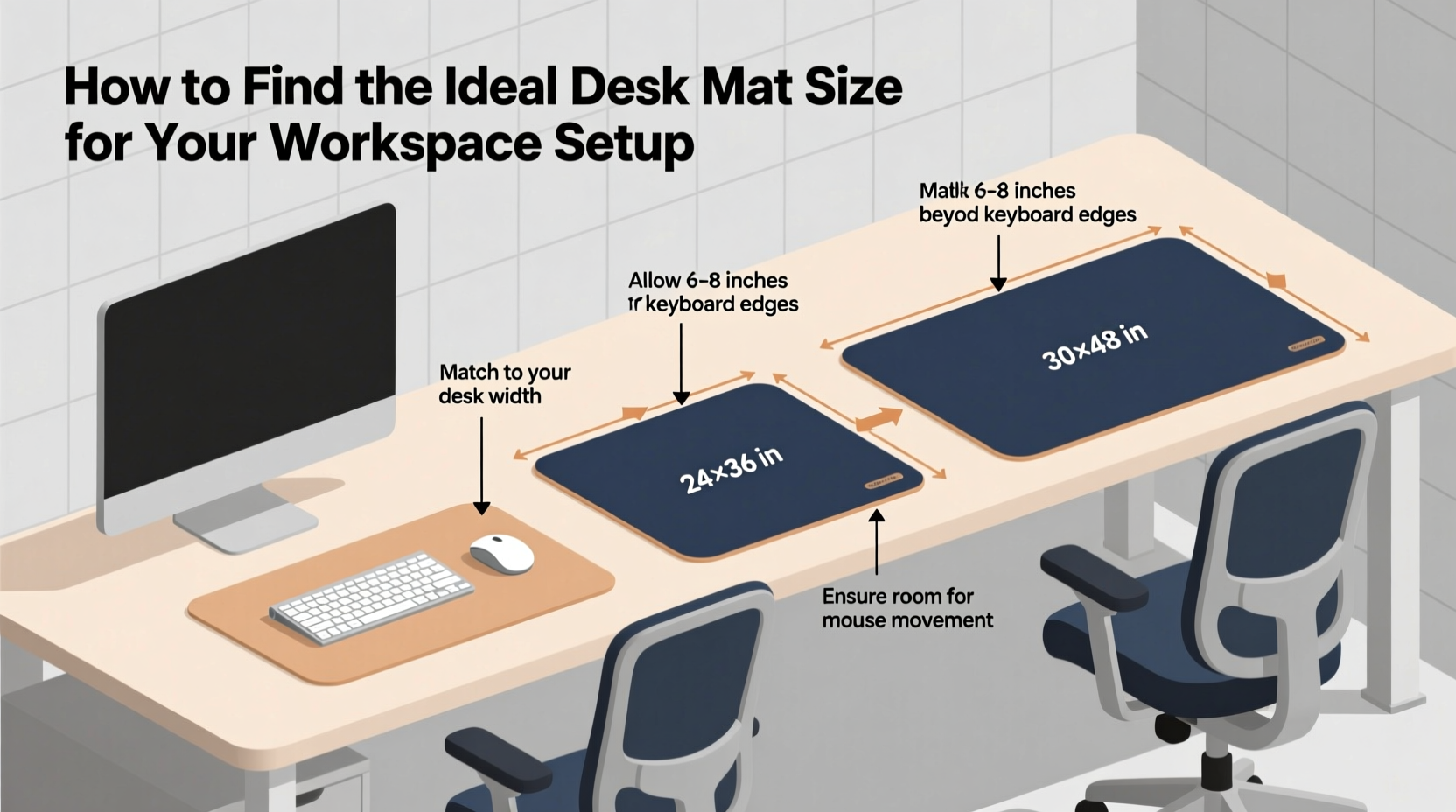
The size of your desk mat influences both function and aesthetics. A mat that's too small won’t protect your desk adequately or provide enough space for smooth mouse gliding. One that’s too large may overhang excessively, collect dust, or interfere with drawers and lighting. An ideal fit ensures your peripherals stay within a comfortable reach while maintaining a clean, intentional appearance.
Ergonomically, your wrist and forearm should rest naturally on the mat during typing or mousing. If the mat doesn’t extend far enough under your keyboard and mouse, you risk developing strain over time. Additionally, aesthetic balance plays a role—your mat should complement the proportions of your desk without overwhelming it.
Step-by-Step Guide to Measuring for the Perfect Fit
Finding the ideal desk mat begins with accurate measurements and thoughtful planning. Follow this step-by-step process to ensure compatibility with your current and future setup.
- Clear your desk completely. Remove all items including monitors, keyboards, cables, and accessories to get an unobstructed view of the surface.
- Measure your desk surface. Use a tape measure to record the width and depth (front to back) of your desk. Standard desks range from 48” to 60” wide and 24” to 30” deep, but custom or compact models vary.
- Determine your primary work zone. Identify where your keyboard, mouse, and writing tools will sit. This area typically spans 24–36 inches in width and 16–24 inches in depth from the front edge.
- Account for equipment footprint. Measure the length and width of your keyboard, mouse pad, and any additional accessories like a numpad or drawing tablet. Add at least 2–3 inches on each side for wrist support and movement.
- Decide on coverage preference. Choose between full-desk coverage, partial coverage (just under devices), or extended coverage (including mouse-heavy zones). Each has trade-offs in cost, maintenance, and visual impact.
- Select your final dimensions. Based on your measurements and preferences, choose a mat that fits within your desired parameters. Round up slightly if between sizes, but avoid excessive overhang.
Recommended Desk Mat Sizes by Setup Type
Not all workspaces are the same. Below is a comparison of common desk configurations and their ideal mat sizes.
| Desk Type | Typical Desk Size | Recommended Mat Size | Coverage Notes |
|---|---|---|---|
| Compact Home Office | 40” x 24” | 32” x 16” | Covers keyboard + mouse only; minimal overhang |
| Standard Single Monitor | 48” x 24” | 36” x 24” | Full device zone + wrist space; centered placement |
| Dual-Monitor Gaming | 55” x 30” | 40” x 20” or 36” x 24” | Landscape or portrait orientation depending on mouse needs |
| Standing Desk (Small) | 42” x 28” | 30” x 18” | Lightweight mats preferred; easy to reposition |
| Executive L-Shaped Desk | 72” + corner extension | Custom cut or dual mats (e.g., 48” x 24” + 24” x 24”) | Segmented coverage for flexibility and ease of cleaning |
Common Mistakes to Avoid
- Choosing based on aesthetics alone. A beautiful marbled mat won’t help if it’s too small for your ergonomic needs.
- Ignoring cable management. Thick mats can block access to ports or elevate your desk surface, making routing difficult.
- Overlooking thickness. Mats thicker than 3mm may raise your keyboard uncomfortably high, affecting wrist angle.
- Forgetting about future upgrades. If you plan to add a second monitor or larger mouse pad, size accordingly now.
- Using adhesive-backed mats on delicate finishes. These can damage wood or laminate surfaces when removed.
“An ideal desk mat supports both form and function. It should align with your workflow, not force you to adapt to its limits.” — Jordan Lee, Ergonomic Design Consultant
Real Example: Transforming a Cluttered Workspace
Sarah, a freelance graphic designer, struggled with wrist fatigue after long illustration sessions. Her desk was spacious (60” x 30”), but her small 12” x 10” mousepad didn’t allow room for her graphics tablet and pen holder. She frequently reached beyond the pad, causing friction and discomfort.
After measuring her active zone—keyboard, mouse, Wacom tablet, and stylus dock—she realized she needed at least 36 inches in width and 24 inches in depth to keep everything within reach. She opted for a 36” x 24” leather-look PVC desk mat with a non-slip base. The new mat covered her entire tool cluster, reduced arm movement, and improved her posture. Within a week, her wrist pain decreased significantly, and her desk looked more cohesive.
Checklist: How to Choose Your Desk Mat Size
Use this checklist before making a purchase:
- ✅ Measured desk dimensions (width and depth)
- ✅ Identified primary work zone (keyboard, mouse, tablet, etc.)
- ✅ Measured combined footprint of all desktop devices
- ✅ Added 2–3 inches of clearance around devices for comfort
- ✅ Considered future equipment additions
- ✅ Checked desk material compatibility (avoid adhesives on wood)
- ✅ Selected appropriate thickness (1.5–3mm recommended)
- ✅ Verified mat shape matches desk geometry (rectangular, L-shaped, etc.)
Frequently Asked Questions
Can I use multiple smaller mats instead of one large one?
Yes, especially on L-shaped or U-shaped desks. Using separate mats for different zones (typing vs. mousing) offers flexibility and easier replacement. Just ensure seams don’t interfere with device movement.
How much overhang is acceptable?
Ideal overhang is 1–3 inches on the sides and 2–4 inches at the front. More than 4 inches increases tripping or snagging risks, especially in shared spaces.
Do desk mats affect posture?
Indirectly, yes. A properly sized mat keeps your hands and wrists supported within a neutral position. If your devices are scattered outside the mat, you may lean or stretch, compromising spinal alignment over time.
Final Thoughts: Build a Foundation That Works for You
Your desk mat isn’t just an accessory—it’s the foundation of your daily digital interaction. Taking the time to measure, plan, and select the right size transforms your workspace from functional to optimized. Whether you're assembling a minimalist study nook or a high-performance command center, precision in sizing ensures longevity, comfort, and visual harmony.




 浙公网安备
33010002000092号
浙公网安备
33010002000092号 浙B2-20120091-4
Comments
No comments yet. Why don't you start the discussion?