
In recent years, phone chains—also known as lanyards or wrist straps—have surged in popularity. Once associated primarily with corporate ID badges or event check-ins, they’ve now become a fashion statement and practical accessory for everyday smartphone users. Whether you're using one to prevent accidental drops on crowded streets or to add flair to your device, it’s essential to use a phone chain safely. Improper attachment or low-quality accessories can lead to serious issues: stripped screw holes, cracked casings, or even internal component damage. The good news is that with the right approach, you can enjoy the benefits of a phone chain while keeping your device intact and functional.
Understanding How Phone Chains Attach
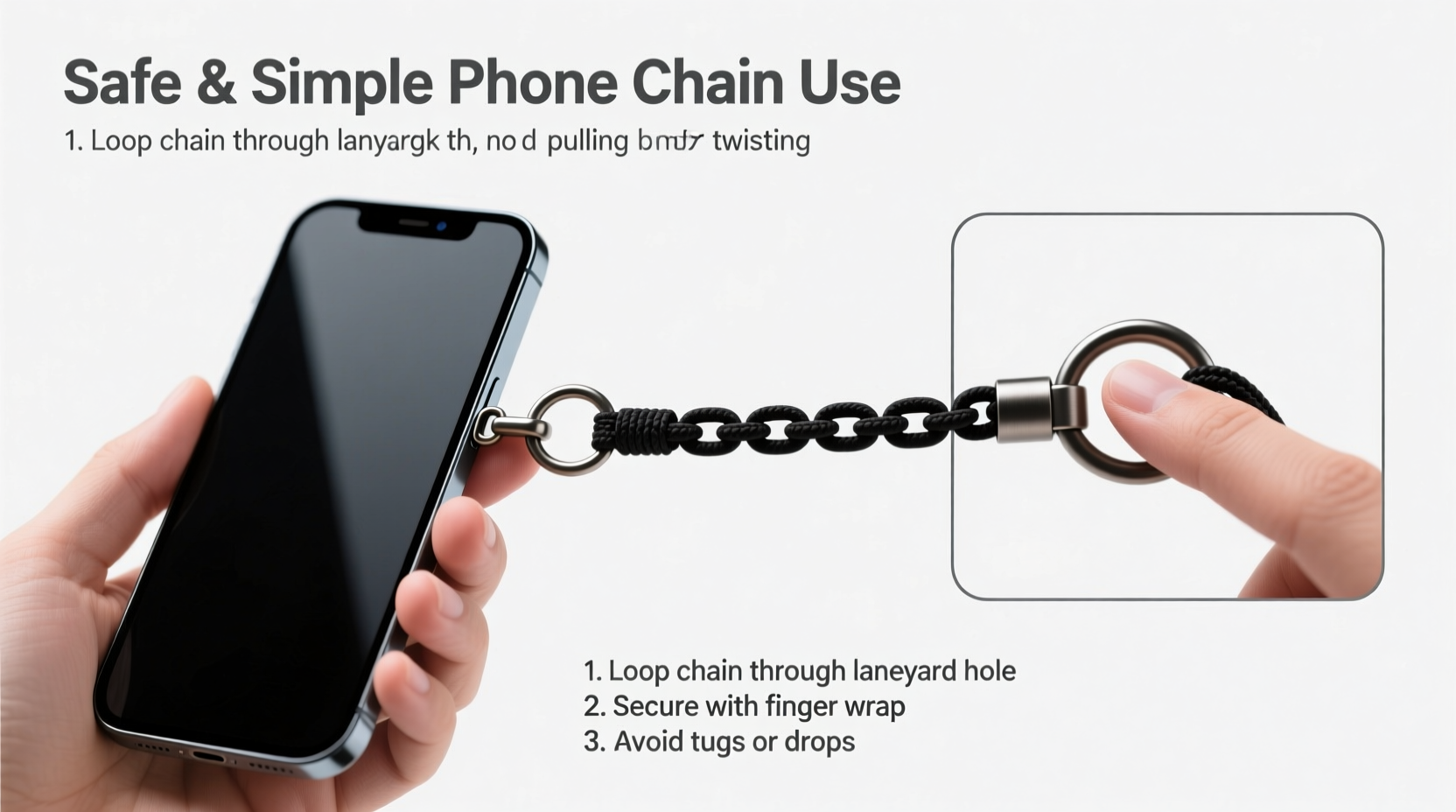
Phone chains typically attach through one of three methods: via a case with a built-in loop, a screw-on adapter that replaces the SIM tray, or a clip-style fastener that grips the edge of the phone. Each method carries different risks and benefits. The safest and most reliable option is using a case designed with a lanyard loop. These are engineered to distribute tension across a durable part of the phone's exterior, minimizing stress on sensitive areas like ports or buttons.
Screw-on adapters, which thread into the SIM card slot, are popular for minimalist designs but come with higher risk. They rely on the integrity of the tray mechanism, which isn’t built to bear constant lateral force. Over time, especially if the phone is frequently tugged or swung, this can loosen the tray or strip the threading inside the phone body.
Step-by-Step Guide to Safely Install a Phone Chain
Attaching a phone chain doesn’t need to be complicated, but doing it correctly ensures long-term safety for your device. Follow this sequence to minimize risk:
- Select a compatible case: Choose a rugged or lifestyle case with a reinforced lanyard loop near the corner. Brands like OtterBox, Spigen, and UAG often include this feature.
- Verify loop durability: Ensure the loop is made of metal or high-tensile polymer, not flimsy plastic. Gently tug it to test resistance.
- Cut the chain to appropriate length: A chain that drapes just below the wrist allows comfortable movement without dragging on surfaces.
- Attach using a secure knot or clasp: Use a double-loop knot or a locking carabiner to connect the chain to the loop. Avoid excessive twisting or over-tightening.
- Test under controlled conditions: Swing the phone gently to simulate motion and ensure no parts flex unnaturally or strain.
This process prioritizes structural integrity over convenience, ensuring your phone remains protected during daily use.
Do’s and Don’ts of Phone Chain Usage
| Do’s | Don’ts |
|---|---|
| Use a case with a reinforced lanyard loop | Attach directly to the SIM tray with an adapter |
| Opt for lightweight chains or fabric cords | Use heavy metallic chains or charms |
| Inspect the connection point weekly | Ignore signs of wear like fraying or loosening |
| Remove the chain when placing the phone in a bag | Let the chain dangle while storing the phone loosely |
| Clean the chain regularly to prevent dirt buildup | Expose the chain to moisture or harsh chemicals |
Real Example: A Cautionary Experience
Jessica, a freelance photographer in Portland, started using a phone chain after losing her phone at a music festival. She opted for a sleek screw-on adapter because she didn’t want to change her slim case. For two months, it worked perfectly—until she bent down to pick up her keys, and the phone swung sharply against the pavement. The impact caused the adapter to twist inside the SIM slot, bending the tray and making it impossible to reinsert properly. Repair costs exceeded $120, and she realized too late that aesthetics had compromised safety.
After switching to a rugged case with a top-corner loop and a nylon strap, she found the same peace of mind without risking damage. Her experience underscores a critical truth: short-term convenience can lead to long-term expense.
Expert Insight on Device Longevity
“Any modification that turns a passive component—like a SIM tray—into a load-bearing anchor undermines the phone’s structural design. Manufacturers don’t test those points for sustained tension.” — Dr. Alan Reyes, Mobile Hardware Engineer
This insight highlights why seemingly minor accessories can have major consequences. Engineers design smartphones with precise tolerances. Adding forces outside intended parameters—even from something as light as a chain—can accelerate wear in unexpected ways.
Tips for Maintaining Your Phone Chain System
Even with proper installation, ongoing maintenance is crucial. Sweat, dust, and friction degrade materials over time. Here are key practices to extend the life of both your chain and your phone:
- Wipe down fabric straps weekly with a damp cloth and mild soap.
- Check metal links for corrosion, especially if used near saltwater or humid environments.
- Replace worn clasps immediately—don’t wait until they snap.
- Avoid wrapping the chain tightly around the phone screen, which can scratch the display.
- Detach the chain when charging wirelessly, as metal components may interfere with induction.
FAQ: Common Questions About Phone Chains
Can a phone chain really damage my device?
Yes, especially if attached improperly. Forces from swinging or snagging can crack casings, loosen internal components, or damage port mechanisms. The risk increases with heavier chains or weak attachment points like modified SIM trays.
Are all phone cases compatible with lanyards?
No. Only cases specifically designed with lanyard loops or anchor points should be used. Standard cases without reinforcement may tear or deform under stress, potentially harming the phone underneath.
What’s the best material for a phone chain?
Nylon webbing, braided polyester, or lightweight stainless steel are ideal. Avoid thick metal chains, which add unnecessary weight and increase leverage during falls. Soft-touch fabrics also reduce surface scratches.
Essential Checklist for Safe Phone Chain Use
- ✅ Choose a case with a factory-designed lanyard loop
- ✅ Avoid screw-in SIM tray attachments
- ✅ Use lightweight, flexible chains or straps
- ✅ Inspect attachment points weekly for wear
- ✅ Remove chain before placing phone in pockets or bags
- ✅ Clean the chain monthly to prevent grime buildup
- ✅ Replace damaged components immediately
Conclusion: Style Meets Safety
A phone chain doesn’t have to be a compromise between fashion and function. With thoughtful selection and careful use, it can enhance both the security and personalization of your device. The key lies in respecting your phone’s engineering limits and choosing accessories that work with—not against—its design. By following these proven techniques, you protect your investment while enjoying the convenience and style that a well-fitted chain provides.




 浙公网安备
33010002000092号
浙公网安备
33010002000092号 浙B2-20120091-4
Comments
No comments yet. Why don't you start the discussion?